Siteefy
New
Categories
Tools
Siteefy
New
Categories
Tools

Company

  • About
  • Contact
  • Blog
  • Newsletter

Resources

  • Submit Tool
  • Categories
  • Use Cases
  • All Tools

Siteefy Tools

  • AI Writer
  • AI Prospecting Tool
  • AI Humanizer
  • AI Content Checker

Legal

  • Privacy Policy
  • Terms of Service

Popular Categories

  • Video40
  • Productivity21
  • Audio & Music20
  • Generative AI20
  • Content & Writing20
  • Photography17

Stay Updated

Get the latest AI tools and insights delivered to your inbox.

Subscribe to Newsletter
Siteefy
Discover the best tools
© 2025 Siteefy. All Rights Reserved.
Siteefy
New
Categories
Tools
Home/TurboScribe
Rate
Visit Website
TurboScribe

TurboScribe

AI-powered transcription for audio and video files with high accuracy and multi-language support.

Freemium
Categories
VideoAudio & Music
#Speech Transcription#Multilingual Transcription#Audio Import#Video Transcription#Meeting Transcription

Overview

TurboScribe is an AI-driven transcription service that converts audio and video files into accurate text transcripts. It supports over 98 languages, offers fast turnaround times, and includes features like speaker identification and time stamping. The platform integrates with popular sources such as YouTube, Google Drive, and Dropbox, making transcription accessible and flexible for various user needs.
Category
Video
Also in
Audio & Music
Pricing Model
freemium
Last Updated
2025-12-02

Key Features

1

High-Accuracy Transcription

Converts audio and video files into text with high accuracy, ensuring reliable transcripts.

2

Multiple Language Support

Supports transcription in over 98 languages, enabling global and multilingual content processing.

3

Fast Turnaround

Delivers transcription results quickly, allowing users to access their transcripts within seconds to minutes.

4

Time Stamping

Automatically inserts timestamps at regular intervals or when speakers change, facilitating easy navigation of transcripts.

5

Speaker Identification

Detects and labels different speakers in the audio, making it easier to follow multi-participant conversations.

6

Wide File Format Compatibility

Supports numerous audio and video formats including MP3, MP4, WAV, YouTube links, and more for flexible input options.

7

Multiple Import Options

Allows users to upload files directly or import from platforms like YouTube, Google Drive, Dropbox, Facebook, Vimeo, and audio/video URLs.

8

Export in Multiple Formats

Enables downloading transcripts in various formats such as PDF, DOCX, SRT, VTT, CSV, and TXT for diverse use cases.

Who It's For

Audience 1#1

Journalism

Transcribe interviews and press events quickly for efficient editing and publication.

Audience 2#2

Academic Research

Convert focus groups, lectures, and interviews into text for easier analysis and reference.

Audience 3#3

Content Creation

Transcribe podcasts and videos to generate blog posts, captions, and improve SEO.

Audience 4#4

Business Meetings

Create searchable records of meetings and webinars for team collaboration and documentation.

Audience 5#5

Legal & Compliance

Produce accurate transcripts of depositions, hearings, and legal discussions for records and compliance.

How to Use

1

Sign Up

Visit the TurboScribe website and click on 'Sign Up' to create an account.

2

Log In

Sign in using your Google account or email address.

3

Upload or Import Files

Upload audio or video files from your device or import directly from YouTube, Google Drive, Dropbox, and other supported platforms.

4

Select Language

Choose the transcription language from over 98 supported options.

5

Configure Settings

Optionally enable speaker identification, time stamping, or select specific transcription modes.

6

Start Transcription

Initiate the transcription process and wait for the AI to generate the transcript.

7

Review and Export

Review the transcript for accuracy, then download or share it in your preferred format.

Pricing

Pricing details are gathered from the official TurboScribe website and are provided for reference only. Always confirm the latest information directly with the vendor.

PlanPriceHighlights
Free Version$0

3 transcriptions per day

  • Each file up to 30 minutes long
  • Access to basic transcription features
TurboScribe Unlimited Plan$20

Unlimited transcriptions

  • Support for all file lengths
  • Access to advanced features like speaker identification and time stamping
Found a change in pricing? We welcome corrections. Reach out so we can keep this listing accurate.

Pros & Cons

Pros

  • High transcription accuracy appreciated by users.
  • Supports most common audio and video formats.
  • Generous free plan with 3 transcriptions per day for light users.
  • Integration with popular platforms like YouTube, Google Drive, and Dropbox.
  • Fast transcription turnaround time.

Cons

  • Unlimited Plan reportedly has some usage restrictions.
  • Free plan limits to 3 transcriptions per day, which may be insufficient for heavy users.
  • No detailed information on collaboration features or API access.
OT

Our Test

Hands-on notes from our editorial team.

✅ Our Test

⬇️ Signing In and Setting Up the Video

We signed in with a Google account, which gave us access to 3 free daily transcriptions. For our test, we selected our YouTube video,How to Upload a Theme to a WordPress Website.

⬇️ Uploading and Starting the Transcription

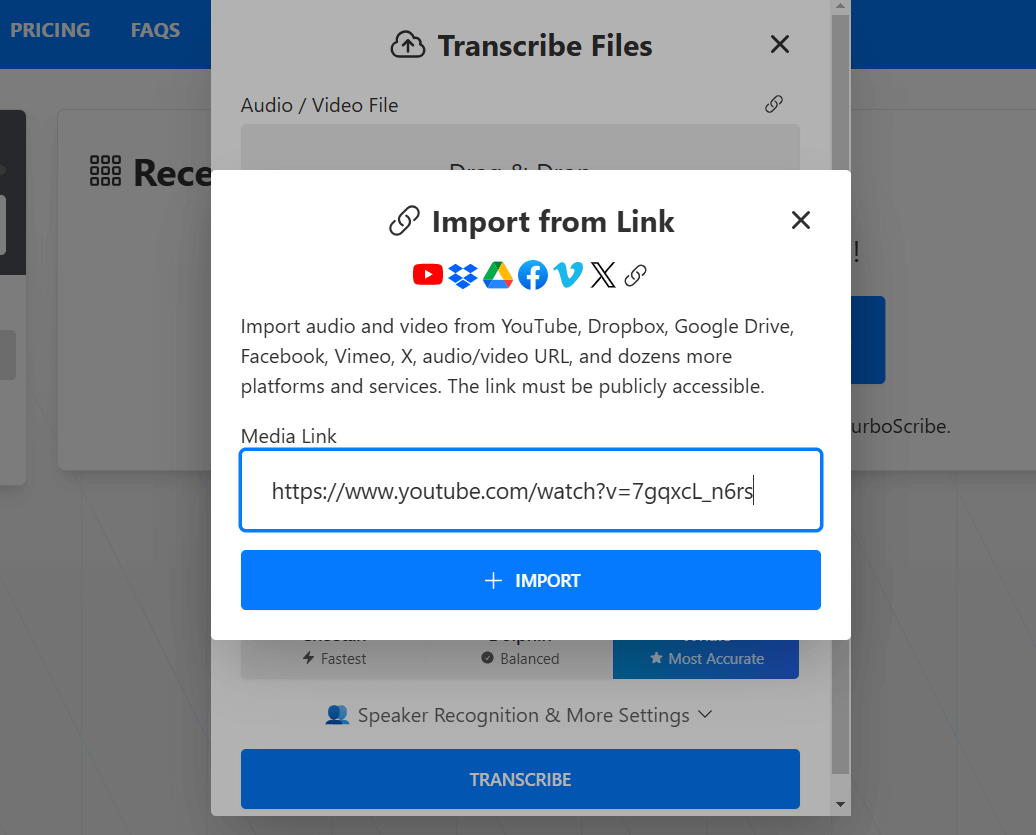
We clicked "Upload Video and Audio Files," then "Transcribe Files." From there, we chose the URL icon and pasted our YouTube video link. TurboScribe also offers options for language selection, speaker recognition, and translation, but we skipped these and clicked "Transcribe.".
⬇️ Getting and Sharing the Transcript

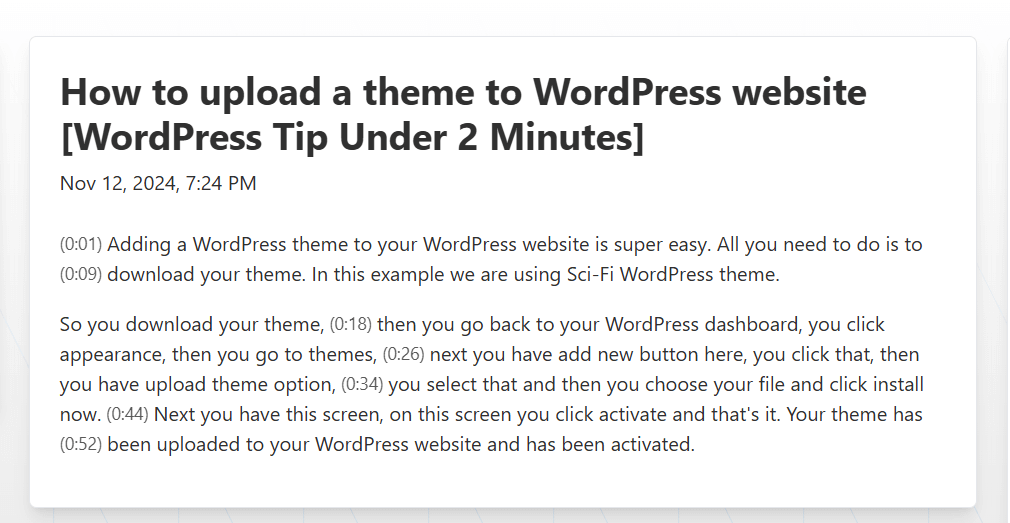
TurboScribe transcribed our video accurately and quickly, taking about 10-15 seconds. After transcription, you can share the file, export it in multiple formats, and access all your transcriptions in one place. Here’s the result of our test!

Frequently Asked Questions

How do I upload files to TurboScribe?
You can upload files directly from your device or import from platforms like YouTube, Dropbox, Google Drive, Facebook, Vimeo, and audio/video URLs.
Which audio and video formats does TurboScribe support?
TurboScribe supports common formats including MP3, M4A, MP4, MOV, AAC, WAV, OGG, OPUS, WMA, AVI, FLAC, and more.
Can I export my transcripts from TurboScribe?
Yes, transcripts can be downloaded in PDF, DOCX, SRT, VTT, CSV, and TXT formats.
Is there a free version of TurboScribe?
Yes, the free version allows 3 transcriptions per day at no cost.
Does TurboScribe support speaker identification?
Yes, TurboScribe can automatically identify and label different speakers in your audio files.

Ratings & reviews

Use Cases

Explore tools grouped by use case so you can keep researching without losing momentum.

1 tool

Speech Transcription

View use case
7 tools

Multilingual Transcription

View use case
1 tool

Audio Import

View use case
3 tools

Video Transcription

View use case
8 tools

Meeting Transcription

View use case

Alternatives

Compare other vetted products our editors see buyers evaluate alongside TurboScribe.

N

Notta

freemium

Notta is an AI-powered meeting note taker that automatically transcribes meetings, interviews, and recordings into searchable text. It offers real-time transcription, AI-generated summaries highlighting decisions and action items, and seamless collaboration features. Notta supports 58 languages and integrates with popular tools like Slack and Salesforce to streamline workflows and enhance team productivity.

AI Note Takers
#Meeting Transcription#Collaborative Notes#Multilingual Transcription+2
View Details
Hedy

Hedy

freemium

Hedy AI is an advanced AI-powered assistant designed to enhance meetings and classes by providing real-time insights, automatic transcription, and actionable summaries. It supports over 30 languages, offers privacy-first on-device processing, and integrates with other tools via API and Zapier. Hedy helps users formulate questions, spot critical issues, and organize meeting content across devices for improved collaboration and productivity.

AI Note Takers
#Meeting Transcription#Multilingual Support#AI Summarization+2
View Details
Otter

Otter

freemium

Otter.ai is an AI-powered meeting assistant that provides real-time transcription, automated summaries, action item capture, and AI chat capabilities to enhance meeting productivity. It integrates seamlessly with popular video conferencing and collaboration tools to streamline workflows and ensure teams stay aligned. Designed for individuals and enterprises, Otter.ai helps users save time by automating note-taking and follow-ups, making meetings smarter and more efficient.

AI Note Takers
#Meeting Transcription#Automated Summaries#Action Item Capture+4
View Details
Eightify

Eightify

freemium

Eightify is an AI-driven application designed to generate concise summaries and accurate transcriptions of YouTube videos. It offers users the ability to save time by extracting key points from lengthy video content, accessible directly via a browser extension. With customizable summary lengths and support for over 40 languages, Eightify caters to diverse topics including podcasts, business, technology, and news.

AI Note Takers
#Video Summarization#Browser Extension#Multilingual Summarization+2
View Details
Fieldy

Fieldy

paid

Fieldy is a wearable AI-powered device designed to record conversations and transform them into searchable notes, reminders, and summaries. It helps professionals, executives, and neurodiverse users stay present and organized by automatically transcribing and organizing their spoken interactions. With privacy-focused design, Fieldy processes recordings securely without storing data unless the user chooses to save it.

AI Note Takers
#Wearable Recording#Conversation Summarization#AI Transcription+2
View Details
Elephas

Elephas

freemium

Elephas is an AI-driven personal knowledge assistant designed for Mac users that consolidates scattered information from files, notes, and recordings into searchable, intelligent 'Super Brains.' It enables users to interact with their own data through natural language queries, generate content, automate workflows, and access AI-powered insights securely with offline capabilities. Elephas integrates deeply with Apple ecosystem apps and supports multiple AI models, making it a versatile productivity enhancer for professionals across industries.

AI Note Takers
#Personal Knowledge Management#Workflow Automation#Meeting Summarization+2
View Details

Other tools people mention

These entries need a full review before we can publish deep dives, but they're worth a look if you want a broader shortlist.

nottahedyottereightifyfieldyelephas

Share your experience

Sign in to rate this tool and help the community understand how it fits into their workflow.

Community reviews (0)

No reviews yet. Be the first to share your experience.