Eightify

Eightify

AI-powered YouTube video summarizer for quick insights.

Freemium·No reviews yet

Overview

Eightify is an AI-driven application designed to generate concise summaries and accurate transcriptions of YouTube videos. It offers users the ability to save time by extracting key points from lengthy video content, accessible directly via a browser extension. With customizable summary lengths and support for over 40 languages, Eightify caters to diverse topics including podcasts, business, technology, and news.

Pricing Model
freemium
Last Updated
2025-12-01

Featured Video

Video via YouTubeWatch on YouTube

Key Features

1

YouTube Video Summarization

Automatically generates concise summaries of YouTube videos to help users grasp main points quickly.

2

Customizable Summary Lengths

Allows users to select summary styles and lengths such as short, medium, or detailed to fit their needs.

3

Browser Extension Integration

Works directly through a browser extension for easy access while watching YouTube videos.

4

Accurate Transcriptions

Provides full-text transcriptions of videos with minimal errors, capturing spoken content precisely.

5

Multilingual Support

Supports summarization and translation in over 40 languages, making it accessible globally.

6

No Limits on Usage

Users can summarize unlimited videos regardless of count or length without restrictions.

7

Keyword Highlighting

Summaries include highlighted keywords to emphasize important concepts and topics.

8

Copy and Save Summaries

Enables users to copy both summaries and transcriptions for later use or sharing.

Use Cases

#1

Podcast Summaries

Capture main points from long podcast episodes without listening to the entire recording.

#2

AI Topic Updates

Stay informed on artificial intelligence developments with concise video summaries.

#3

Scientific Research Highlights

Quickly understand breakthroughs and research findings from science-related videos.

#4

Business Insights

Extract essential strategies and leadership advice from business-focused videos.

#5

Market and Trading Analysis

Get snapshots of investment strategies and trading tips from relevant video content.

How to Use

1

Sign Up

Create an account on Eightify's website using your Google account.

2

Install Browser Extension

Download and install the Eightify extension from the official website.

3

Activate Extension

Pin the extension to your browser's toolbar for easy access.

4

Subscribe to Pro Plan

Start a 3-day free trial by subscribing to the paid plan to enable summarization features.

5

Select YouTube Video

Navigate to any YouTube video you want to summarize.

6

Generate Summary

Click the Eightify icon on the video page and choose your preferred summary length and style.

7

Review and Use Summary

Read the generated summary and transcription, then copy or save as needed.

Pricing

Pricing details are gathered from the official Eightify website and are provided for reference only. Always confirm the latest information directly with the vendor.

PlanPriceHighlights
Pro Plan$4.99

3-day free trial

  • Unlimited video summarization
  • Customizable summary lengths
  • Multilingual support
  • Access to full transcriptions
Found a change in pricing? We welcome corrections. Reach out so we can keep this listing accurate.

Pros & Cons

Pros

  • Easy to use with a clean, intuitive interface.
  • Fast and time-saving video summarization.
  • Direct integration with YouTube via browser extension.
  • Supports multiple languages for global accessibility.
  • No limits on the number or length of videos summarized.

Cons

  • Only supports YouTube videos, limiting source variety.
  • Free trial is limited to 3 days with no permanent free plan.
  • May miss nuanced details in complex or technical videos.
  • Requires installation of a browser extension.
  • Subscription required to access summarization features after trial.
OT

Our Test

Hands-on notes from our editorial team.

✅ Our Test

⬇️ Sign Up, Download, Purchase

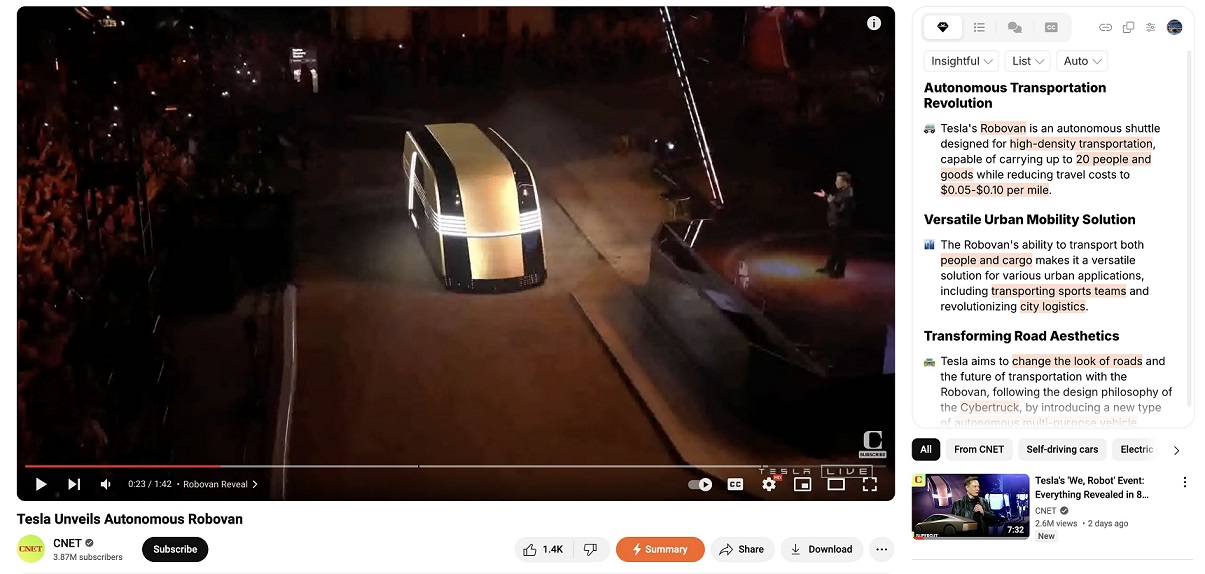
Our test was performed on the Chrome browser.After signing up with our Google account, we downloaded and pinned the Chrome extension. Once installed, we entered payment details to activate the 3-day free trial of the Pro plan.

⬇️Summarize and Save

Then we selected a tech-themed video on YouTube, clicked the “Summary” button, and the tool automatically generated a video summary. There were some pre-settings like style, type, and length. As you can see in the summary list, we have paragraphs and highlighted keywords.

⬇️ More Features

We also tried another feature, "Transcript”. Clicking the “cc” icon on the toolbar of the Eightify menu, we viewed the full-text transcription of the video. The transcription was pretty accurate; every sound of the presenter was included with minimal mistakes.Then, we clicked the copy icon in the Eightify menu to copy both the summary and transcription.

Frequently Asked Questions

Ratings & reviews

Ratings & reviews

No reviews yet. Be the first to share your experience.
Share your experience

Sign in to rate this tool and help the community understand how it fits into their workflow.

Community reviews (0)

No reviews yet. Be the first to share your experience.