lenso.ai

lenso.ai

AI-powered reverse image and facial recognition search to find people, places, and image duplicates online.

Freemium·No reviews yet

Overview

Lenso.ai is a platform specializing in AI-driven reverse image search and facial recognition technology. It enables users to upload an image and find identical, similar, or related images across the web, including duplicates, edited versions, and images featuring the same people or places. The tool is designed for content creators, photographers, artists, and anyone seeking to protect their image copyrights or track their digital footprint.

Pricing Model
freemium
Last Updated
2025-12-13

Featured Video

Video via YouTubeWatch on YouTube

Key Features

1

Reverse Image Search

Upload an image to find identical or visually similar images on the internet without needing keywords.

2

Facial Recognition Search

Find photos of the same person across different websites and images using AI-powered facial recognition technology.

3

Duplicate Image Detection

Detect exact duplicates, edited, cropped, or filtered versions of the uploaded image to track image usage and copyright.

4

Category-Based Search Results

Search results are sorted into categories such as People, Places, Duplicates, Similar, and Related for easier navigation.

5

Advanced Filtering and Sorting

Filter results by text keywords or specific websites and sort by newest, oldest, best match, or random order.

6

Mobile and Desktop Compatibility

Use the service on any popular desktop or mobile browser without needing to download an app.

7

Collections and Bookmarking

Save and organize found images into collections within your account for easy reference and management.

8

Email Alerts for New Results

Set up notifications to receive email alerts when new matching images appear in selected categories.

Use Cases

#1

Protecting Image Copyrights

Find unauthorized copies or edited versions of your images online to protect your intellectual property.

#2

Tracking Digital Footprint

Locate photos of yourself or others across the internet to monitor online presence and privacy.

#3

Finding Similar or Related Images

Discover images that are visually or contextually related to your uploaded photo for creative or research purposes.

#4

Identifying Places and Landmarks

Use images to find matching locations, landmarks, or landscapes from uploaded photos.

#5

Brand and Logo Monitoring

Detect unauthorized logo usage or counterfeit products by searching for your brand images online.

How to Use

1

Upload an Image

Go to lenso.ai and upload an image from your device, paste from clipboard, or drag and drop into the upload area.

2

Select Search Category

After the search completes, choose a category such as People, Places, Duplicates, Similar, or Related to filter results.

3

Filter and Sort Results

Use available filters like text keywords or website URL and sort by date or match quality to refine your search.

4

Explore and Save Images

Click on images to view details, open source pages, and save interesting results to your collections if logged in.

5

Set Up Alerts (Optional)

Create an account and enable email alerts for new matching images in selected categories to stay updated.

Pricing

Pricing details are gathered from the official lenso.ai website and are provided for reference only. Always confirm the latest information directly with the vendor.

PlanPriceHighlights
Free Plan$0

Limited number of searches per month

  • Access to basic categories (Similar, Related)
  • Standard filtering and sorting options
  • Access via web browser
Premium PlanContact Sales

Unlimited image searches

  • Access to all categories including People and Duplicates
  • Advanced filtering and sorting
  • Email alerts and notifications
  • Priority support and unlocked results
Found a change in pricing? We welcome corrections. Reach out so we can keep this listing accurate.

Pros & Cons

Pros

  • Advanced AI facial recognition for accurate person identification across images.
  • Supports multiple categories for comprehensive image search results.
  • Compatible with all major browsers and mobile devices without app installation.
  • Allows filtering and sorting to refine search results effectively.
  • Enables saving and organizing images into collections for user convenience.

Cons

  • Facial recognition search is available only in selected regions.
  • No explicit pricing details publicly available, which may hinder quick purchase decisions.
  • Some search results may be locked behind premium subscription.
  • Limited information on API usage and integration capabilities in public content.
  • No dedicated mobile app, relying solely on browser compatibility.
OT

Our Test

Hands-on notes from our editorial team.

✅ Our Test
⬇️ Drag, Paste, or Upload an Image

To use the tool, you don’t need to sign up. Just go to the homepage and upload, paste, or drag your image. However, there’s also an option to sign up with your email address or Google account. For this test, we’ll proceed with a Google account.

⬇️ Select a Category & Explore Results

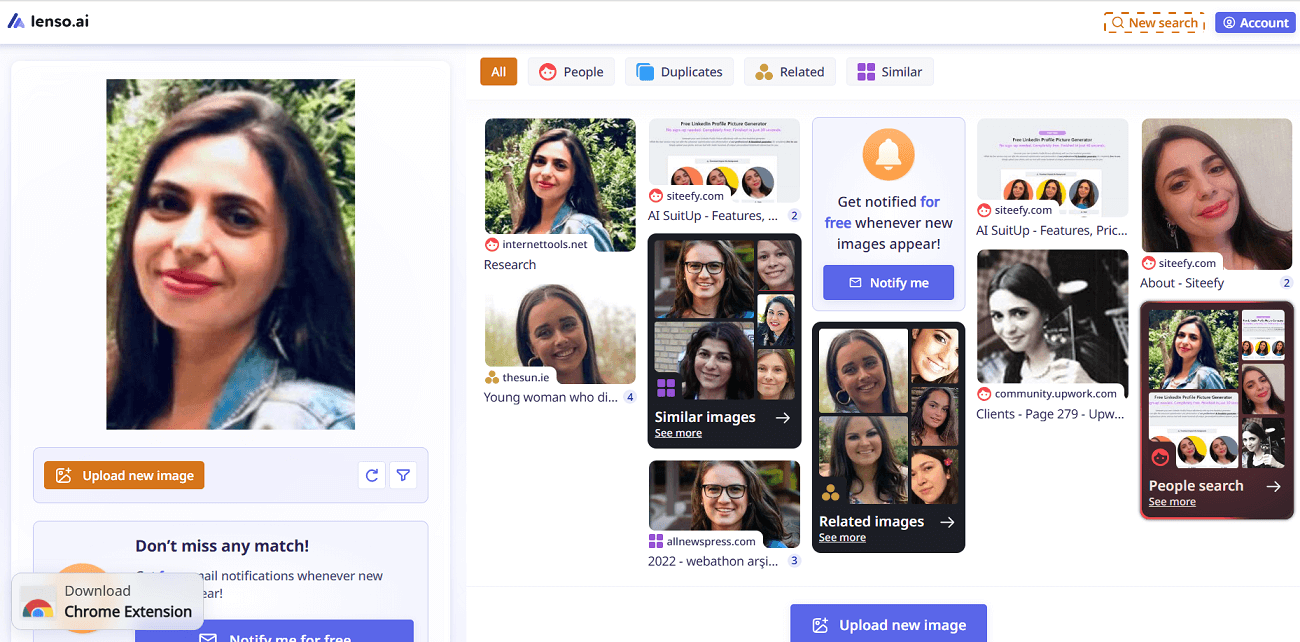
I uploaded my image to see how the tool works, and it performed accurately. In the People category, it found my photos on different platforms, from our official Siteefy website to Upwork. The tool correctly identified each source where my images appear. We liked how quickly and precisely it found the results. In the Similar and Related categories, there were lots of images that matched my pose and expression. Lenso AI categories

⬇️ Use Other Features and Alerts

Lenso also offers several useful features. You can filter results by keyword or domain, sort them by newest or best match, and save your favorite images into collections. It’s also possible to set alerts to get notified when new matches appear.

Frequently Asked Questions

Ratings & reviews

Ratings & reviews

No reviews yet. Be the first to share your experience.

Share your experience

Sign in to rate this tool and help the community understand how it fits into their workflow.

Community reviews (0)

No reviews yet. Be the first to share your experience.