Paintit.ai

Paintit.ai

Revolutionize your space with AI-powered interior design and personalized furniture recommendations.

Paid·No reviews yet

Overview

Paintit.ai is an AI-driven interior design platform that allows users to instantly visualize and customize room designs using AI-generated furniture placement, color adjustments, and style selections. It offers a seamless, intuitive interface that feels like browsing a music playlist, enabling real-time updates and personalized design guidance for homeowners, real estate agents, and professionals. The platform integrates shoppable designs, making it easy to discover, edit, and purchase furniture and decor in a single flow.

Pricing Model
paid
Last Updated
2025-12-02

Featured Video

Video via YouTubeWatch on YouTube

Key Features

1

AI-Generated Furniture Recommendations

Automatically suggests furniture pieces perfectly matched to your space and style preferences, streamlining the selection process.

2

Real-Time Room Design Updates

Instantly preview changes like wall colors, furniture swaps, and layout adjustments with no lag or manual refresh.

3

Style Selection Interface

Choose from curated design styles such as Scandinavian, industrial, or bohemian to transform your space effortlessly.

4

Upload or Start Fresh

Begin designing with an existing photo or a blank slate, with AI analyzing scale, layout, color, and vibe automatically.

5

Social Media Integration

Save and share your designs easily on social platforms or keep them private as you prefer.

6

All-in-One Subscription

Access all features including high-resolution renders, AI chats, and commercial usage under a single subscription plan.

7

Personalized AI Guidance

The AI adapts to your lifestyle needs and preferences, providing empathetic and tailored design suggestions.

8

Commercial and Residential Use

Suitable for homeowners, real estate agents, and professionals designing homes, offices, retail stores, and more.

Use Cases

#1

Home Renovations

Experiment with new furniture, colors, and layouts before investing in physical changes to your home.

#2

Real Estate Virtual Staging

Create fully furnished, photorealistic visuals to showcase properties to potential buyers effectively.

#3

Social Media Content Creation

Generate eye-catching interior designs for marketing, branding, or inspiration sharing on social platforms.

#4

Personal Interior Design Inspiration

Explore various design styles and ideas without hiring a professional interior designer.

#5

Commercial Space Design

Design offices, retail stores, or restaurants with AI-generated layouts and furniture placement tailored to business needs.

How to Use

1

Upload or Start Fresh

Begin by uploading a photo of your space or start with a blank canvas to create a new design.

2

Select a Design Style

Choose from curated styles like Scandinavian or industrial to set the mood for your room.

3

Customize Elements

Adjust wall colors, swap furniture, or add decor elements with real-time AI updates.

4

Review AI Furniture Suggestions

Browse AI-recommended furniture pieces that fit your design and add them to your layout.

5

Save, Share, or Purchase

Save your design, share it on social media, or directly purchase recommended furniture through the platform.

Pricing

Pricing details are gathered from the official Paintit.ai website and are provided for reference only. Always confirm the latest information directly with the vendor.

PlanPriceHighlights
Weekly Plan6.99 USD

20 high-resolution renders included

  • Unlimited AI chats
  • Unlimited suggested prompts
  • Real furniture suggestions
  • Mix & match from dozens of styles
  • Commercial usage license
Monthly Plan24.99 USD

100 high-resolution renders included

  • Unlimited AI chats
  • Unlimited suggested prompts
  • Real furniture suggestions
  • Mix & match from dozens of styles
  • Commercial usage license
Found a change in pricing? We welcome corrections. Reach out so we can keep this listing accurate.

Pros & Cons

Pros

  • Intuitive, music app-like interface makes design accessible to all skill levels.
  • Fast generation of multiple photorealistic design ideas in 1-2 minutes.
  • Seamless integration of furniture shopping within the design workflow.
  • Empathy-driven AI that adapts to user lifestyle and preferences.
  • Supports both full-room and element-specific design projects.

Cons

  • Pricing details are not fully transparent; subscription required for advanced features.
  • Currently focuses on interior design; exterior design tools are planned but not yet available.
  • Limited file format support for uploads (JPG, PNG, PDF, DWG).
  • May require internet connection for real-time AI processing.
  • No explicit mention of offline or mobile app availability.
OT

Our Test

Hands-on notes from our editorial team.

✅ Our Test

⬇️ Getting Started

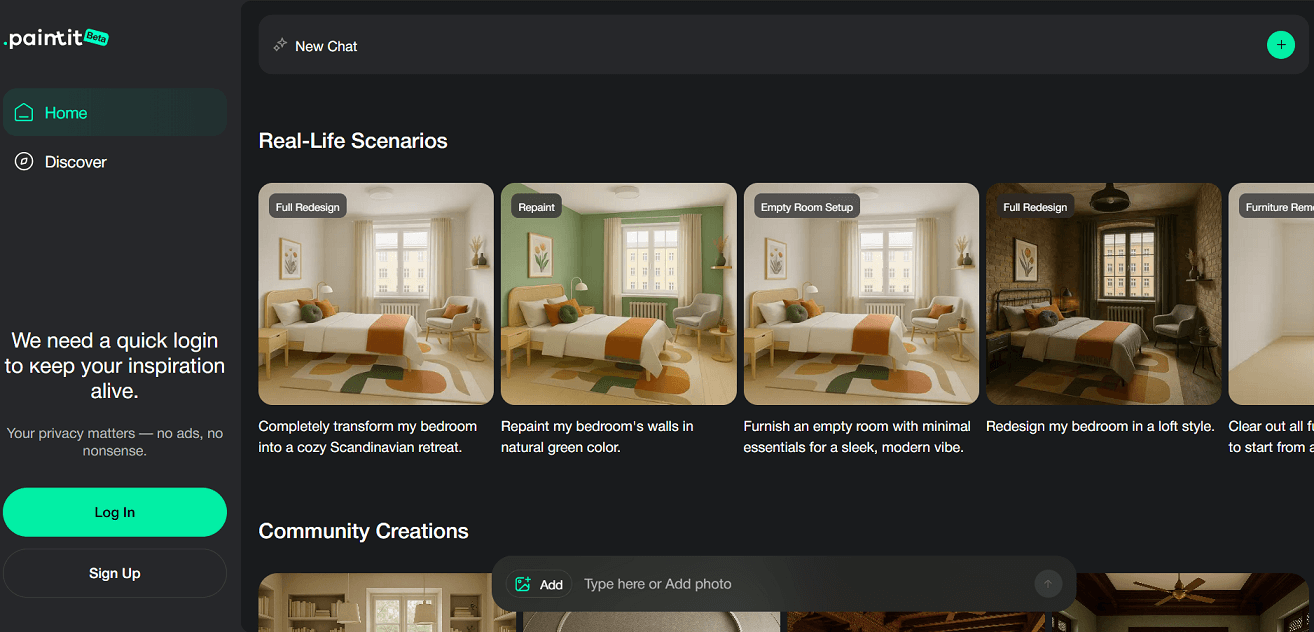
We clicked Start My Flow Now on the homepage, which redirected us to the dashboard. After signing up with a Google account, we were welcomed with visual examples such as Full Redesign, Repaint, and Empty Room Setup. These examples serve as inspiration to show what the platform can create. <img decoding="async" class="alignnone size-full wp-image-62680" src="https://siteefy.com/wp-content/uploads/2025/07/Paintit-dashboard.png" alt="" width="1314" height="632" srcset="https://siteefy.com/wp-content/uploads/2025/07/Paintit-dashboard.png 1314w, https://siteefy.com/wp-content/uploads/2025/07/Paintit-dashboard-768x369.png 768w" sizes="(max-width: 1314px) 100vw, 1314px" />

⬇️ Navigating the Dashboard

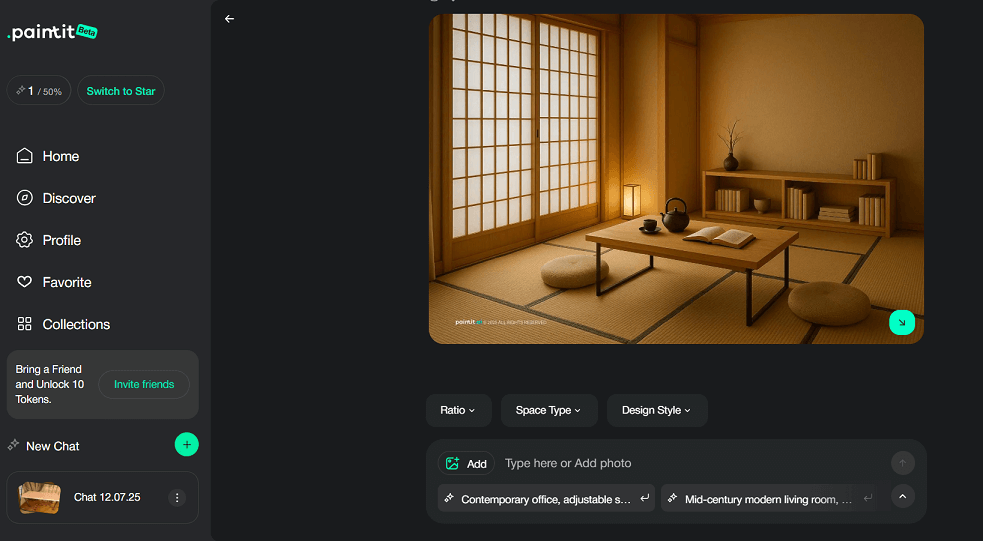
The main workspace displayed a welcome message along with filters for_Ratio, Space Type, and Design Style_. On the left-hand menu, we found navigation options like_Home, Discover, Profile, Favorites, and Collections_. A referral option also appeared, offering bonus tokens for inviting friends.

⬇️ Uploading a Photo and Choosing Preferences

We clicked the + Add button to start a new design. After uploading a photo of a reading table, we selected Reading Room under space type and Japanese under design style. A prompt appeared asking whether to use the uploaded image as a reference or not. We chose to use it as a reference so the AI could generate a design based on the real space.

⬇️ Getting the Design

The AI chat helped guide the next steps, making the experience more interactive and smooth. The platform generated our design in less than a minute, delivering a complete Japanese-style reading room based on the photo and style we selected. <img decoding="async" class="alignnone size-full wp-image-62681" src="https://siteefy.com/wp-content/uploads/2025/07/Reading-room-created-with-Paintit.png" alt="" width="983" height="541" srcset="https://siteefy.com/wp-content/uploads/2025/07/Reading-room-created-with-Paintit.png 983w, https://siteefy.com/wp-content/uploads/2025/07/Reading-room-created-with-Paintit-768x423.png 768w" sizes="(max-width: 983px) 100vw, 983px" />

Frequently Asked Questions

Ratings & reviews

Ratings & reviews

No reviews yet. Be the first to share your experience.
Share your experience

Sign in to rate this tool and help the community understand how it fits into their workflow.

Community reviews (0)

No reviews yet. Be the first to share your experience.