
RoomGPT

RoomGPT

Your personal AI interior designer to redesign your room from just one photo.

Paid·No reviews yet

Overview

RoomGPT is an AI-powered application that allows users to transform and redesign any room by uploading a single photo. It serves as a personal interior designer, enabling users to visualize different room layouts and themes before renovation. Trusted by over 2 million users worldwide, it helps overcome indecisiveness in home decoration with AI-generated design suggestions.

Pricing Model
paid
Last Updated
2025-12-02

Key Features

1

AI-Powered Room Redesign

Transforms a single photo of your room into multiple redesigned versions using AI technology.

2

Multiple Design Themes

Offers various interior design themes to visualize different styles and layouts for your space.

3

User-Friendly Interface

Simple upload and instant redesign process suitable for users without design experience.

4

Global User Base

Trusted and used by over 2 million people worldwide, indicating reliability and popularity.

5

Visual Pre-Renovation Planning

Allows users to preview room changes before committing to physical renovations, reducing uncertainty.

6

Inspiration for Home Decor

Helps users overcome indecisiveness by providing creative ideas and visual inspiration for decorating.

7

Fast Processing

Delivers redesigned room images quickly after photo upload for immediate feedback.

8

Accessible on Web

Available as a web application, requiring no installation and accessible from various devices.

Use Cases

#1

Home Renovation Planning

Visualize different room layouts and styles before starting physical renovations to make informed decisions.

#2

Interior Design Inspiration

Get creative ideas and inspiration for decorating your home by seeing AI-generated redesigns.

#3

Overcoming Design Indecisiveness

Helps users who struggle with choosing a design direction by providing instant visual options.

#4

Real Estate Staging

Virtually stage rooms to showcase potential to buyers or renters without physical staging costs.

#5

DIY Home Decor Projects

Assist DIY enthusiasts in planning and visualizing their home decor projects effectively.

How to Use

1

Upload a Photo

Take a clear photo of the room you want to redesign and upload it to the RoomGPT web app.

2

Select Design Preferences

Choose from available design themes or styles to guide the AI redesign process.

3

Generate Redesigns

Let the AI process your photo and create multiple redesigned versions of your room.

4

Review and Compare

Browse through the AI-generated room designs to find the style that suits your taste.

5

Download or Share

Save your favorite redesigns or share them with friends, family, or contractors for feedback.

Pricing

Pricing details are gathered from the official RoomGPT website and are provided for reference only. Always confirm the latest information directly with the vendor.

PlanPriceHighlights
Free Trial$0

Try basic redesigns with limited themes

  • Access to standard AI-generated designs
Basic Plan$9.99

Unlimited photo uploads

  • Access to all design themes
  • High-resolution downloads
  • Priority processing
Pro Plan$19.99

All Basic features

  • Exclusive premium themes
  • Faster AI processing
  • Commercial use license
Found a change in pricing? We welcome corrections. Reach out so we can keep this listing accurate.

Pros & Cons

Pros

  • Easy to use with just one photo upload
  • Provides multiple design options and themes
  • Helps users visualize renovations before making changes
  • Widely trusted with over 2 million users
  • Speeds up interior design decision-making process

Cons

  • No explicit pricing details publicly available
  • Limited information on customization controls
  • May not replace professional interior designers for complex projects
  • Dependent on quality of uploaded photo for best results
  • No mobile app version mentioned
OT

Our Test

Hands-on notes from our editorial team.

✅ Our Test

⬇️ Sign Up

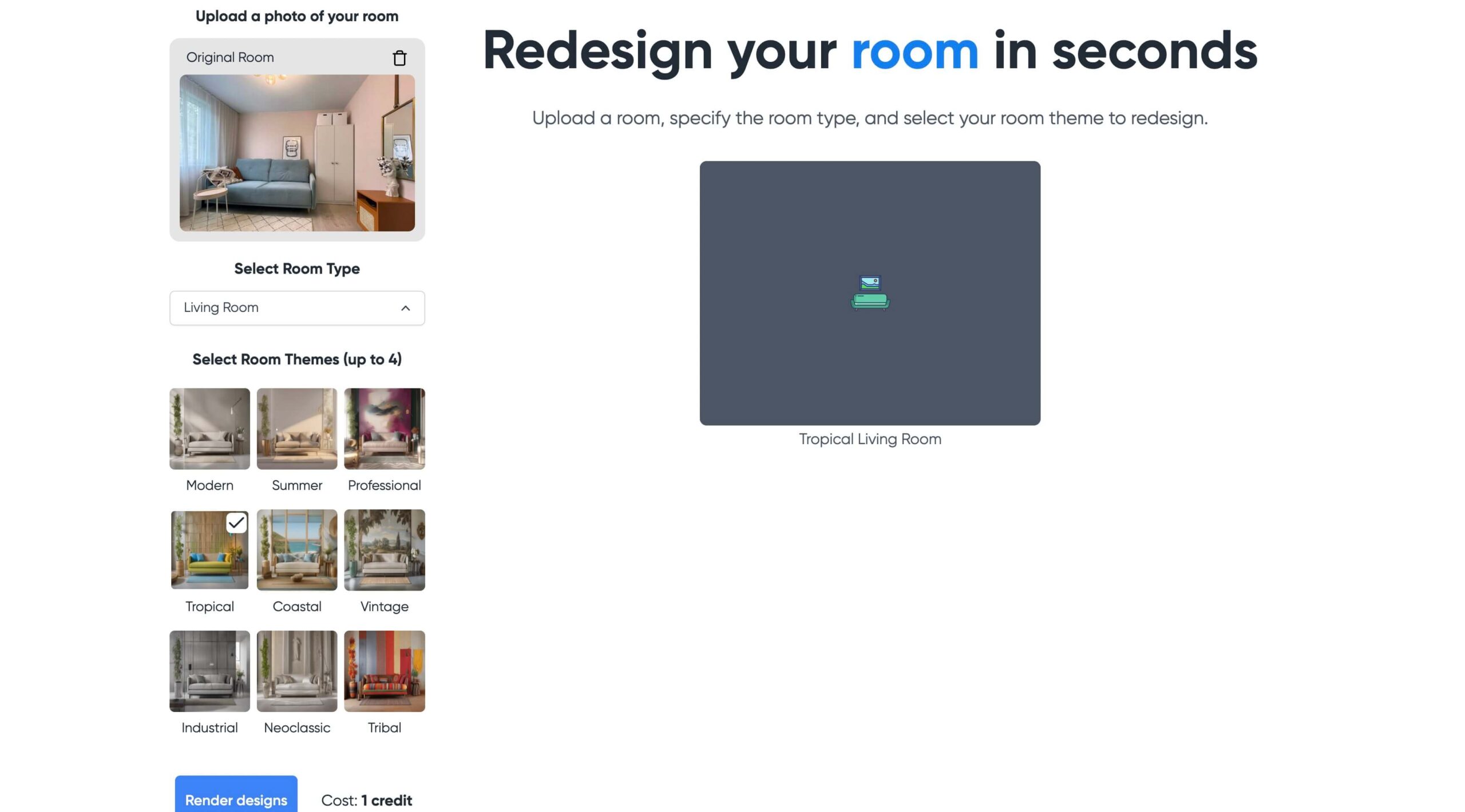
Here, as usual procedure, we signed up on the website using our Google account.

⬇️Upload a Room Picture

Then on the main dashboard page, we uploaded a casual living room image from the open source. The website provided us with one free credit to redesign the room, and we selected one of the available redesign styles. You can select up to 4 designs at the same time, and each one will cost you one credit.
⬇️ Redesign and Export

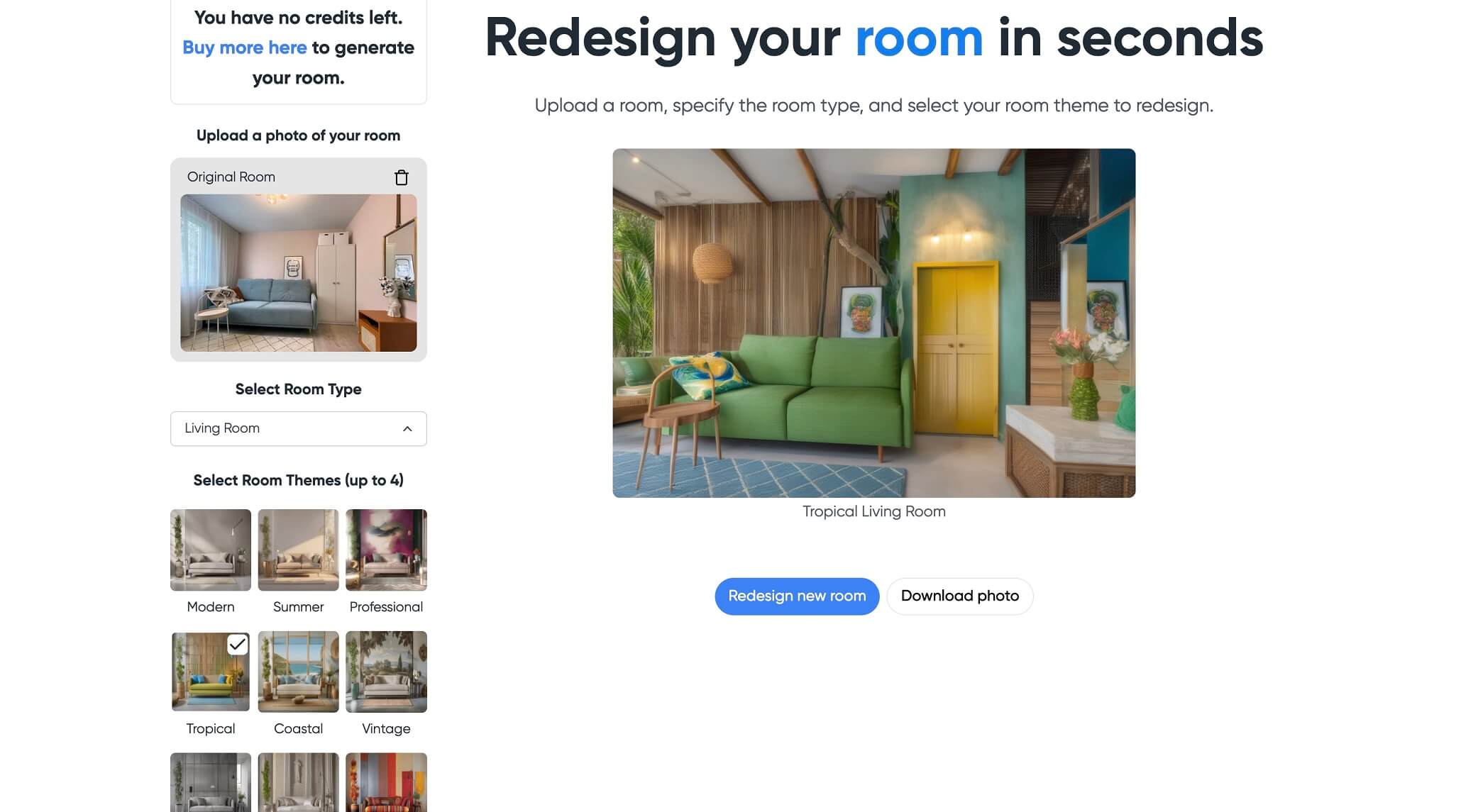
After that, we clicked the “Render designs” button, and just in a couple of seconds, the tropical redesign picture of the room was ready. Yeah, AI transformed a closet into a door, but the redesign still looks good. As a final step, we clicked “Download photo” to export the result.
Frequently Asked Questions

Ratings & reviews

Ratings & reviews

No reviews yet. Be the first to share your experience.

Share your experience

Sign in to rate this tool and help the community understand how it fits into their workflow.

Community reviews (0)

No reviews yet. Be the first to share your experience.