

Siteefy
New
Siteefy
New

Company

  • About
  • Contact
  • Blog
  • Newsletter

Resources

  • Submit Tool
  • Categories
  • Use Cases
  • All Tools

Siteefy Tools

  • AI Writer
  • AI Prospecting Tool
  • AI Humanizer
  • AI Content Checker

Legal

  • Privacy Policy
  • Terms of Service

Popular Categories

  • Video40
  • Productivity21
  • Audio & Music20
  • Generative AI20
  • Content & Writing20
  • Photography17

Stay Updated

Get the latest AI tools and insights delivered to your inbox.

Subscribe to Newsletter
Siteefy
Discover the best tools
© 2025 Siteefy. All Rights Reserved.
Siteefy
New
Home/SolidPoint
Be first!
Visit
Be first!
Visit
Be first!
Visit
Be first!
Visit
SolidPoint

SolidPoint

AI-powered platform to instantly summarize and extract key insights from YouTube videos, web articles, research papers, and Reddit posts.

FreemiumWeb Scraping
SolidPoint

SolidPoint

AI-powered platform to instantly summarize and extract key insights from YouTube videos, web articles, research papers, and Reddit posts.

Freemium
Categories
Data Extraction/Web Scraping
#Video Summarization#Academic Research#Knowledge Retention#Content Analysis#Flashcard Generation

Overview

SolidPoint leverages advanced AI summarization technology to help users save time by transforming lengthy digital content into concise, actionable summaries. It supports multiple content types including YouTube videos, web pages, scientific papers, and Reddit discussions, enabling efficient knowledge absorption and retention. With features like flashcard generation, semantic search, and citation tracking, SolidPoint is designed for students, researchers, and professionals seeking to optimize their learning and research workflows.

Category
Data ExtractionWeb Scraping
Pricing Model
freemium
Last Updated
2025-12-02

Key Features

1

YouTube Summarization

Extract key points, timestamps, and summaries from any YouTube video with a single click, saving hours of viewing time.

2

Web Page Summarization

Instantly summarize any web article, blog post, or news page to get the main insights without reading lengthy content.

3

arXiv Paper Analysis

Condense complex academic papers into digestible summaries highlighting key findings for faster learning.

4

Reddit Thread Insights

Identify the most valuable information and insightful comments from Reddit discussion threads automatically.

5

PDF Flashcard Generator

Transform documents into interactive flashcards using spaced repetition to enhance learning and retention.

6

Auto Categorization

Automatically organize content by topic and relevance for easy navigation and retrieval.

7

Knowledge Library

Store all summaries in a searchable personal database for quick reference and knowledge management.

8

Semantic Search and Citation Tracking

Powerful search across all summarized content with accurate source references for academic and professional use.

Who It's For

Audience 1#1

Academic Research

Quickly summarize lengthy scientific papers and extract key findings to accelerate literature reviews and study sessions.

Audience 2#2

Professional Development

Condense long YouTube tutorials and presentations into actionable summaries to stay informed without spending hours watching.

Audience 3#3

Content Consumption

Extract main ideas from web articles and Reddit discussions to efficiently gather insights and opinions on various topics.

Audience 4#4

Educational Flashcards

Generate interactive flashcards from documents to enhance learning retention using spaced repetition techniques.

Audience 5#5

Knowledge Management

Organize and store all summarized content in a searchable library for easy access and future reference.

How to Use

1

Paste Your Link

Insert the URL of the content you want to summarize, such as a YouTube video, web article, research paper, or Reddit post.

2

Select Content Type

Choose the type of summarization needed: YouTube, Reddit, arXiv paper, web page, or flashcard creation.

3

Generate Summary

Use the AI summarizer to instantly extract key points, main topics, and actionable insights from the content.

4

Review and Save

Review the concise summary and save it to your personal knowledge library or export it in your preferred format.

5

Create Flashcards (Optional)

Transform summaries or documents into interactive flashcards for optimized learning and retention.

Pricing

Pricing details are gathered from the official SolidPoint website and are provided for reference only. Always confirm the latest information directly with the vendor.

PlanPriceHighlights
Free Plan$0

Access to basic summarization features

  • Limited number of summaries per month
  • Standard export options
Pro Plan$15

Unlimited summarization across all content types

  • Advanced flashcard generation and spaced repetition
  • Priority customer support
  • Export in multiple formats including PDF and Markdown
Enterprise PlanContact Sales

Custom integrations and API access

  • Dedicated account manager
  • Enhanced security and compliance
  • Team collaboration features
Found a change in pricing? We welcome corrections. Reach out so we can keep this listing accurate.

Pros & Cons

Pros

  • Supports multiple content types including videos, articles, papers, and discussions.
  • Saves significant time by condensing lengthy content into concise summaries.
  • Includes advanced learning features like flashcard generation and spaced repetition.
  • Provides a searchable knowledge library for organized content management.
  • Offers export options in multiple formats for easy sharing and citation.

Cons

  • No explicit pricing details publicly available, which may hinder purchase decisions.
  • Primarily focused on summarization, lacking broader content creation features.
  • May require internet connection as it is a fully online platform.
  • Limited information on integration with other productivity or research tools.
  • No mobile app mentioned, potentially limiting on-the-go access.
OT

Our Test

Hands-on notes from our editorial team.

✅ Our Test

⬇️ Testing the YouTube Summarizer

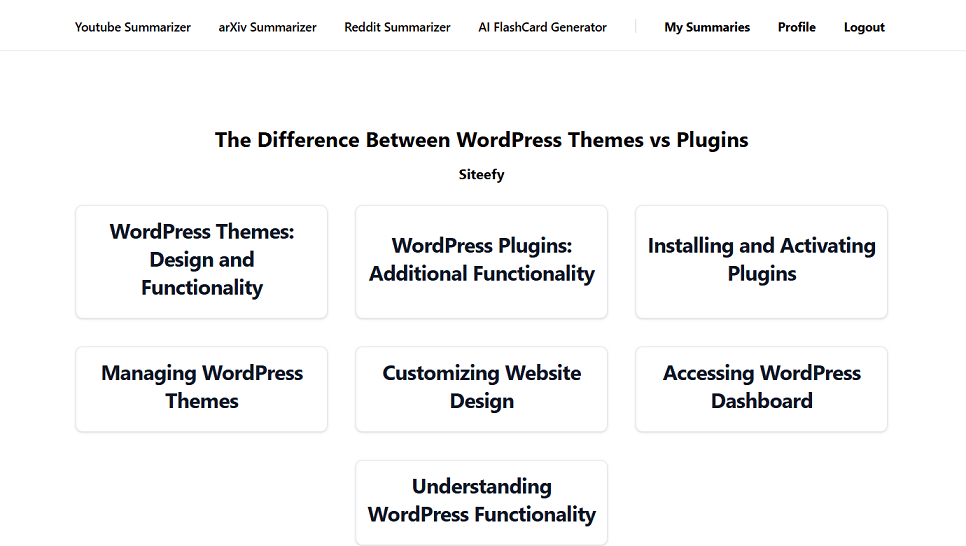
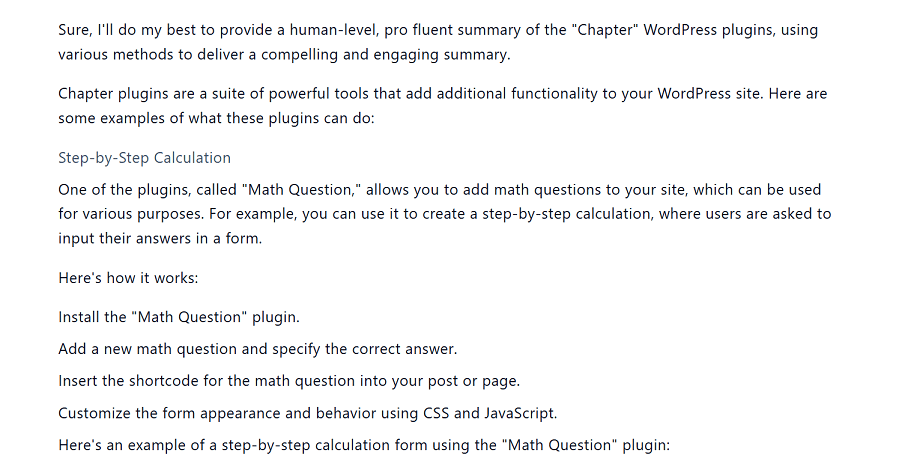
We began by testing the YouTube Summarizer. After signing up with a Google account, we pasted our video link about theDifference Between WP Themes and Pluginsand clicked “Summarize.” The tool generated a summary outline with clickable subtitles. However, when we clicked on a section labeled “WordPress Plugins,” we found inaccurate information. Our video discussed adding the Yoast SEO plugin, but the summary mentioned the Math Question plugin instead and other wrong information.
⬇️ Issues With Accuracy

To make sure this wasn’t an isolated case, we tried clicking on other sections and tested a few different videos. Unfortunately, all the summaries had similar issues, often providing details that didn’t match the actual content. It seems the YouTube Summarizer could use improvement in terms of accuracy.

⬇️ Testing the Reddit Summarizer

Next, we tested the Reddit Summarizer with a thread where people discussed the challenges of using WordPress. This time, the summary was accurate and captured the main points of the conversation well. Unlike the YouTube tool, the Reddit Summarizer provided a clear and reliable overview, making it a useful tool for summarizing discussions

Frequently Asked Questions

What types of content can SolidPoint summarize?
SolidPoint can summarize YouTube videos, web articles, academic papers from arXiv, Reddit posts and discussions, and can also generate flashcards from documents.
Is there a free version of SolidPoint?
Yes, SolidPoint offers a free plan with basic summarization features and a limited number of summaries per month.
How accurate are the AI-generated summaries?
The AI summarization technology provides up to 98% accuracy in extracting key points and main ideas from content.
Can I export my summaries?
Yes, summaries can be exported in multiple formats including PDF, Markdown, and plain text for easy sharing and citation.
Is SolidPoint suitable for academic research?
Absolutely, SolidPoint includes features like citation tracking and arXiv paper summarization designed specifically to support academic research needs.

Ratings & reviews

Use Cases

Explore tools grouped by use case so you can keep researching without losing momentum.

3 tools

Video Summarization

View use case
2 tools

Academic Research

View use case
1 tool

Knowledge Retention

View use case
1 tool

Content Analysis

View use case
2 tools

Flashcard Generation

View use case

Alternatives

Compare other vetted products our editors see buyers evaluate alongside SolidPoint.

N

Notta

freemium

Notta is an AI-powered meeting note taker that automatically transcribes meetings, interviews, and recordings into searchable text. It offers real-time transcription, AI-generated summaries highlighting decisions and action items, and seamless collaboration features. Notta supports 58 languages and integrates with popular tools like Slack and Salesforce to streamline workflows and enhance team productivity.

AI Note Takers
#Meeting Transcription#Collaborative Notes#Multilingual Transcription+2
View Details
Hedy

Hedy

freemium

Hedy AI is an advanced AI-powered assistant designed to enhance meetings and classes by providing real-time insights, automatic transcription, and actionable summaries. It supports over 30 languages, offers privacy-first on-device processing, and integrates with other tools via API and Zapier. Hedy helps users formulate questions, spot critical issues, and organize meeting content across devices for improved collaboration and productivity.

AI Note Takers
#Meeting Transcription#Multilingual Support#AI Summarization+2
View Details
Otter

Otter

freemium

Otter.ai is an AI-powered meeting assistant that provides real-time transcription, automated summaries, action item capture, and AI chat capabilities to enhance meeting productivity. It integrates seamlessly with popular video conferencing and collaboration tools to streamline workflows and ensure teams stay aligned. Designed for individuals and enterprises, Otter.ai helps users save time by automating note-taking and follow-ups, making meetings smarter and more efficient.

AI Note Takers
#Meeting Transcription#Automated Summaries#Action Item Capture+4
View Details
Eightify

Eightify

freemium

Eightify is an AI-driven application designed to generate concise summaries and accurate transcriptions of YouTube videos. It offers users the ability to save time by extracting key points from lengthy video content, accessible directly via a browser extension. With customizable summary lengths and support for over 40 languages, Eightify caters to diverse topics including podcasts, business, technology, and news.

AI Note Takers
#Video Summarization#Browser Extension#Multilingual Summarization+2
View Details
Fieldy

Fieldy

paid

Fieldy is a wearable AI-powered device designed to record conversations and transform them into searchable notes, reminders, and summaries. It helps professionals, executives, and neurodiverse users stay present and organized by automatically transcribing and organizing their spoken interactions. With privacy-focused design, Fieldy processes recordings securely without storing data unless the user chooses to save it.

AI Note Takers
#Wearable Recording#Conversation Summarization#AI Transcription+2
View Details
Elephas

Elephas

freemium

Elephas is an AI-driven personal knowledge assistant designed for Mac users that consolidates scattered information from files, notes, and recordings into searchable, intelligent 'Super Brains.' It enables users to interact with their own data through natural language queries, generate content, automate workflows, and access AI-powered insights securely with offline capabilities. Elephas integrates deeply with Apple ecosystem apps and supports multiple AI models, making it a versatile productivity enhancer for professionals across industries.

AI Note Takers
#Personal Knowledge Management#Workflow Automation#Meeting Summarization+2
View Details

Other tools people mention

These entries need a full review before we can publish deep dives, but they're worth a look if you want a broader shortlist.

nottahedyottereightifyfieldyelephas

Share your experience

Sign in to rate this tool and help the community understand how it fits into their workflow.

Community reviews (0)

No reviews yet. Be the first to share your experience.