Speechify

Speechify

Your Voice AI Assistant for Natural-Sounding Text to Speech and Voice Typing.

Paid·
1.0(1)

Overview

Speechify is an AI-powered text-to-speech platform designed to help users read faster, comprehend better, and multitask by converting any text into natural-sounding audio. It supports over 200 lifelike voices across 60+ languages and integrates seamlessly with PDFs, Google Docs, emails, and more. With features like voice typing, AI summaries, quizzes, and offline MP3 downloads, Speechify caters to students, professionals, and individuals with reading difficulties such as dyslexia and ADHD.

Pricing Model
paid
Last Updated
2025-12-02

Featured Video

Video via YouTubeWatch on YouTube

Key Features

1

Natural-Sounding Voices

Access over 200 high-quality AI voices across more than 60 languages, including the ability to clone your own voice for personalized narration.

2

Text Highlighting

Follow along as Speechify reads aloud with synchronized text highlighting to improve reading retention and engagement.

3

Speed Control

Adjust listening speeds up to 5x faster to save time and enhance productivity while consuming content.

4

Voice Typing Dictation

Dictate messages, notes, and documents using your voice, with Speechify converting speech into perfectly formatted text.

5

AI Summaries & Quizzes

Instantly generate concise summaries of long documents and personalized quizzes to reinforce learning and retention.

6

Multi-Platform Support

Use Speechify on iOS, Android, Chrome, Edge, Mac, and Windows with dedicated apps and browser extensions for seamless access.

7

Offline MP3 Download

Download audio files for offline listening, enabling users to consume content without an internet connection.

8

Advanced Skipping and Importing

Automatically skip headers, footers, and irrelevant content in PDFs and documents for a focused listening experience.

Use Cases

#1

For Students

Understand complex materials better by listening to textbooks, articles, and notes read aloud, enabling confident self-study.

#2

For Professionals

Save hours by listening to emails, reports, and documents while multitasking, improving productivity and focus.

#3

For Individuals with Dyslexia or ADHD

Enjoy easier reading experiences with dyslexia-friendly tools and voice AI assistance to follow along comfortably.

#4

For Book Lovers

Access nearly a million titles and listen to books at adjustable speeds to consume more content efficiently.

#5

For Commuters and Multitaskers

Listen to any text content on the go—while commuting, exercising, or doing chores—to make productive use of time.

How to Use

1

Install Speechify

Download the Speechify app on your preferred device (iOS, Android, Mac, Windows) or add the Chrome/Edge browser extension.

2

Import or Select Text

Open the document, webpage, email, or PDF you want to listen to and select the text or use Speechify’s import features.

3

Choose Voice and Speed

Pick from over 200 AI voices and adjust the playback speed to your preference for optimal listening.

4

Listen and Follow Along

Start playback to hear the text read aloud with synchronized text highlighting to enhance comprehension.

5

Use Additional Features

Utilize voice typing to dictate text, generate AI summaries or quizzes for study, and download audio for offline use if needed.

Pricing

Pricing details are gathered from the official Speechify website and are provided for reference only. Always confirm the latest information directly with the vendor.

PlanPriceHighlights
Free Plan$0

Listen at speeds up to 1.5x

  • Access to 10 robotic-sounding voices
  • Use on multiple devices
  • Basic text-to-speech functionality
Premium Monthly$29.00

Access to 200+ natural-sounding voices

  • Listen at speeds up to 5x
  • Offline MP3 downloads
  • AI Summaries and Chats
  • Advanced skipping and importing
  • 60+ languages supported
  • 24/7 priority support
Premium Annual$11.58

All Premium Monthly features

  • Cost-effective annual billing
  • Unlimited storage for library files
Found a change in pricing? We welcome corrections. Reach out so we can keep this listing accurate.

Pros & Cons

Pros

  • Extensive library of natural and customizable AI voices.
  • Supports a wide range of document formats and platforms including Google Docs, PDFs, emails, and webpages.
  • Features designed to aid people with dyslexia, ADHD, and other reading challenges.
  • Includes productivity enhancements like voice typing and AI-generated summaries and quizzes.
  • Highly rated with over 500,000 five-star reviews and recognized with awards such as the 2025 Apple Design Award.

Cons

  • Premium pricing may be expensive for casual users at $29/month.
  • Free plan offers limited voices and slower reading speeds.
  • Some advanced features like AI summaries and offline downloads require premium subscription.
  • Limited information on enterprise or team pricing and collaboration features.
  • Dependent on internet connection for most features except offline MP3 downloads.
OT

Our Test

Hands-on notes from our editorial team.

✅ Our Test

⬇️ Sign Up or Log In

We visited the Speechify AI website and signed up using a Google account. You can register using Google, Apple, or Facebook. To use the free version, you need to complete a short survey during the sign-up process.

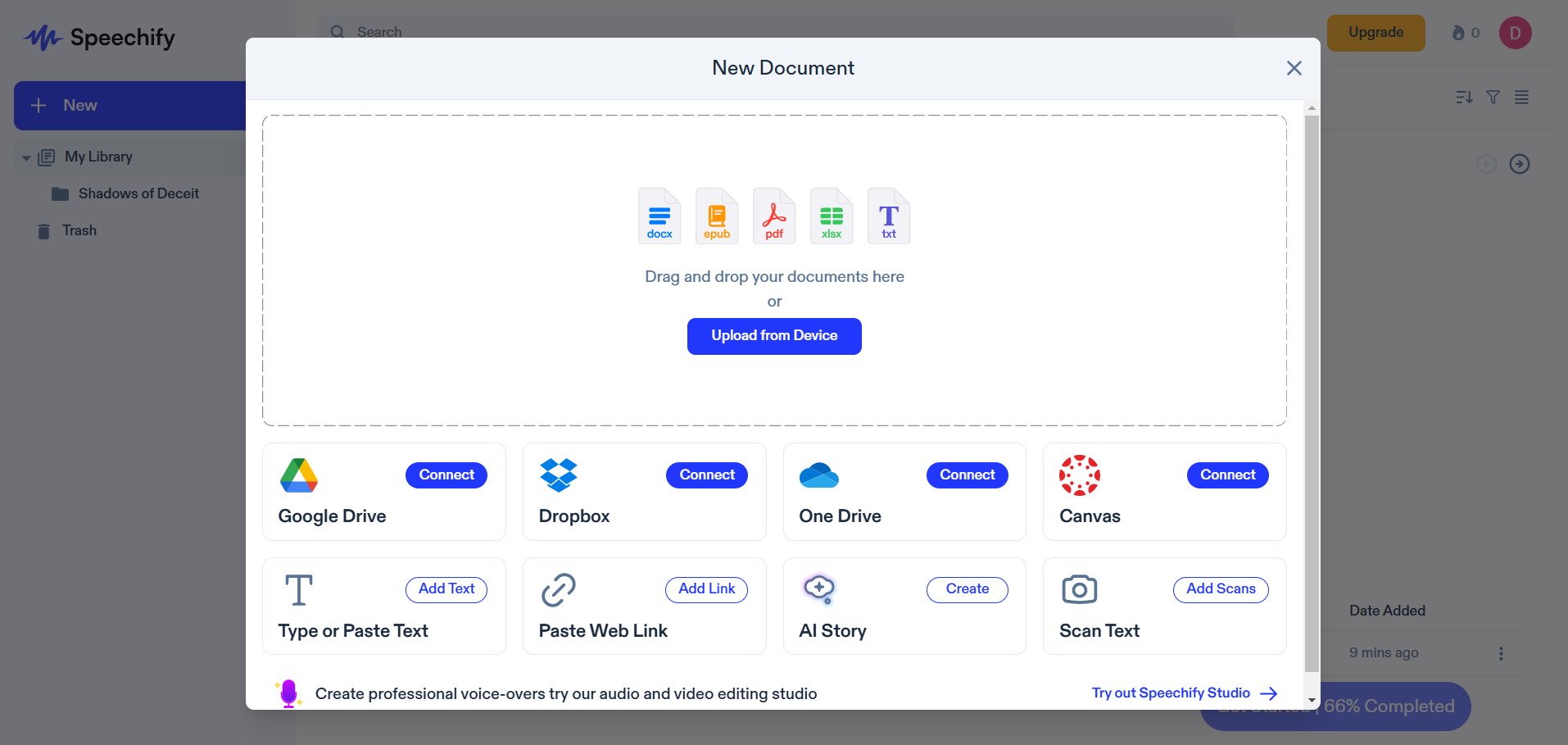
⬇️Upload a Document

Speechify provides free text-to-speech conversion for different types of content. We uploaded a text document and explored additional options for importing files. Users can connect their Google Drive, Dropbox, OneDrive, or Canvas accounts to access documents directly. Alternatively, you can manually type or paste text, scan printed documents using the built-in OCR feature, or even create an AI-generated story within the platform. Speechify upload doc

⬇️ Listen and Share Documents

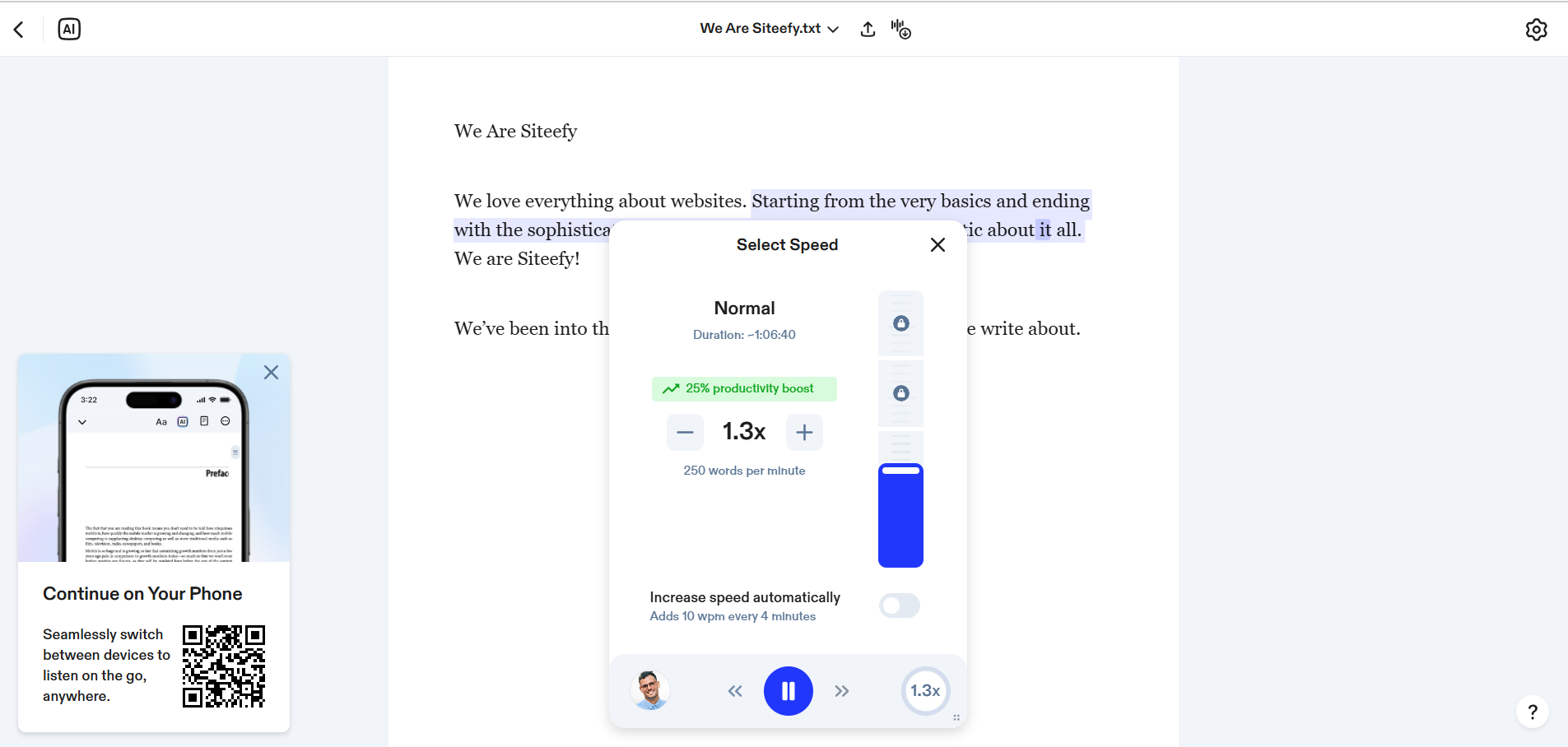
Once the text was processed, Speechify converted it into speech with a natural-sounding AI voice. The playback speed can be adjusted to suit individual preferences, from slow to fast-paced reading. Additionally, Speechify allows users to share audio content through popular messaging apps, making it easy to distribute information in a convenient, listenable format. Speechify Result
Frequently Asked Questions

Ratings & reviews

Average Rating

0.0

1 reviews

5
0%
4
0%
3
0%
2
0%
1
100%

Share your experience

Sign in to rate this tool and help the community understand how it fits into their workflow.

Community reviews (1)

Al

Dec 28, 2023

Does not recommend

Bad support, bad customisation

Cloned voices are not that accurate, and unlike other apps, this does not support pauses, tone changes etc. Downloading any projects or voices is also a hit and miss. Refuses refunds even after 24hrs of trying it.