Siteefy
New
Siteefy
New

Company

  • About
  • Contact
  • Blog
  • Newsletter

Resources

  • Submit Tool
  • Categories
  • Use Cases
  • All Tools

Siteefy Tools

  • AI Writer
  • AI Prospecting Tool
  • AI Humanizer
  • AI Content Checker

Legal

  • Privacy Policy
  • Terms of Service

Popular Categories

  • Video40
  • Productivity21
  • Audio & Music20
  • Generative AI20
  • Content & Writing20
  • Photography17

Stay Updated

Get the latest AI tools and insights delivered to your inbox.

Subscribe to Newsletter
Siteefy
Discover the best tools
© 2025 Siteefy. All Rights Reserved.
Siteefy
New
Home/TraceGPT (by PlagiarismCheck)
Be first!
Visit
Be first!
Visit
Be first!
Visit
Be first!
Visit
TraceGPT (by PlagiarismCheck)

TraceGPT (by PlagiarismCheck)

Detect AI-generated content quickly and accurately with TraceGPT, the leading AI content detector.

FreemiumAI Detection
TraceGPT (by PlagiarismCheck)

TraceGPT (by PlagiarismCheck)

Detect AI-generated content quickly and accurately with TraceGPT, the leading AI content detector.

Freemium
Categories
Content & Writing/AI Detection
#Academic Integrity#Content Authenticity#Recruitment Screening#SEO Content Verification#Plagiarism Prevention

Overview

TraceGPT by PlagiarismCheck.org is an advanced AI content detection tool designed to identify AI-generated text with high accuracy. It supports multiple environments including browser extensions, Google Docs add-ons, LMS integrations, and API access, providing instant, detailed reports highlighting AI-generated parts of text. Trusted by over 200,000 users worldwide, it helps educators, SEO experts, and recruiters maintain integrity by distinguishing human-written content from AI-generated material.

Category
Content & WritingAI Detection
Pricing Model
freemium
Last Updated
2025-12-02

Featured Video

Video via YouTubeWatch on YouTube

Key Features

1

Accurate AI Detection

Uses advanced algorithms analyzing creativity, predictability ratio, and stylistic details to detect AI-generated content with 97% accuracy.

2

Multi-Platform Integration

Available as a browser extension, Google Docs add-on, LMS integration, and API for seamless use in various workflows.

3

Comprehensive Reporting

Generates instant, downloadable PDF reports highlighting AI-generated text segments and similarity scores.

4

Confidentiality and Security

Ensures user texts are deleted after checking and protects data from leaks or unauthorized reuse.

5

Supports Large Texts

Can analyze text lengths up to 97 pages, accommodating extensive documents and academic papers.

6

Grammar Checking

Includes a grammar checker integrated within Google Docs add-on to identify and suggest corrections for grammar, spelling, and punctuation.

7

Institutional Features

Offers institutional accounts with personal archives, LMS integrations, fingerprint authorship verification, and VIP support.

8

User-Friendly Interface

Easy to use with clear AI detection confidence levels and interactive results to guide users in improving their work.

Who It's For

Audience 1#1

Academic Integrity Enforcement

Helps educators detect AI-generated essays and assignments to uphold honesty and prevent cheating.

Audience 2#2

SEO Content Verification

Enables SEO professionals to ensure content is human-written to comply with Google’s policies and maintain rankings.

Audience 3#3

Recruitment Screening

Assists HR teams in verifying that CVs and cover letters are genuinely authored by applicants, not AI-generated.

Audience 4#4

Content Quality Assurance

Allows writers and bloggers to check originality and improve their work by identifying AI-generated segments.

Audience 5#5

Institutional Plagiarism Management

Supports schools and universities with institutional accounts, LMS integration, and personal archives for managing plagiarism detection at scale.

How to Use

1

Add Text or Document

Input your text directly into the AI checker window or upload documents via supported platforms like Google Docs or LMS.

2

Initiate AI Detection

Run the AI detection process using the browser extension, add-on, or API to scan the text for AI-generated content.

3

Review Detection Results

View the interactive report highlighting text segments flagged as likely or highly likely AI-generated.

4

Download Report

Download a detailed PDF report for record-keeping or further analysis.

5

Use Insights to Improve

Use the detection results to revise your content, ensure originality, or discuss flagged parts with authors.

Pricing

Pricing details are gathered from the official TraceGPT (by PlagiarismCheck) website and are provided for reference only. Always confirm the latest information directly with the vendor.

PlanPriceHighlights
Institutional Advanced PlanContact Sales

Web-based institutional account

  • LMS integration (Google Classroom, Moodle, Canvas)
  • Personal archive for institution
  • Fingerprint authorship verification
  • Grammar checker
  • VIP support
  • Custom features and onboarding
Institutional Pro PlanContact Sales

Web-based institutional account

  • LMS integration
  • Personal archive
  • Fingerprint authorship verification
  • Grammar checker
  • VIP support
  • Customizable interface language
Individual UsageFree for 1 page

One free page check

  • Access to AI detection and plagiarism reports
  • Option to purchase additional pages
Found a change in pricing? We welcome corrections. Reach out so we can keep this listing accurate.

Pros & Cons

Pros

  • High detection accuracy (97%) for AI-generated content.
  • Supports multiple platforms including Google Docs and LMS.
  • Provides detailed, downloadable reports for transparency.
  • Strong focus on academic integrity and plagiarism prevention.
  • Secure handling of user data with text deletion after checks.

Cons

  • Pricing details require contacting sales; no transparent public pricing.
  • Primarily focused on academic and professional use; less tailored for casual users.
  • Limited free usage (one free page) before requiring payment.
  • May require institutional onboarding for full feature access.
  • AI detection may not be 100% foolproof due to evolving AI text generation.
OT

Our Test

Hands-on notes from our editorial team.

✅ Our Test
⬇️ Sign Up

We signed up on the website with our Google account for this test.

⬇️Insert and Check the Text

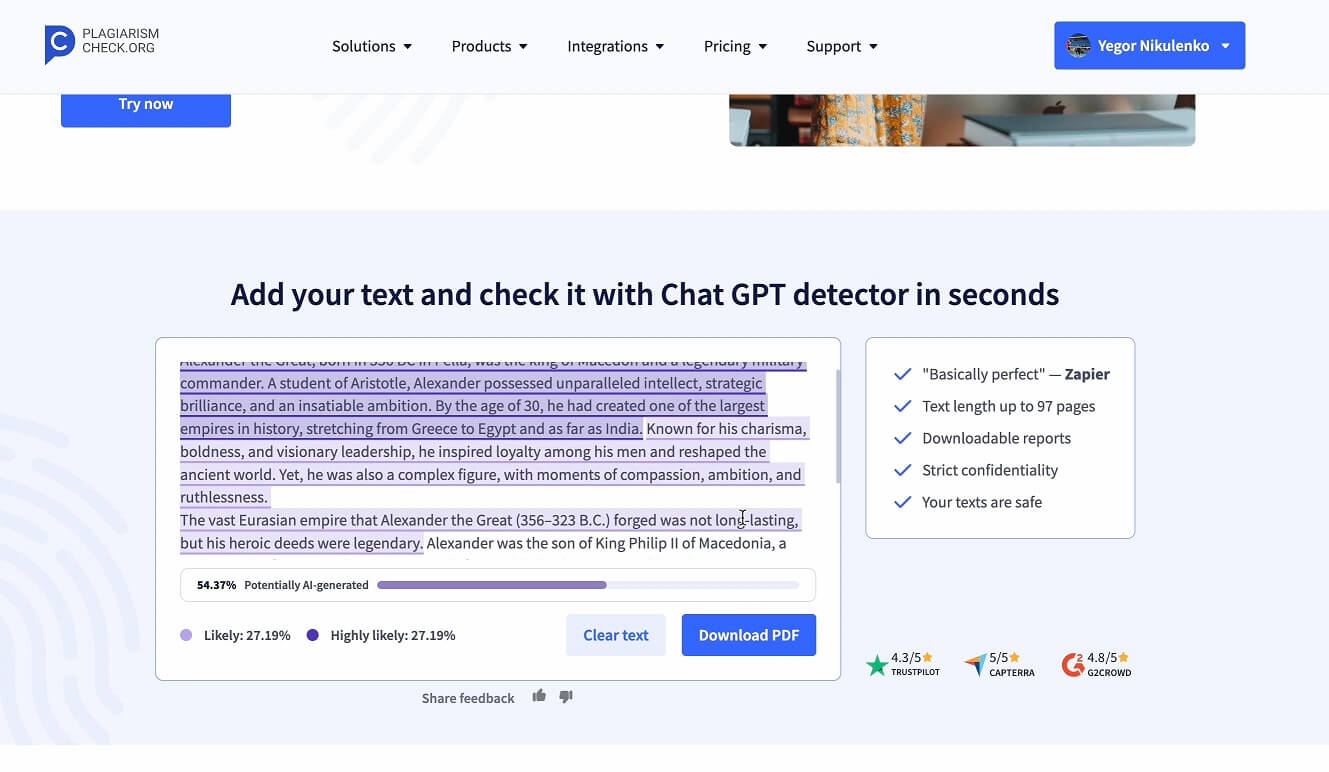
After getting 1 free page for the sign-up, we inserted a text to the textbox. Our text was made from both AI-generated and human-written halves. Then we clicked the “Check for AI” button, and in a few seconds, it highlighted the parts that were likely created with the help of AI. The tool also provided a percentage information.

⬇️View the Report

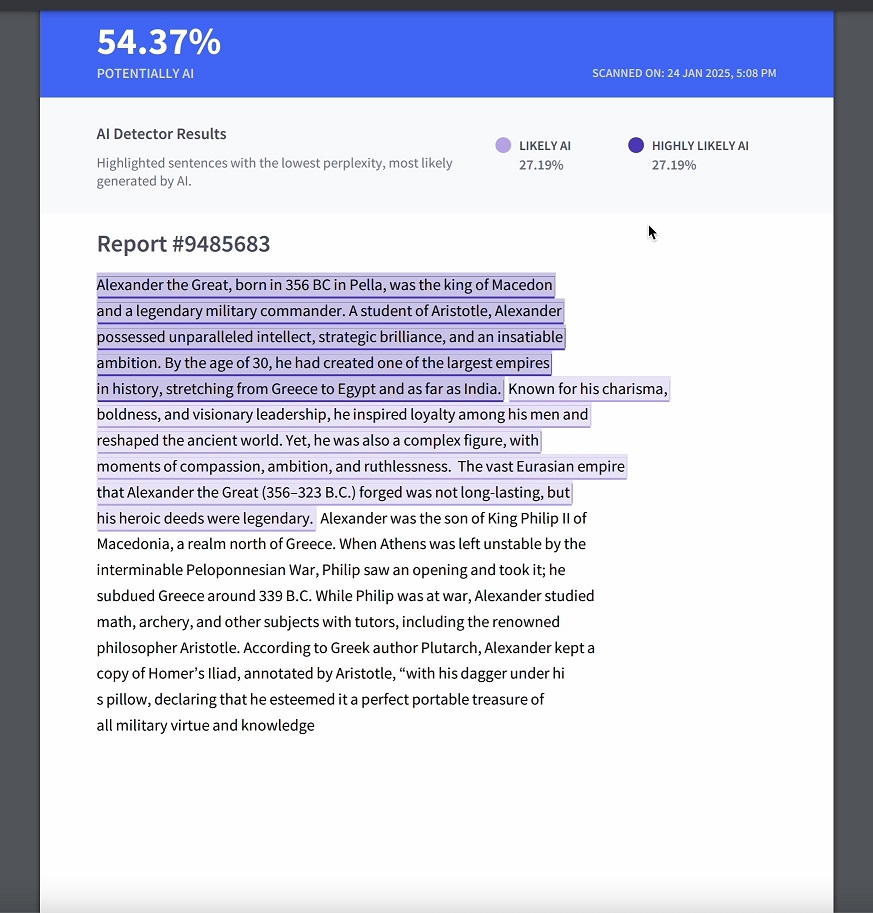
Right after the information view, we clicked the “Download PDF” button and exported the report made by the AI Detector in PDF format. We viewed the detailed report, with the scan date, all percentage information, and highlighted text. Screenshot
Frequently Asked Questions

Is there a free version of TraceGPT?
You can check one page for free after signing up. Additional pages require purchasing a subscription or package.
Can I integrate TraceGPT with Google Docs?
Yes, there is a Google Docs add-on that allows you to check documents directly within Google Docs.
How accurate is the AI detection?
TraceGPT boasts a 97% accuracy rate in detecting AI-generated content using advanced algorithms.
Is my text data secure?
Yes, the service deletes your texts after checking and ensures confidentiality to prevent leaks or reuse.
Can institutions customize their subscription?
Yes, institutional plans can be customized with specific features and integrations to meet organizational needs.

Ratings & reviews

Use Cases

Explore tools grouped by use case so you can keep researching without losing momentum.

2 tools

Academic Integrity

View use case
1 tool

Content Authenticity

View use case
1 tool

Recruitment Screening

View use case
1 tool

SEO Content Verification

View use case
3 tools

Plagiarism Prevention

View use case

Alternatives

Compare other vetted products our editors see buyers evaluate alongside TraceGPT (by PlagiarismCheck).

Smodin

Smodin

freemium

Smodin is an AI-powered writing assistant designed to help students, writers, and professionals improve their content by detecting AI-generated text, rewriting paragraphs for clarity and flow, humanizing AI content, and checking for plagiarism. It supports multiple document formats and ensures content originality and authenticity with over 98% detection accuracy. The platform streamlines writing and editing processes, making it easier to produce professional, plagiarism-free, and human-like text.

AI Detection
#Content Rewriting#Text Humanization#Academic Writing+1
View Details
GPTZero

GPTZero

freemium

GPTZero is a leading AI detection platform designed to identify text generated by AI models such as ChatGPT, GPT-5, Gemini, Claude, and LLaMa. It offers advanced AI detection with 99% accuracy, supports multiple languages, and integrates seamlessly with educational and professional tools to promote responsible AI use and preserve human writing authenticity. The platform includes features like plagiarism detection, writing feedback, video replay of writing processes, and detailed writing reports, making it trusted by educators, publishers, and businesses worldwide.

AI Detection
#AI Content Detection#Writing Feedback#Plagiarism Checker+2
View Details
HumanizerPro

HumanizerPro

paid

AI Humanizer PRO is a sophisticated AI-powered platform designed to transform AI-generated text into natural, original, and human-like content. It preserves the original meaning while improving tone and flow, helping users bypass popular AI detection tools. The tool supports multiple languages and offers various humanizing modes to suit different content needs, making it ideal for writers, marketers, SEO experts, freelancers, and business professionals.

AI Text Humanization
#Content Rewriting#Multilingual Content#Plagiarism Prevention+1
View Details

Other tools people mention

These entries need a full review before we can publish deep dives, but they're worth a look if you want a broader shortlist.

smodingptzerohumanizerpro

Share your experience

Sign in to rate this tool and help the community understand how it fits into their workflow.

Community reviews (0)

No reviews yet. Be the first to share your experience.