
Vexub

Vexub

Create unique faceless AI videos from text and other media effortlessly to maximize your revenue.

Paid·
5.0(1)

Overview

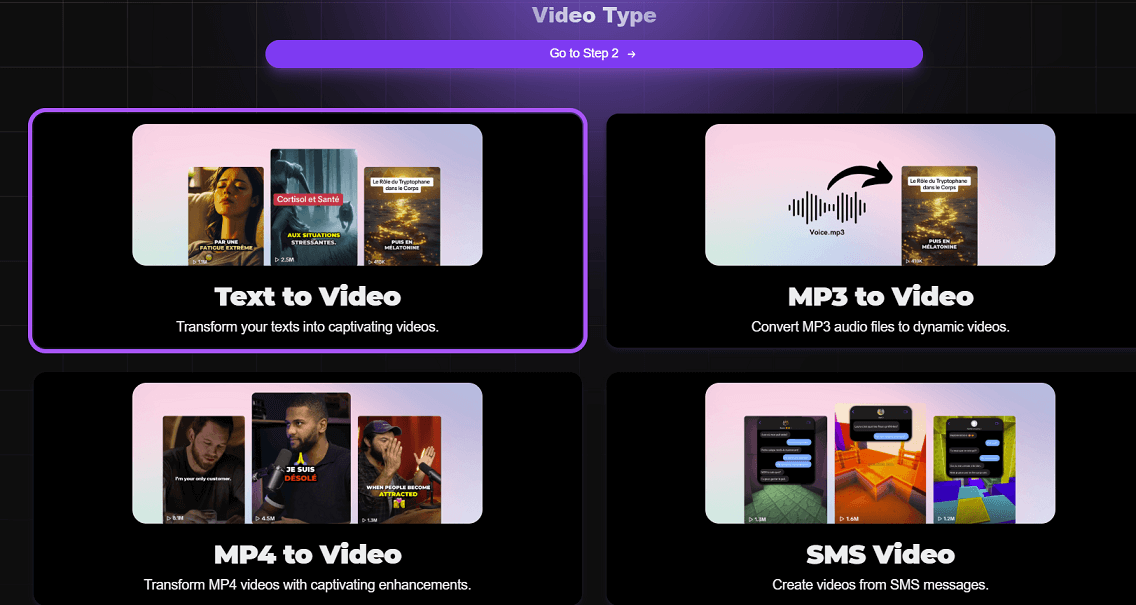
Vexub is an AI-powered video generation platform that transforms text, MP3 audio, MP4 videos, and SMS messages into engaging faceless videos quickly and easily. It supports over 70 languages and offers a variety of voices, visual styles, and advanced customization options, making it ideal for content creators, marketers, and educators. Users can monetize their videos through YouTube, TikTok, affiliate programs, and online courses, leveraging Vexub's capabilities to grow their audience and revenue.

Pricing Model
paid
Last Updated
2025-12-02

Featured Video

Video via YouTubeWatch on YouTube

Key Features

1

Text to Video

Convert simple text inputs into captivating faceless videos with AI-generated visuals and narration.

2

MP3 to Video Conversion

Transform MP3 audio files into dynamic videos by adding visual elements automatically.

3

MP4 Video Enhancement

Enhance existing MP4 videos with AI-powered visual styles and subtitles for better engagement.

4

SMS Video Creation

Generate videos directly from SMS messages, enabling quick content creation from text conversations.

5

Variety of Voices and Visual Styles

Choose from multiple AI voices and visual themes to customize the look and sound of your videos.

6

Automatic Subtitles

Automatically generate subtitles for videos to improve accessibility and viewer retention.

7

Advanced Customization

Fine-tune video elements including descriptions, hashtags, and personalized AI voices for branding.

8

Multi-language Support

Supports over 70 languages, allowing content creation for diverse global audiences.

Use Cases

#1

YouTube Content Creation

Generate engaging faceless videos from scripts or text to post on YouTube and monetize through ads.

#2

TikTok Video Monetization

Create short, dynamic videos optimized for TikTok to grow followers and earn revenue.

#3

Affiliate Marketing Videos

Produce promotional videos about products or services to share affiliate links and earn commissions.

#4

Online Course Content

Develop educational video content from text or audio to sell as online courses.

#5

Social Media Content Repurposing

Convert existing audio or text content into videos suitable for various social media platforms.

How to Use

1

Sign Up and Log In

Create an account on Vexub and log in to access the video creation dashboard.

2

Choose Input Type

Select the type of content you want to convert into video: text, MP3, MP4, or SMS.

3

Input Your Content

Enter your text, upload audio or video files, or paste SMS messages into the platform.

4

Customize Video Settings

Pick AI voices, visual styles, languages, and add subtitles or hashtags as needed.

5

Generate and Download

Let Vexub create the video, then preview and download it for publishing or monetization.

Pricing

Pricing details are gathered from the official Vexub website and are provided for reference only. Always confirm the latest information directly with the vendor.

PlanPriceHighlights
Plus$50

55 videos per month

  • Variety of voices and visual styles
  • Automatic subtitles
  • Advanced customization
  • Personalized AI voice
  • Full rights to videos
  • HD export
  • Support access
Pro$100

120 videos per month

  • All Plus features
  • Pro narrators
  • Premium support (human assistance)
  • Access to Discord support
Enterprise$375

Unlimited video generation (10 videos per 3 hours)

  • All Pro features
  • Dedicated enterprise support
Found a change in pricing? We welcome corrections. Reach out so we can keep this listing accurate.

Pros & Cons

Pros

  • Supports multiple input formats including text, MP3, MP4, and SMS for versatile video creation.
  • Offers a wide range of AI voices and visual styles for customization.
  • Enables monetization through popular platforms like YouTube and TikTok.
  • Includes automatic subtitle generation to enhance video accessibility.
  • Provides advanced customization features and full rights to created content.

Cons

  • Pricing plans may be expensive for individual creators on a budget.
  • Limited information about integrations with other marketing or editing tools.
  • No explicit mention of collaboration features for teams.
  • Faceless video style may not suit all types of video content needs.
  • Video generation limits apply in some plans (e.g., 10 videos per 3 hours).
OT

Our Test

Hands-on notes from our editorial team.

✅ Our Test

⬇️ Getting Started

To test the tool, we signed up using our Google account. After logging in, we landed on the dashboard and clicked “Create a Video” under the Project section.

⬇️Choosing the Video Type

There were four video types to choose from:Text to Video, MP3 to Video, MP4 to Video, and SMS Video. We selected “Text to Video” to generate a video from the text. Then, we picked the horizontal format for a wider layout. Vexub video types

⬇️ Writing the Script

In this step, you can enter a topic or prompt, and the tool will generate a script for you. We typed “Why the sky is blue,” and it created a complete script. If you want, you can also write your own text in the box. The tool supports multiple languages for script creation.

⬇️ Style &Generation

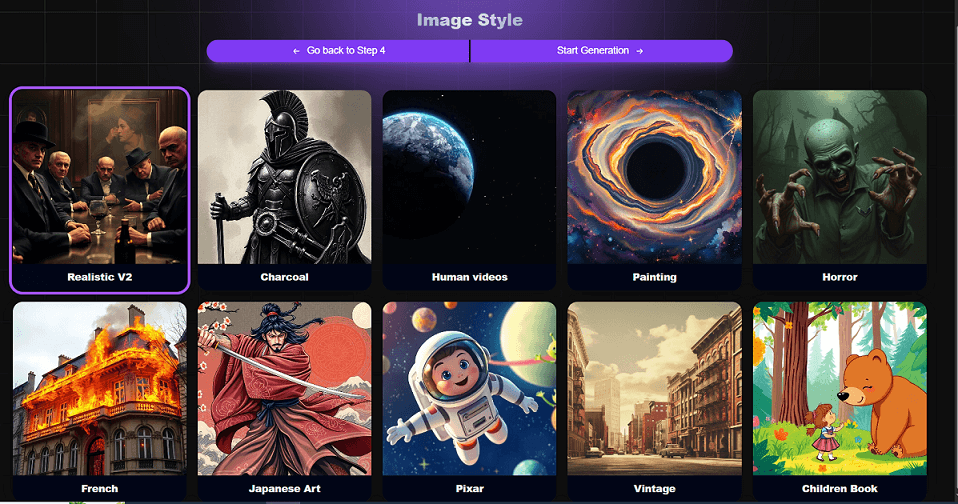
There are different image styles to choose from that match your topic. We decided on the Pixar style because we thought it suited it well. After that, we clicked “Start Generation” to generate the video. Vexub image styles The process took about 2 minutes, and the result looked great—we liked the video quality.
⬇️ Final Edits & Export

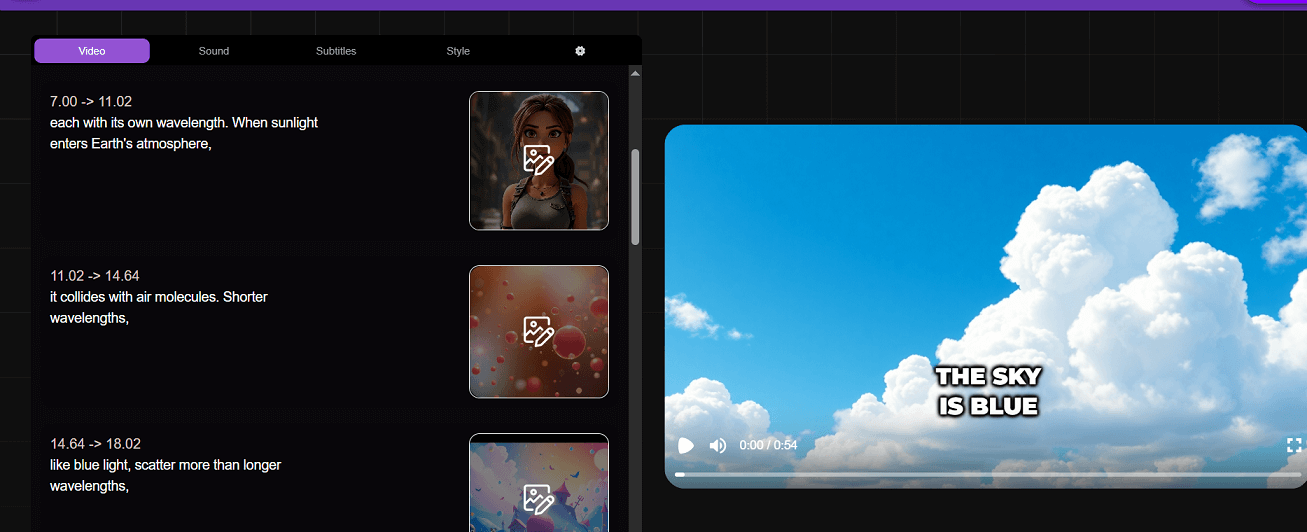
After that, you can adjust the sound, subtitles, or style. We didn't change much, as we liked the original. Finally, we clicked “Export,” and the tool showed the final version where you can edit the title, download a thumbnail, or download the full video. Vexub editing video
Frequently Asked Questions

Ratings & reviews

Average Rating

0.0

1 reviews

5
100%
4
0%
3
0%
2
0%
1
0%

Share your experience

Sign in to rate this tool and help the community understand how it fits into their workflow.

Community reviews (1)

Rida

Aug 17, 2025

Recommends this tool

Nice

It’s a really nice app. It helped me a lot in my career, and I recommend everyone to use it.