
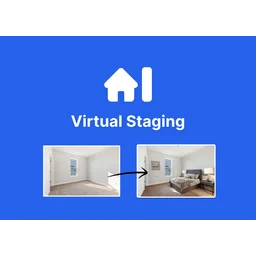
Virtual Staging AI

Virtual Staging AI

Transform vacant home photos into beautifully furnished listings in just 15 seconds with AI-powered virtual staging.

Paid·No reviews yet

Overview

Virtual Staging AI is a fast, cost-effective solution for real estate professionals to digitally furnish and stage vacant or furnished rooms using artificial intelligence. The platform offers instant results with a 15-second turnaround, multi-view staging capabilities, and unlimited regenerations to ensure satisfaction. Starting at $16 per month, it provides an affordable alternative to traditional staging services while maintaining MLS compliance and accurate room layouts.

Pricing Model
paid
Last Updated
2025-12-02

Featured Video

Video via YouTubeWatch on YouTube

Key Features

1

Instant AI Virtual Staging

Transforms property photos into digitally furnished rooms within 15 seconds, enabling quick listing preparation.

2

Multi-View Staging

Allows staging of rooms from two different perspectives with consistent furniture layout for better visualization.

3

Furniture Removal

Automatically removes existing furniture and clutter from images to create a clean slate for staging.

4

Unlimited Regenerations

Offers unlimited redesigns of staged images at no additional cost until the user is satisfied.

5

Affordable Subscription Plans

Pricing starts at $16/month for 6 photos, making it cost-effective compared to traditional staging services.

6

Supports Furnished and Unfurnished Photos

Users can upload photos with or without furniture for virtual staging.

7

Fully MLS Compliant

Ensures virtual staging does not misrepresent the property, maintaining compliance with real estate listing standards.

8

Free Image Editing Trial

Includes a trial for image editing features to enhance staged photos before download.

Use Cases

#1

Real Estate Listing Enhancement

Realtors can quickly stage vacant or furnished homes to attract more buyers and sell properties faster.

#2

Property Marketing

Marketing teams can create appealing visuals for online listings, brochures, and advertisements.

#3

Photography Post-Processing

Photographers can enhance real estate photos by digitally adding furniture and removing clutter.

#4

Home Renovation Visualization

Homeowners and designers can visualize different furniture layouts and styles before physical staging or renovation.

#5

Brokerage Team Solutions

Brokerages can provide consistent virtual staging services across multiple agents with enterprise plans.

How to Use

1

Upload Your Property Photo

Upload a furnished or unfurnished room photo to the platform without needing to sign up or provide payment details initially.

2

AI-Powered Staging

The AI processes the image and digitally removes existing furniture if needed, then adds new furniture and decor in the chosen style within 15 seconds.

3

Review and Regenerate

Review the staged image and request unlimited regenerations to adjust the design until satisfied.

4

Download Your Staged Photo

Download the final staged image to use in listings, marketing materials, or presentations.

5

Use Multi-View Staging (Optional)

For supported room types, stage multiple views with consistent furniture layout to provide comprehensive visualization.

Pricing

Pricing details are gathered from the official Virtual Staging AI website and are provided for reference only. Always confirm the latest information directly with the vendor.

PlanPriceHighlights
Basic$16

6 photos per month

  • Unlimited renders and downloads
  • All room types and styles for standard staging
  • Furniture removal included
  • No watermark
  • Free image editing trial
  • 10 seconds turnaround
  • Multi-view staging for bedrooms and living rooms
Standard$19

20 photos per month

  • All Basic features plus
  • Image storage forever
Professional$39

60 photos per month

  • All Standard features plus
  • Success manager
Enterprise$79

150 photos per month

  • All Professional features plus
  • API access
  • Enterprise support with success manager
Found a change in pricing? We welcome corrections. Reach out so we can keep this listing accurate.

Pros & Cons

Pros

  • Fast turnaround time of 15 seconds per image.
  • Cost-effective pricing starting at $16/month with multiple subscription tiers.
  • Unlimited regenerations allow users to get the desired staging without extra fees.
  • Supports multi-view staging for enhanced room visualization.
  • Fully MLS compliant to avoid misrepresentation issues.

Cons

  • Limited to staging up to 150 photos per month on the highest plan.
  • Primarily focused on bedrooms and living rooms for multi-view staging.
  • No free tier beyond a free image upload; requires subscription for full features.
  • May not replace the nuanced touch of professional human designers in complex staging scenarios.
  • API access available only on the Enterprise plan, limiting integration options for smaller users.

Frequently Asked Questions

Ratings & reviews

Ratings & reviews

No reviews yet. Be the first to share your experience.

Share your experience

Sign in to rate this tool and help the community understand how it fits into their workflow.

Community reviews (0)

No reviews yet. Be the first to share your experience.