GunAiLegend3/5
Recommends this tool
It’s a useful tool with a lot of cool extras like translation and video generation. However, the logo maker missed the mark for me. It just didn't follow the styling rules I set from the start.


Create unique logos and build your full brand identity instantly with AI-powered design.
Zoviz is an AI-driven branding platform that enables users to create professional-quality logos and complete brand kits quickly and easily. It offers a comprehensive suite of branding assets including logos, business cards, social media profiles, letterheads, email signatures, and brand books, all tailored to your business needs. The platform supports multiple languages, provides lifetime access with unlimited revisions, and ensures full commercial rights for all designs.
Last updated: Apr 1, 2026
Average rating
Share your experience
Help others decide, your insights matter
It’s a useful tool with a lot of cool extras like translation and video generation. However, the logo maker missed the mark for me. It just didn't follow the styling rules I set from the start.
Average rating
Share your experience
Help others decide, your insights matter
It’s a useful tool with a lot of cool extras like translation and video generation. However, the logo maker missed the mark for me. It just didn't follow the styling rules I set from the start.
Generate unique, professional logos tailored to your business name and industry using advanced AI algorithms in just minutes.
Receive a full branding package including business cards, social media profiles and covers, letterheads, email signatures, favicons, and a brand book with guidelines.
Access over 30 high-quality logo file types including SVG, PNG, EPS, and PDF with various color and background variations for versatile use.
Make unlimited changes to colors, fonts, and layouts post-purchase to keep your branding fresh and consistent without extra cost.
Use the Zoviz mobile app to create, edit, and download your brand assets anytime, anywhere for seamless branding on the go.
Choose from tailored logo designs across numerous industries such as food, fashion, technology, real estate, and more for targeted branding.
Enhance ordinary product photos into studio-quality images instantly with AI-powered lighting, shadows, and backgrounds, free to use.
Get full commercial usage rights with all packages, and opt for exclusive ownership with the Elite package for trademark and transfer rights.
| Plan | Price | Highlights |
|---|---|---|
| Basic Logo Pack | $19.99 | Standard high-quality files (PNG, JPG)
|
| Full Brand Kit | $49.99 | Everything in Basic Logo Pack
|
Hands-on notes from our editorial team.
✅ Our Test
We signed up using a Google account. The process was smooth and required no extra verification.The dashboard has the options of uploading a logo or designing a new one. We chose the option to design a new one and selected**“Design your logo with Zoviz AI logo generator.”The tool first asked for keywords that reflect our brand. We entered:restaurant, cozy, organic, modern, family.**Here, it auto-suggested keywords as we typed:
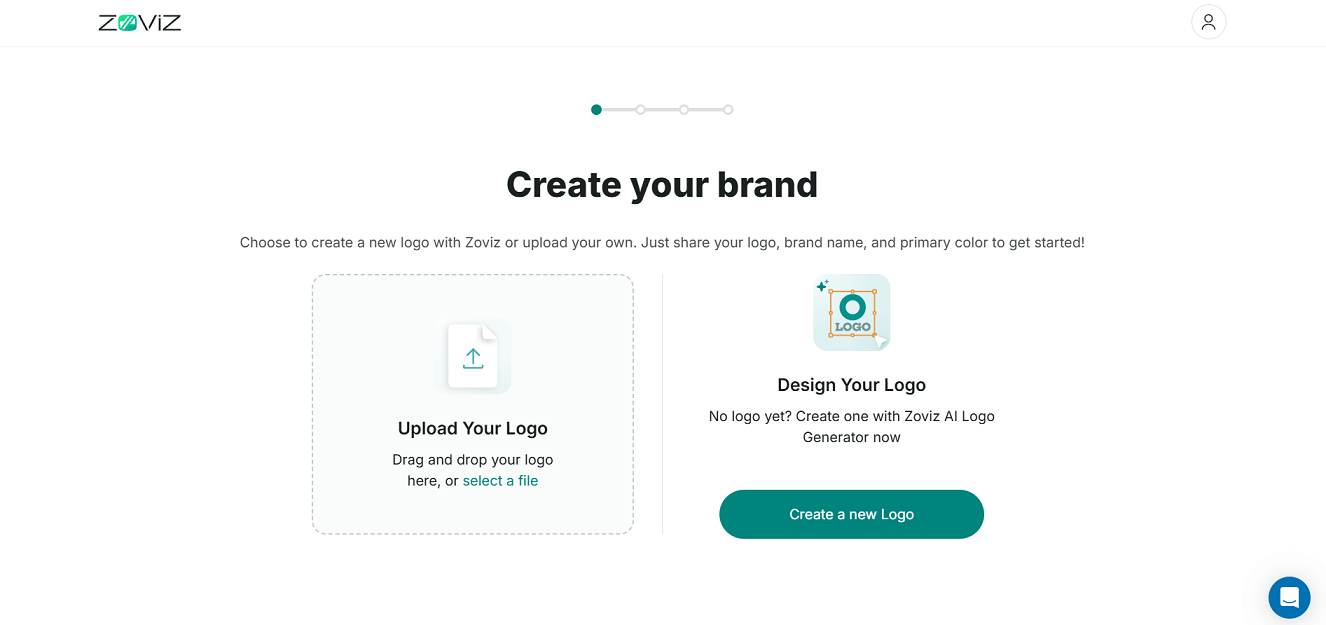
We selected two brand vibes:Eco-Friendly_and_Minimalist. Zoviz offered AI-generated name suggestions, and we picked a custom name,PureFork. We also chose an AI-generated tagline: “Simply Nourishing, Naturally Delicious.”
In the editor, we customized the layout, fonts, and colors with a real-time preview showing updates across the logo and brand assets.

Once we finalized the design, we were prompted to claim the logo. Zoviz gave us a 48-hour window to purchase before the design would be released to the public gallery.
Top rated tools from the same category.
Generate short, catchy, and brandable business names powered by AI.
AI-powered design platform to create logos and build brand identity.

AI-powered generator for unique business names with matching domain availability.

Generate unique, AI-powered business and product names with instant domain availability checks for free.
AI-powered business name and domain generator with free logo creation.
AI-powered business name generator that creates unique, memorable names with matching logo designs in seconds.