MetaVoice Studio

MetaVoice Studio

AI-powered voice customization with realistic multilingual voice cloning and easy integration.

Freemium·No reviews yet

Overview

MetaVoice Studio is an AI-driven platform for voice customization, enabling users to generate and clone realistic voices with multilingual support. It offers versatile voice change features and an API for seamless integration into apps, games, and digital content. The platform caters to content creators, game developers, educators, marketers, and customer support teams seeking natural and customizable voice synthesis.

Pricing Model
freemium
Last Updated
2025-12-02

Key Features

1

Voice Change

Switch easily between different voices to match various characters, tones, or styles, enhancing the versatility of voice-based projects.

2

AI Voice Cloning

Create realistic voice clones that preserve the original speaker's tone, accent, and style for personalized voice generation.

3

Multilingual Voice Support

Generate voices in multiple languages to effectively reach and engage a global audience.

4

API Integration

Provides an easy-to-use API for developers to embed AI-generated voices into applications, games, and digital products.

5

Audio Recording and Upload

Record audio directly on the platform using a microphone or upload audio files for voice conversion.

6

Voice Preview

Preview various available voices before finalizing to ensure the best match for your project.

7

Downloadable Audio Files

Download generated speech audio files for use in external projects or media.

8

Freemium Access

Offers a free plan with basic features and usage limits, allowing users to try core functionalities before upgrading.

Use Cases

#1

Content Creators & Podcasters

Generate unique and engaging voiceovers for videos, podcasts, and digital content to enhance audience experience.

#2

Game Developers

Integrate character voices or interactive storytelling features with natural AI voice synthesis for immersive gameplay.

#3

E-Learning & Education

Create compelling narration and course materials for online training and educational modules.

#4

Marketing & Advertising

Produce customized voice advertisements tailored to specific audiences to improve campaign effectiveness.

#5

Customer Support

Implement natural-sounding voice bots to provide efficient and engaging customer support services.

How to Use

1

Select or Clone a Voice

Choose an existing voice from the gallery or create a custom voice clone using AI voice cloning features.

2

Record or Upload Audio

Record your audio directly on the dashboard using a microphone or upload an existing audio file for processing.

3

Preview Voices

Listen to different voice options to find the one that best fits your project needs.

4

Adjust and Generate Speech

Customize voice parameters as needed and generate the speech output.

5

Download or Integrate

Download the generated audio file or use the provided API to integrate the voice directly into your application or project.

Pricing

Pricing details are gathered from the official MetaVoice Studio website and are provided for reference only. Always confirm the latest information directly with the vendor.

PlanPriceHighlights
Free Plan$0

Access to basic features

  • Usage limits apply
  • Limited voice library
Personal Plan$10

Extended usage limits

  • Access to more voices
  • Basic API access
Creator Plan$25

Full feature access

  • Priority support
  • Advanced API integration
Advanced Custom PlanContact Sales

Tailored solutions

  • Enterprise-grade features
  • Dedicated support
Found a change in pricing? We welcome corrections. Reach out so we can keep this listing accurate.

Pros & Cons

Pros

  • Customizable voice generation for diverse applications
  • Supports multiple languages for global reach
  • Easy API integration for developers
  • Realistic and natural-sounding voice conversions
  • User-friendly interface with audio recording and upload options

Cons

  • Limited voice library available in the free plan
  • Subscription required for extensive use and advanced features
  • Occasional audio artifacts such as burr effects in converted voices
  • No real-time voice changing capability yet
OT

Our Test

Hands-on notes from our editorial team.

✅ Our Test

⬇️ Easy Start

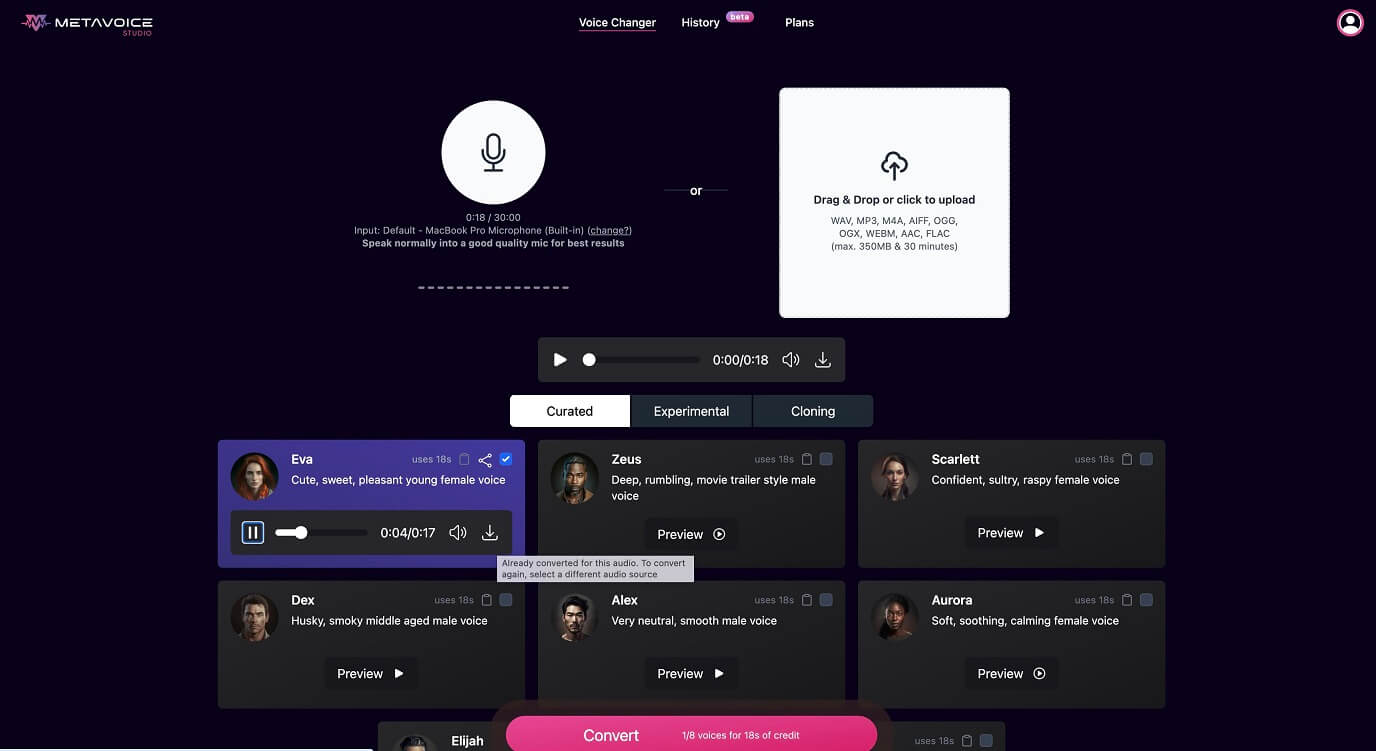
For our test, we signed up on the website using our Google account. After registration, we got a welcome 1-day free trial for a “Creator Plan” to test all features.Then on the main dashboard, we recorded an 18-second audio using our microphone. This feature is available right there, as file uploading does.

⬇️Choose the Voice, Convert, and Download

After recording our audio, we previewed a variety of available voices from the gallery and selected one from the “Curated” category. Then we just clicked to the “Convert” button, and after a few seconds, it was ready to view and download.

Frequently Asked Questions

Ratings & reviews

Ratings & reviews

No reviews yet. Be the first to share your experience.
Share your experience

Sign in to rate this tool and help the community understand how it fits into their workflow.

Community reviews (0)

No reviews yet. Be the first to share your experience.