SocialBee

SocialBee

AI-Powered Social Media Management Tool for Effortless Content Creation, Scheduling, and Collaboration

Paid·No reviews yet

Overview

SocialBee is an AI-driven social media management platform designed to streamline content creation, scheduling, engagement, and analytics across multiple social networks. It integrates with popular design and content platforms like Canva, Unsplash, and GIPHY, enabling users to generate tailored posts, manage multiple accounts, and collaborate with teams efficiently. SocialBee supports a wide range of social media channels and offers detailed analytics and engagement tools to optimize social media strategies.

Pricing Model
paid
Last Updated
2025-12-02

Featured Video

Video via YouTubeWatch on YouTube

Key Features

1

AI-Powered Content Creation

Generate social media posts, captions, images, and hashtags using AI with over 1000+ prompts and personalized tone options.

2

Multi-Platform Scheduling and Publishing

Schedule and publish posts directly to Facebook, Instagram, LinkedIn, Twitter (X), Pinterest, TikTok, YouTube, and more with automatic posting and universal posting for platforms without direct API support.

3

Content Categories and Recycling

Organize posts into categories and recycle evergreen content automatically to maintain consistent posting without manual rescheduling.

4

Team Collaboration and Approval Workflows

Manage multiple users with roles and permissions, approve content, leave internal notes, and receive email notifications to streamline teamwork.

5

Social Media Analytics and Reporting

Track audience growth, engagement rates, top-performing posts, and generate PDF reports to measure social media success and refine strategies.

6

Integrated Design and Media Resources

Access Canva for graphic design, Unsplash for stock images, and GIPHY for GIFs directly within the platform to enhance post visuals.

7

Engagement Management

Monitor and respond to comments, mentions, and messages from a unified inbox to build community and customer loyalty.

8

Customizable Posting Schedule and Best Time Recommendations

Plan posting cadence per profile with AI-driven suggestions for optimal times to maximize reach and engagement.

Use Cases

#1

Small Business Social Media Management

Manage multiple social media profiles with scheduled posts, AI-generated content, and engagement tracking to grow brand presence efficiently.

#2

Agency Client Management

Organize multiple client accounts with dedicated workspaces, collaborate with team members, and streamline content approval workflows.

#3

Freelancer Content Creation and Scheduling

Quickly generate tailored posts using AI, schedule content across platforms, and monitor performance to save time and improve results.

#4

Nonprofit and Community Engagement

Use SocialBee to maintain consistent posting, respond to community interactions, and analyze audience growth to increase outreach impact.

#5

Educational Institutions Social Outreach

Coordinate social media campaigns across departments, collaborate on content, and track engagement to enhance communication with students and stakeholders.

How to Use

1

Connect Your Social Media Accounts

Link your Facebook, Instagram, LinkedIn, Twitter (X), Pinterest, TikTok, YouTube, and other supported profiles to SocialBee.

2

Create and Organize Content

Use AI to generate posts or import content via RSS feeds; organize posts into categories for easy scheduling and management.

3

Customize Posts for Each Platform

Tailor your posts manually or use AI to automatically adjust captions, images, and hashtags to fit each social network’s best practices.

4

Schedule Posts Using the Visual Calendar

Plan your posting schedule with SocialBee’s calendar, set posting times, and enable recycling for evergreen content.

5

Collaborate and Approve Content

Invite team members, assign roles, review posts, leave feedback, and approve content before publishing.

6

Monitor Engagement and Analytics

Track comments, mentions, messages, and analyze performance metrics to optimize your social media strategy continuously.

Pricing

Pricing details are gathered from the official SocialBee website and are provided for reference only. Always confirm the latest information directly with the vendor.

PlanPriceHighlights
Bootstrap$29

Connect up to 5 social profiles

  • 1 user/workspace
  • Analytics up to 3 months
  • 10 content categories with 1,000 posts per category
  • Canva, Unsplash, GIPHY integrations
Accelerate$49

Connect up to 10 social profiles

  • 1 user/workspace
  • Analytics up to 2 years
  • 50 content categories with 5,000 posts per category
  • All Bootstrap features plus enhanced analytics
Pro$99

Connect up to 25 social profiles

  • 3 users/workspace
  • 5 workspaces
  • Analytics up to 2 years
  • Unlimited content categories and posts
  • Team collaboration and content approval
Pro50$179

Connect up to 50 social profiles

  • 5 users/workspace
  • 10 workspaces
  • Analytics up to 2 years
  • Advanced team management features
Pro100$329

Connect up to 100 social profiles

  • 5 users/workspace
  • 20 workspaces
  • Analytics up to 2 years
  • Priority support and advanced integrations
Pro150$449

Connect up to 150 social profiles

  • 5 users/workspace
  • 30 workspaces
  • Analytics up to 2 years
  • Full feature set with maximum capacity
Found a change in pricing? We welcome corrections. Reach out so we can keep this listing accurate.

Pros & Cons

Pros

  • Comprehensive AI-driven content creation and customization for multiple social media platforms.
  • Robust collaboration features including roles, permissions, content approval, and internal notes.
  • Supports direct posting to a wide range of social networks and universal posting for others.
  • Detailed analytics with audience demographics, engagement tracking, and PDF report exports.
  • Integration with popular design and content curation platforms like Canva, Unsplash, and GIPHY.

Cons

  • Pricing may be high for very small businesses or solo users compared to basic schedulers.
  • No explicit mention of mobile app capabilities beyond universal posting support.
  • Some advanced features like multiple workspaces and extended analytics require higher-tier plans.
  • Limited information on API access or custom integrations beyond listed partners.
  • Learning curve for new users due to feature-rich interface and options.
OT

Our Test

Hands-on notes from our editorial team.

✅ Our Test

⬇️ Sign In and Connect to Social Media

We linked our social accounts and signed up with an email address to use the platform, which offers a 14-day free trial. Our team selected two platforms: LinkedIn for basic articles and YouTube for posting videos out of the many options available.

⬇️Need Help? No Problem

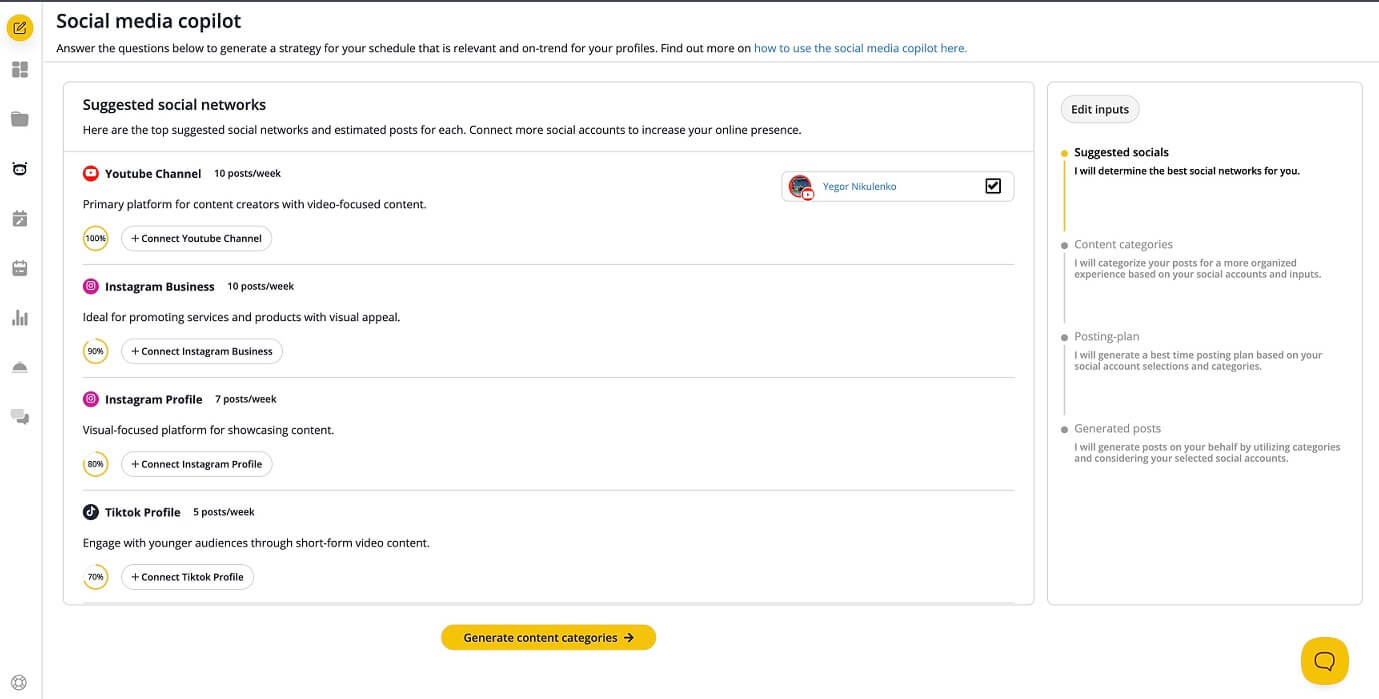
After those steps, we were directed to a dashboard with many different available tools. One of them wasAI-powered Copilotthat asked us some clarifying questions and then helped us to generate approximate schedules, content categories, post themes, and other suggestions for different social media platforms (not only connected ones).

⬇️ Manual Editing

As we completed work withCopilot, we went to theSchedulepage and clicked on theSchedulebutton on the left menu. We viewed our schedule and decided to manually edit the first post for YouTube so that we could release our content earlier. Clicking on the first-in-row scheduled post, we edited its schedule and fulfilled the content we wanted to release. Remember that the YouTube content-releasing tool requires a video upload. Then we saved our future post, but there was another important moment to do.

⬇️Save, Approve, Wait and Enjoy

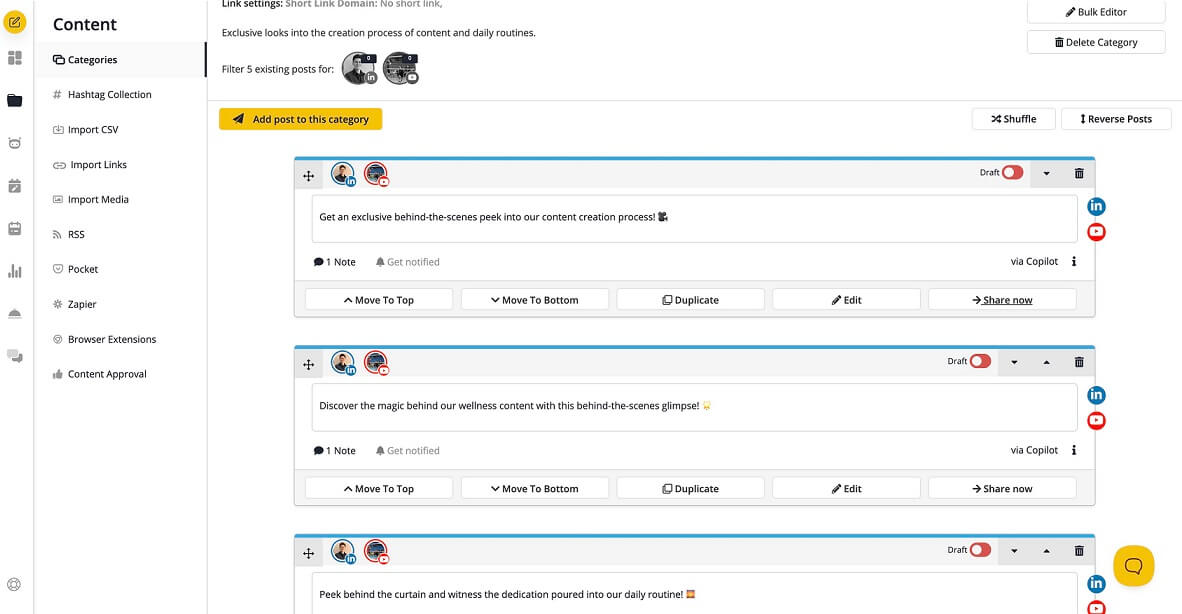
Don't forget toapproveyour posts, or they won't be released. You can do it both whenediting a post byclicking the small button in the right corner or in theContent Categoriespage.Onthe Content Categoriespage, we clicked theShare nowbutton, and content was released on our YouTube channel. Also, for more customization, you can do the Copilot steps manually: create categories, schedule your content, sort it between platforms, and more.And here is theContent Categoriesmenu view, when you enter any of your categories.

Frequently Asked Questions

Ratings & reviews

Ratings & reviews

No reviews yet. Be the first to share your experience.
Share your experience

Sign in to rate this tool and help the community understand how it fits into their workflow.

Community reviews (0)

No reviews yet. Be the first to share your experience.