Siteefy
Search tools...
New
Siteefy
Search tools...
New

Company

  • About
  • Contact
  • Blog
  • Newsletter

Resources

  • Submit Tool
  • Categories
  • Use Cases
  • Collections
  • All Tools

Siteefy Tools

  • AI Writer
  • AI Prospecting Tool
  • AI Humanizer
  • AI Content Checker

Legal

  • Privacy Policy
  • Terms of Service

Popular Categories

  • Productivity51
  • Video46
  • Automation28
  • Audio & Music26
  • Content & Writing22
  • Generative AI20

Stay Updated

Get the latest AI tools and insights delivered to your inbox.

Subscribe to Newsletter
Siteefy
Discover the best tools
© 2025 Siteefy. All Rights Reserved.
Siteefy
Search tools...
New
HomeHeygen
1
Heygen

Heygen

inVideoAI Video Generation

Create lifelike AI videos instantly with customizable avatars and multilingual voiceovers.

FreemiumWebsite
1
Heygen

Heygen

Create lifelike AI videos instantly with customizable avatars and multilingual voiceovers.

FreemiumWebsite
inVideoAI Video Generation
#AI Avatars#Multilingual Video#Script-to-Video Generation#Personalized Sales Videos#Collaborative Video Editing

Overview

HeyGen is an AI-powered video generation platform that transforms text, images, or audio into high-quality videos featuring realistic AI avatars. It offers advanced customization including avatar creation from photos or videos, natural voiceovers, and support for over 175 languages with accurate lip-sync and translations. Designed for marketers, educators, and sales teams, HeyGen streamlines video production, localization, and personalization without the need for cameras or editing expertise.
Category
VideoAI Video Generation
Pricing Model
freemium
Last Updated
2025-11-26

Featured Video

Key Features

1

AI Avatar Generator

Create lifelike AI avatars from a single photo, video, or choose from thousands of stock avatars with customizable expressions, gestures, and clothing.

2

Text-to-Video Creation

Generate complete videos by simply inputting a script; the AI produces synchronized voiceovers, visuals, and avatar animations automatically.

3

Image-to-Video Transformation

Turn any photo or image into a talking video with natural lip-sync, multiple voice options, and background music without manual editing.

4

Multilingual Video Translation

Translate videos into over 175 languages and dialects with AI voiceovers, subtitles, and perfect lip-sync to maintain original tone and pacing.

5

AI Studio Editor

An intuitive text-based video editor that allows users to easily create, customize, and manage videos from draft to final production.

6

Brand Customization

Upload brand assets like logos, colors, fonts, and images to ensure consistent branding across all videos.

7

Collaborative Workflow

Enable team collaboration with live editing, commenting, and tagging features to align on messaging and brand voice.

8

Sales Video Automation

Automate personalized sales outreach with avatar-led videos, PDF/PPT to video conversion, and interactive AI avatars acting as virtual sales reps.

Who It's For

Audience 1#1

Sales Outreach and Demos

Create personalized sales videos and product walkthroughs to accelerate deal cycles and improve customer engagement.

Audience 2#2

Learning and Development

Develop tailored training videos for employee onboarding, compliance, and upskilling with scalable AI video generation.

Audience 3#3

Global Video Localization

Translate and dub videos into multiple languages with accurate lip-sync to reach international markets efficiently.

Audience 4#4

Social Media Video Production

Generate engaging social clips and explainer videos effortlessly to maintain a consistent social media presence.

How to Use

1

Choose or Create an Avatar

Select a pre-made avatar, upload a photo or video to generate your own AI avatar, or pick from thousands of stock avatars.

2

Input Your Script

Type or upload the script you want your avatar to speak in the video.

3

Customize Video Settings

Adjust expressions, gestures, voice style, language, and branding elements to match your desired style and audience.

4

Generate the Video

Click generate to create the video; the AI will produce synchronized voiceover, avatar animation, and visuals.

5

Edit and Collaborate

Use the AI Studio editor to refine the video, add overlays, subtitles, and collaborate with your team before finalizing.

Pricing

Pricing details are gathered from the official Heygen website and are provided for reference only. Always confirm the latest information directly with the vendor.

PlanPriceHighlights
Free Plan$0

Access to text-to-video and AI video generation

  • Limited video length and resolution
  • Basic avatar and voice options
  • Watermarked videos
  • Community support
Pro PlanContact Sales

Full access to all avatars and voice styles

  • High-definition video output (1080p and 4K)
  • Unlimited video length and usage
  • Advanced editing and branding features
  • Multilingual translation and dubbing
  • Priority customer support
Found a change in pricing? We welcome corrections. Reach out so we can keep this listing accurate.

Pros & Cons

Pros

  • Highly realistic AI avatars indistinguishable from real humans.
  • Supports over 175 languages with natural lip-sync and voice cloning.
  • No need for cameras or video production expertise.
  • Easy-to-use interface with collaborative editing features.
  • Speeds up video production and localization significantly.

Cons

  • Pricing details for paid plans are not explicitly provided on the website.
  • Advanced customization may require some learning curve for new users.
  • Dependent on AI-generated content which may occasionally need manual refinement.
  • Limited information on integration options beyond API mention.
  • No explicit offline or desktop version; fully cloud-based.

Used Heygen?

Your review helps others make better decisions

+10 first review bonus!
Tap to rate
OT

Our Test

Hands-on notes from our editorial team.

✅ Our Test

⬇️ Signing Up

We signed up on the website through our Google account authorization. The website proposed to select the plan, and we selected a free one with monthly limits and a watermark.

⬇️Select and Customize a Template

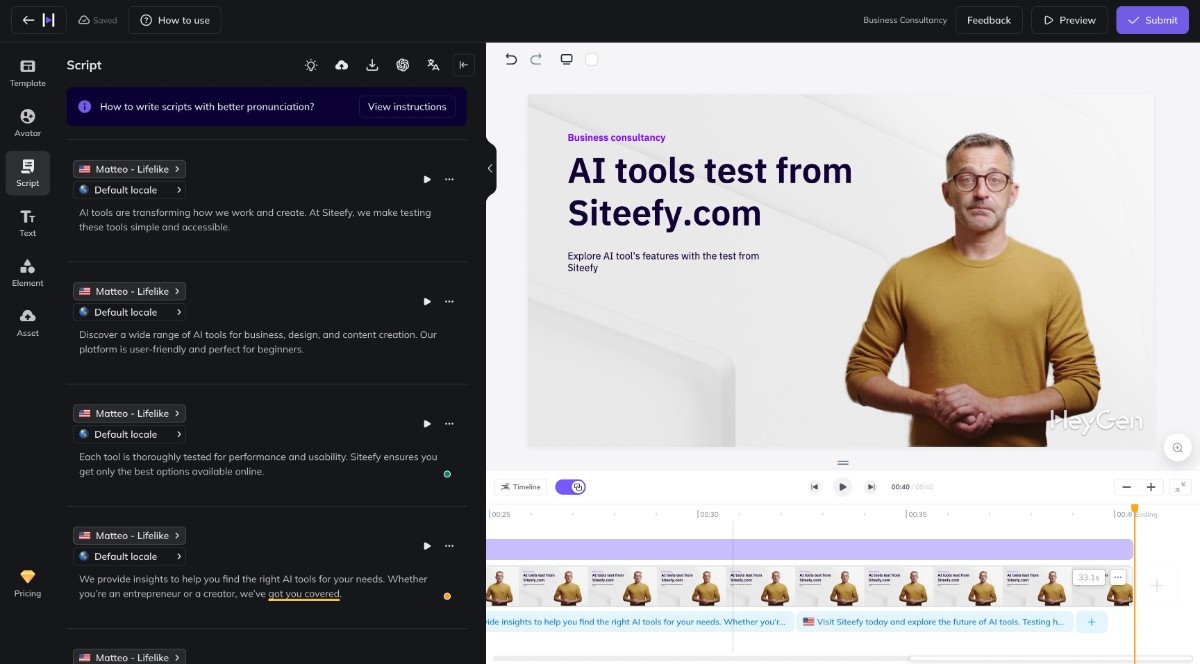
Then we accessed a template library where we selected one to start work with. This template was a part of the “Advertisement” templates category. The website directed us to the video editor page, where the AI avatar, scripts with chapters, and text were ready. We customized some scenes on the editor page, replaced the text on the video, and then edited the scripts. We also left the avatar’s voice as default since it was the best option for this avatar. Heygen video editor page

⬇️ Submit, Wait, Export!

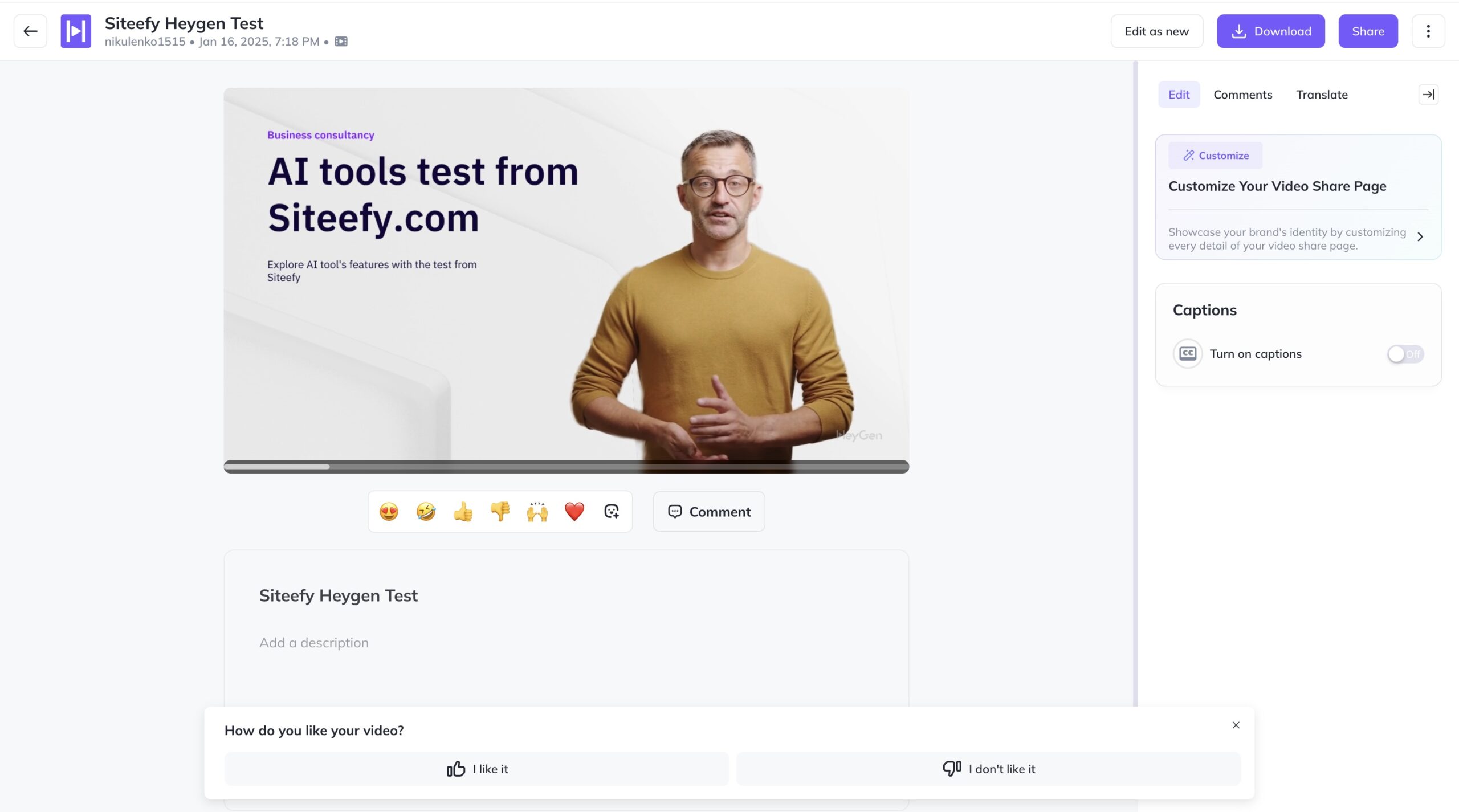
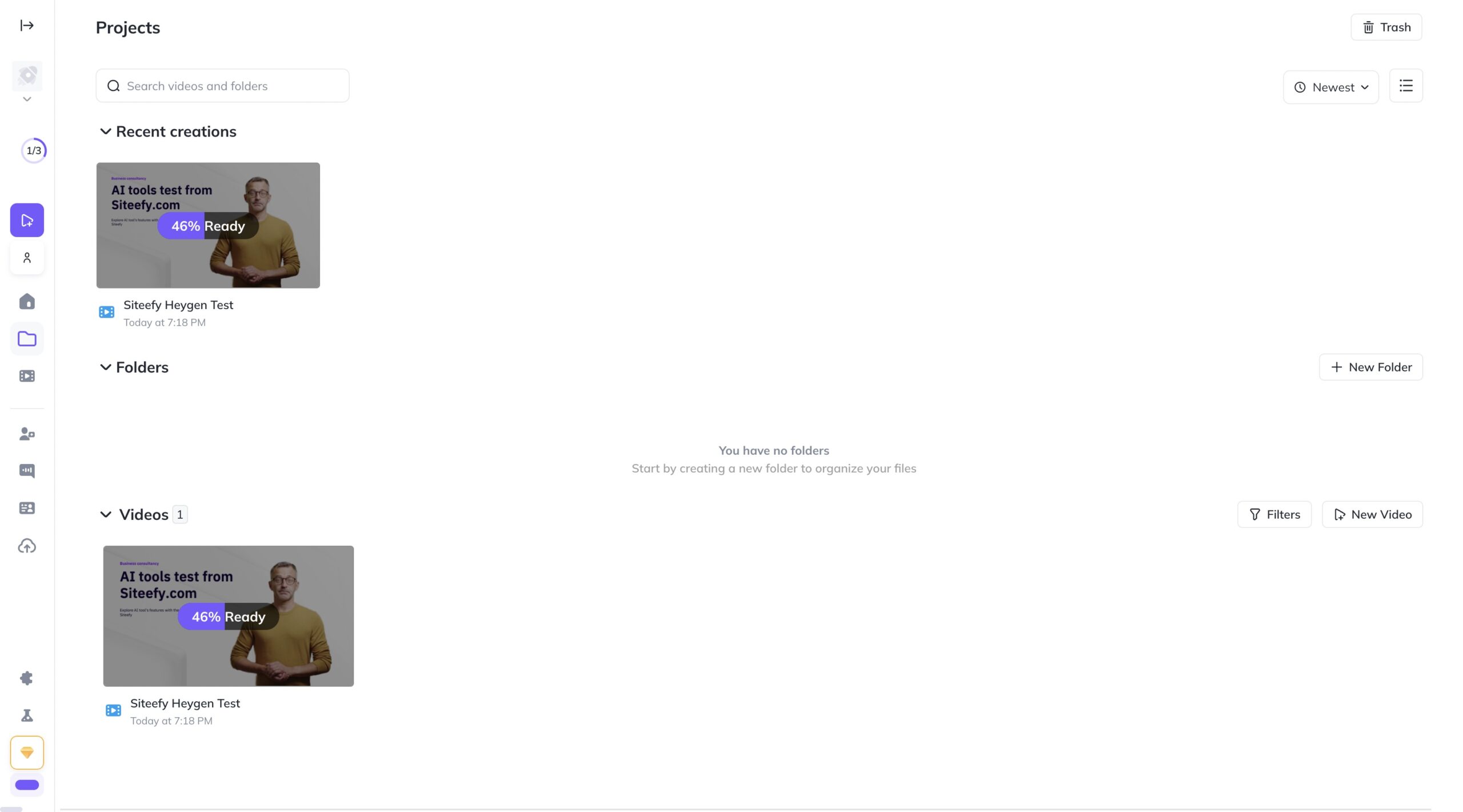
As the last step on the video editor page, we clicked the “Submit” button. Rendering took about 3 minutes for the 40 seconds of video. When everything was ready we viewed our new video and exported it in the MP4 format after a click on the “Download” button. Heygen rendering process Heygen Exporting

Frequently Asked Questions

What is HeyGen?
HeyGen is an AI-powered video generation platform that creates lifelike videos from text, images, or audio using customizable AI avatars and voiceovers.
Can I create videos in multiple languages?
Yes, HeyGen supports over 175 languages and dialects with natural lip-sync and voice cloning for accurate multilingual video localization.
Do I need video editing skills to use HeyGen?
No, HeyGen has an intuitive text-based editor that makes video creation and editing accessible to users without prior video editing experience.
Is there a free version of HeyGen?
Yes, HeyGen offers a free plan that allows users to create AI videos with some limitations on features and video quality.
Can I use my own branding in videos?
Yes, you can upload your logos, colors, fonts, and other brand assets to maintain consistent branding across all your videos.

Ratings & reviews

Use Cases

Explore tools grouped by use case so you can keep researching without losing momentum.

6 tools

AI Avatars

View use case
9 tools

Multilingual Video

View use case
1 tool

Script-to-Video Generation

View use case
1 tool

Personalized Sales Videos

View use case
3 tools

Collaborative Video Editing

View use case

Alternatives

Compare other vetted products our editors see buyers evaluate alongside Heygen.

1
GigaBrain

GigaBrain

freemium

Gigabrain was an AI-powered search platform designed to help users find authentic answers from real people by indexing niche discussions across forums like Reddit and YouTube more effectively than traditional search engines. Due to platform policy changes restricting data access, Gigabrain is shutting down its search service and pivoting to a new product called Aire Video, a social AI video generation platform that empowers creators with advanced AI models and full content ownership. Aire offers free access to cutting-edge AI video models, no gatekeepers, and plans for collaborative storytelling and enhanced editing tools.

AI Video Generation
#Social AI Platform#Content Ownership#Collaborative Storytelling#Content Monetization
View Details
Fliki

Fliki

freemium

Fliki is an AI-powered platform that transforms text into professional-quality videos with natural-sounding voiceovers and lifelike AI avatars. It supports over 80 languages and 2500+ voices, enabling users to create diverse video content such as social media videos, training materials, presentations, and product demos quickly and easily. With features like voice cloning, blog-to-video conversion, and AI video editing, Fliki streamlines content creation without requiring design or video editing expertise.

AI Video Generation
#AI Voice Cloning#AI Avatars#Multilingual Video#AI Voiceover#Video Creation#Social Media Content Creation#Marketing and Product Demos
View Details
KreadoAI

KreadoAI

freemium

KreadoAI is an AI-powered video generation platform that transforms text, images, presentations, and URLs into professional-quality videos featuring over 1,000 digital avatars and 40,000 voices in 140 languages. It offers tools for avatar creation, voice cloning, video editing, and TikTok-optimized marketing videos, enabling users to produce engaging content quickly and cost-effectively without the need for cameras or editing skills. Trusted by millions globally, KreadoAI supports diverse industries including marketing, education, healthcare, and localization.

AI Video Generation
5
(1)
#Digital Avatars#AI Voice Cloning#Video Editing#Multilingual Video#Marketing Automation#Content Localization#E-commerce Marketing#Social Media Content Creation#Corporate Training Videos#E-commerce Product Marketing#Global Marketing Localization
View Details
Kaiber

Kaiber

freemium

Superstudio from Kaiber is a creative platform designed for artists, designers, musicians, and creators to bring their ideas to life using AI. It offers an expansive canvas with integrated tools for image, video, and sound generation, enabling users to train custom AI models, create animations, music videos, and reactive visuals all within a single intuitive interface. The platform supports diverse creative workflows including video editing, graphic remixing, and lip-sync animations, making it suitable for a wide range of artistic and multimedia projects.

AI Video Generation
#Creative AI#Custom AI Models#Video Animation#Music Visualization#Visual Storytelling
View Details
Kapwing

Kapwing

freemium

Kapwing is a modern online video creation platform designed to help teams produce high-quality content faster and more efficiently. It offers a collaborative workspace where users can create, edit, and share videos with real-time feedback and brand consistency. Kapwing integrates AI-powered tools such as automatic subtitling, background removal, and smart editing features to streamline the content creation process for creators of all skill levels.

AI Video Generation
5
(1)
#Video Editing#Collaborative Content Creation#AI Subtitling#Brand Management#Social Media Video#Audio Enhancement#Content Repurposing#Social Media Content Creation#Educational Video Production#Video Creation
View Details
HitPaw VikPea

HitPaw VikPea

paid

HitPaw VikPea is an AI-powered video enhancement software designed to upscale video resolution up to 8K, restore old or damaged footage, and enhance colors and clarity using advanced AI models. It supports batch processing, cloud-accelerated rendering, and multiple specialized AI models for tasks like stabilization, colorization, noise removal, and background removal. Suitable for creators, filmmakers, and businesses, it offers both desktop and API integration options for seamless video quality improvement.

AI Video Generation
#Video Upscaling#Cloud Video Processing#Video Colorization#Video Stabilization
View Details

Share your experience

Help others decide — your insights matter

Community reviews (0)

No reviews yet. Be the first to share your experience.