Smodin

Smodin

Detect, humanize, rewrite, and check AI-generated content with confidence in one easy-to-use platform.

Freemium·No reviews yet

Overview

Smodin is an AI-powered writing assistant designed to help students, writers, and professionals improve their content by detecting AI-generated text, rewriting paragraphs for clarity and flow, humanizing AI content, and checking for plagiarism. It supports multiple document formats and ensures content originality and authenticity with over 98% detection accuracy. The platform streamlines writing and editing processes, making it easier to produce professional, plagiarism-free, and human-like text.

Pricing Model
freemium
Last Updated
2025-12-02

Featured Video

Video via YouTubeWatch on YouTube

Key Features

1

AI Content Detector

Detect AI-generated text at the sentence level with over 98% accuracy to ensure originality and authenticity.

2

AI Detection Remover

Identify and remove AI-derived phrases or sentences from your writing with one click, rewriting them into human-like text.

3

AI Paragraph Rewriter

Paraphrase paragraphs to improve readability, flow, grammar, and sentence structure for clearer communication.

4

Plagiarism Checker

Scan your content against billions of sources to guarantee 100% originality and avoid accidental or intentional plagiarism.

5

AI Humanizer

Transform AI-generated content to sound natural and human-like, helping it pass detection by top AI checkers.

6

Undetectable AI

Rewrite AI text to bypass any AI detector scan, preserving your credibility and integrity.

7

Multi-format Support

Upload and process popular document types including .doc, .docx, .pdf, and .txt files seamlessly.

8

Privacy and Security

All documents are encrypted during upload, and content is not stored after processing unless saved to your account.

Use Cases

#1

Academic Writing Assistance

Students can detect AI content in their essays, rewrite drafts for clarity, and check for plagiarism to ensure originality before submission.

#2

Professional Content Creation

Writers and professionals can humanize AI-generated drafts, polish paragraphs, and verify content authenticity for client-ready documents.

#3

Plagiarism Prevention

Educators and content creators can scan documents against billions of sources to prevent accidental or intentional plagiarism.

#4

AI Content Compliance

Businesses can ensure marketing and communication materials are free from detectable AI content to maintain brand credibility.

#5

Homework and Assignment Support

Students can use AI homework solvers and essay graders to improve their work quality while ensuring it sounds natural and original.

How to Use

1

Upload or Paste Your Text

Start by uploading your document (.doc, .docx, .pdf, .txt) or paste your text directly into the platform.

2

Select Desired AI Tool

Choose from AI Detector, Rewriter, Humanizer, or Plagiarism Checker based on your content needs.

3

Run the Tool

Click to analyze or rewrite your content. The AI will detect AI-generated text, suggest rewrites, or check plagiarism accordingly.

4

Review and Edit Output

Examine the results, make any manual adjustments if needed to tone or style, and ensure the content meets your standards.

5

Download or Save Your Content

Save the polished, humanized, and original content to your account or download it for use in your projects or submissions.

Pricing

Pricing details are gathered from the official Smodin website and are provided for reference only. Always confirm the latest information directly with the vendor.

PlanPriceHighlights
Free Version$0

Access to basic AI detection and rewriting tools

  • Limited daily usage
  • No access to premium features
  • No priority support
Premium SubscriptionContact Sales

Unlimited access to all AI tools

  • Higher accuracy and faster processing
  • Priority customer support
  • Multi-format document uploads
  • Advanced plagiarism checking
Found a change in pricing? We welcome corrections. Reach out so we can keep this listing accurate.

Pros & Cons

Pros

  • Comprehensive suite combining AI detection, rewriting, humanizing, and plagiarism checking in one platform.
  • High accuracy in detecting AI-generated content (over 98%).
  • Supports multiple document formats for easy uploading and editing.
  • Strong privacy measures with encrypted uploads and no content storage by default.
  • User-friendly interface suitable for students, writers, and professionals alike.

Cons

  • No explicit detailed pricing plans publicly available; users must contact or sign up to learn more.
  • Occasional stiff wording in rewritten content may require manual tweaks.
  • No refund policy on digital products, which might deter some users.
  • Some AI rewriting outputs may require user editing for tone and style.
  • Limited information on integration with other writing or editing tools.
OT

Our Test

Hands-on notes from our editorial team.

✅ Our Test

⬇️ Sign Up and Get Credits

For our test, we signed up using our Google account to get 3 free welcome credits.Some features are also available without signing up.We were looking to rewrite and summarize a small AI-generated essay about the world ocean.

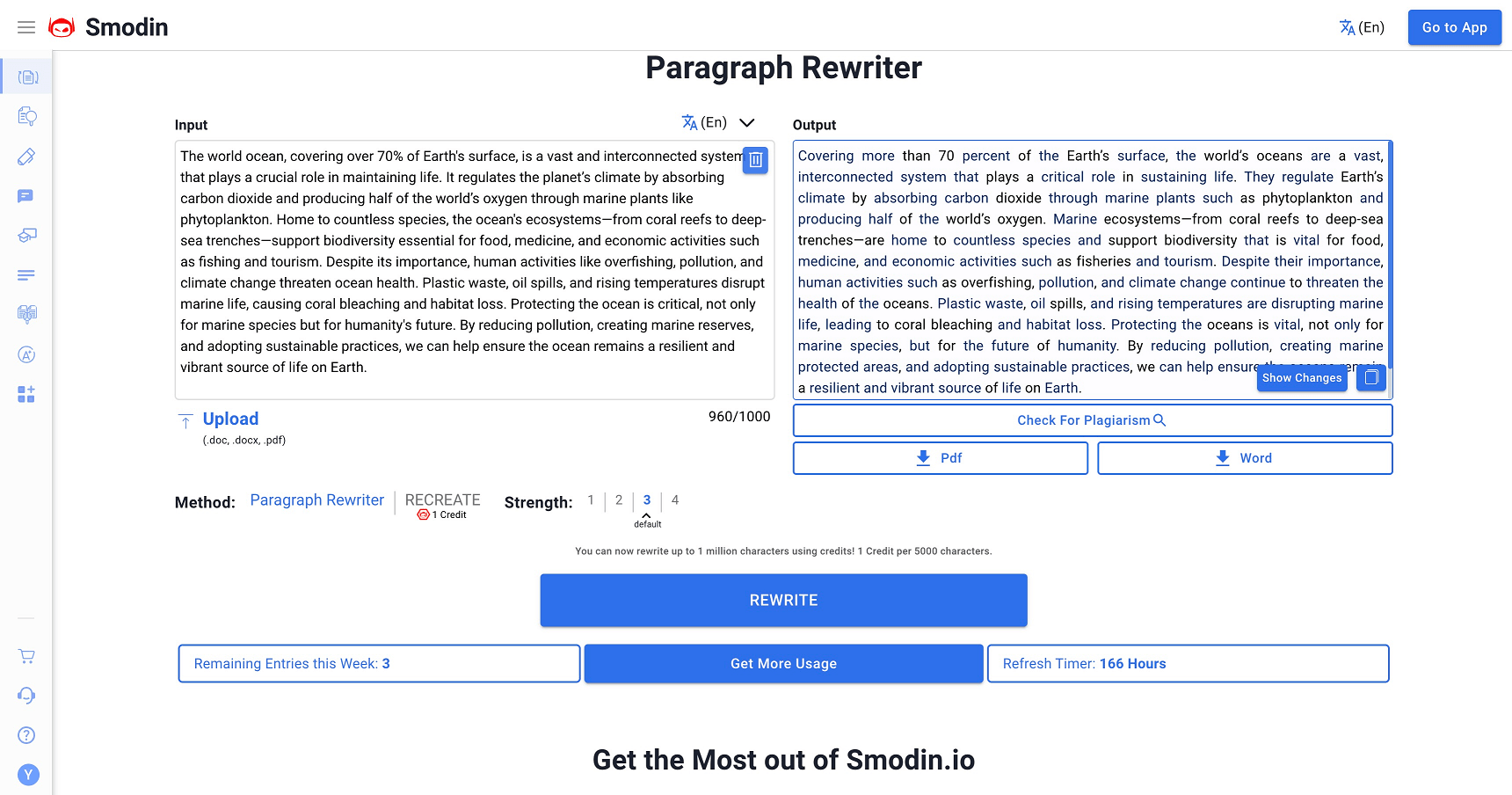
⬇️Rewrite Your Text

After entering the Rewriter tool’s page, we passed an AI-generated essay to the text box and clicked the “Rewrite” button. The tool rewrote the original essay in a more humanized style with no plagiarism in it. You can also customize a summary size depending on your needs.
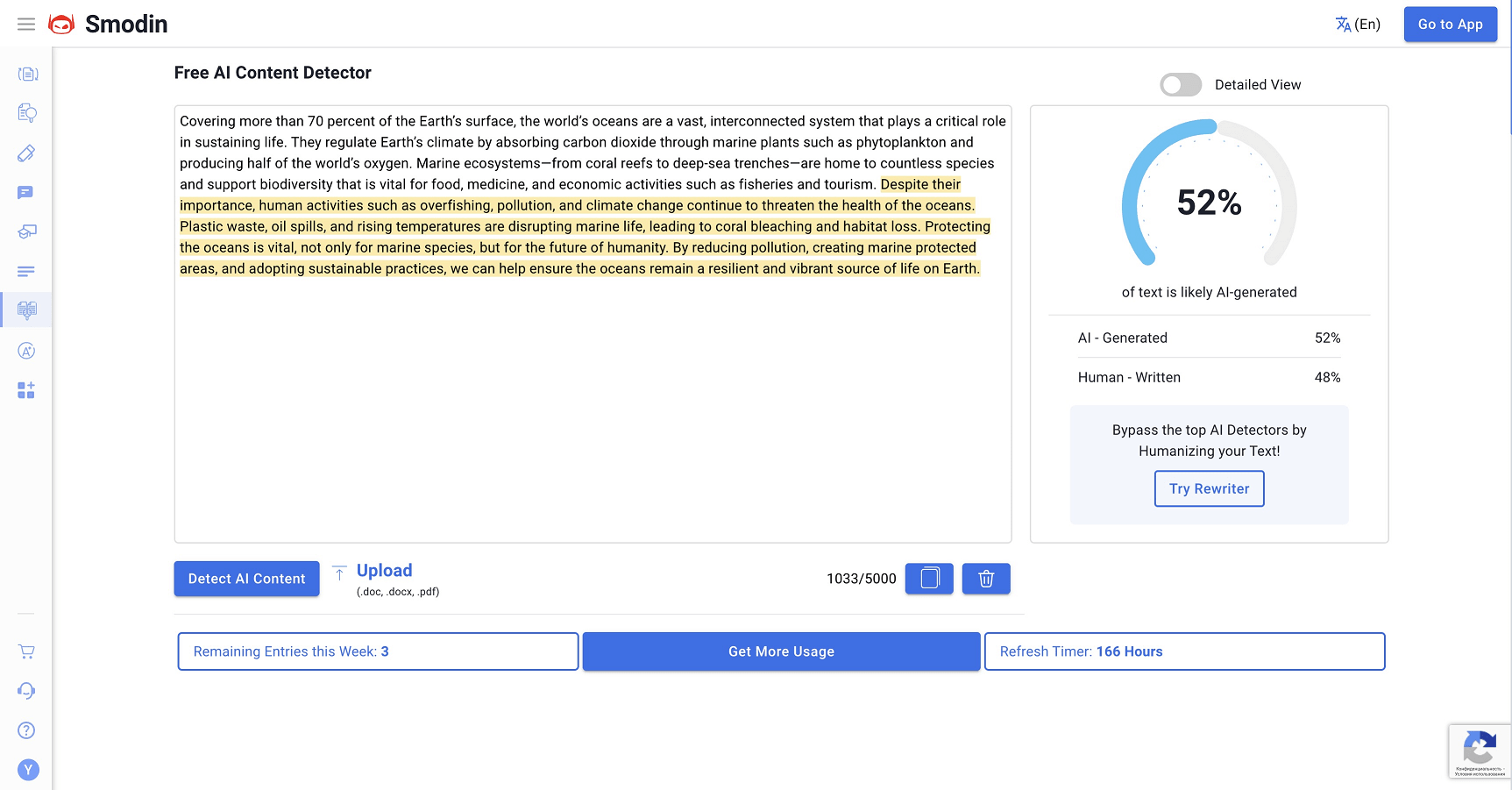
⬇️ What Does the AI Detector Think?

Then we copied the new essay to the “Free AI Content Detector” text box and here are the results.
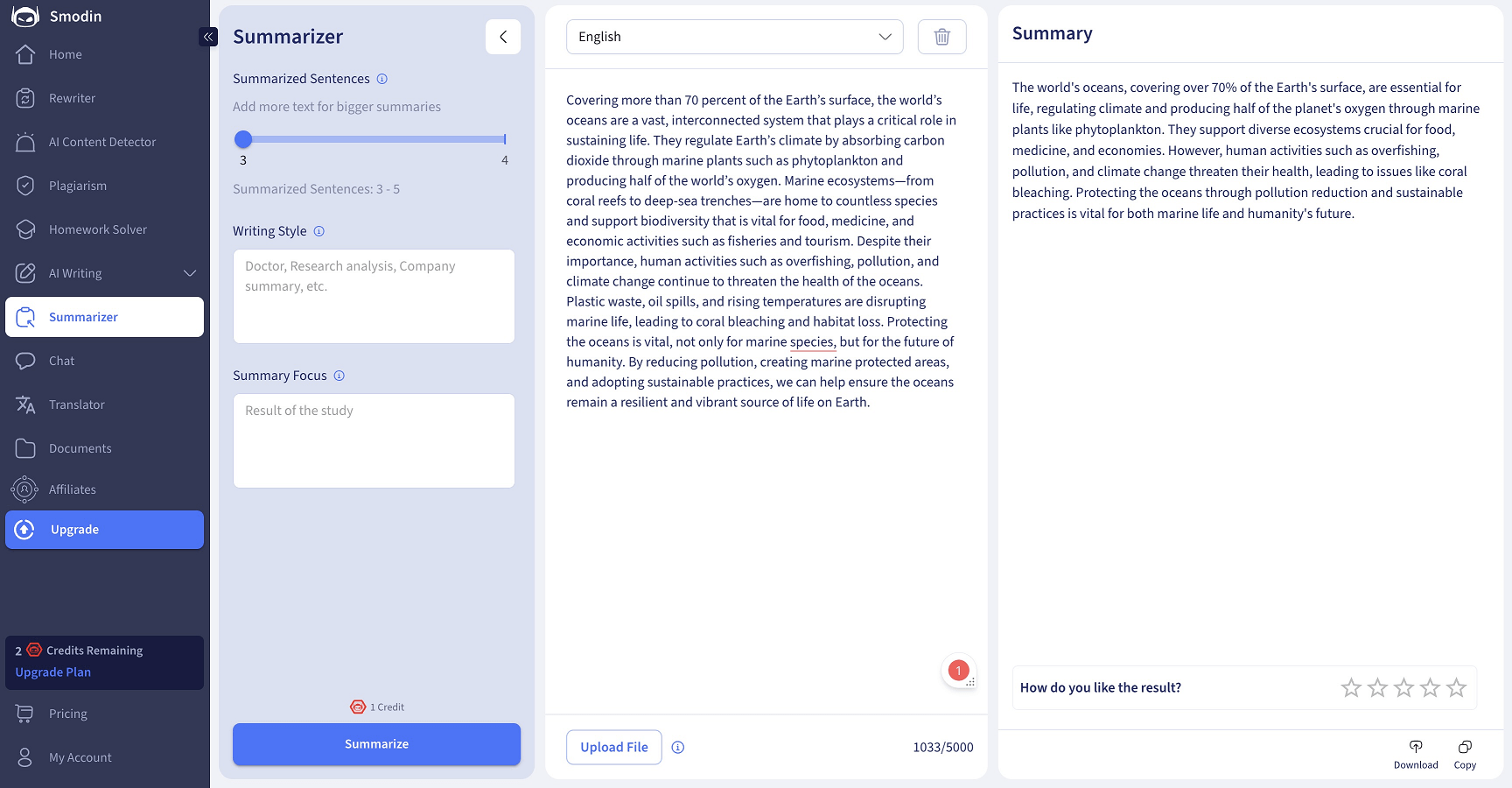
⬇️Get a Summary

Another step was to get a summary of the new essay, so we went to the Summarizer tool’s page and got it by the same algorithm.

Frequently Asked Questions

Ratings & reviews

Ratings & reviews

No reviews yet. Be the first to share your experience.

Share your experience

Sign in to rate this tool and help the community understand how it fits into their workflow.

Community reviews (0)

No reviews yet. Be the first to share your experience.