Speechmatics

Speechmatics

Accurate, secure, and scalable AI-powered speech-to-text and text-to-speech APIs for global voice AI applications.

Freemium·
5.0(1)

Overview

Speechmatics offers advanced AI speech technology delivering high-accuracy, low-latency speech-to-text and text-to-speech services across 55+ languages. Designed for enterprises with global reach, it supports real-time transcription, multilingual conversations, and speaker diarization, enabling powerful voice AI agents and live captioning. The platform ensures enterprise-grade security with flexible deployment options including cloud, on-premises, and on-device.

Pricing Model
freemium
Last Updated
2025-12-02

Featured Video

Video via YouTubeWatch on YouTube

Key Features

1

Real-Time Speech-to-Text

Provides low-latency speech-to-text transcription with sub-second response times, enabling natural conversational flows in live applications.

2

Multilingual Support

Supports transcription and translation across 55+ languages and dialects, covering over half the world's population to enable global reach.

3

Speaker Diarization

Built-in real-time speaker diarization identifies who said what in multi-speaker conversations, enhancing voice agent interactions and analytics.

4

Custom Dictionary

Allows adding up to 1,000 custom words with phonetic guidance to improve recognition of domain-specific terms, acronyms, and names.

5

Medical Transcription Model

Specialized AI model trained to accurately transcribe medical conversations, reducing errors on key terms by up to 50% and supporting clinical documentation.

6

Flexible Deployment Options

Deploy on cloud, on-premises, or on-device to meet privacy requirements, with no data logging by default for sensitive use cases.

7

Enterprise-Grade Security

Compliant with ISO 27001, GDPR, HIPAA, and SOC 2 Type II standards, ensuring data encryption in transit and at rest for privacy-critical applications.

8

Text-to-Speech API

Offers low-latency, natural-sounding text-to-speech voices optimized for real conversations and voice agent responsiveness, currently in English with more languages coming soon.

Use Cases

#1

Live Captioning for Broadcasts

Deliver accurate, real-time captions for live events, sports, and news broadcasts with low latency and high transcription accuracy.

#2

Medical & Healthcare Documentation

Support ambient scribe and dictation workflows in clinical settings to reduce documentation time and physician burnout with specialized medical transcription.

#3

AI Voice Agents

Build intelligent, speaker-aware voice agents that understand multi-party conversations and respond with personalized interactions across multiple languages.

#4

Contact Center Analytics

Enhance customer experience by transcribing calls in real-time, reducing wait times, and providing actionable insights to improve agent performance.

#5

Multilingual Content Monetization

Enable media companies to scale captioning and translation across global markets, reaching diverse audiences with multilingual transcription and voice AI.

How to Use

1

Sign Up and Get Started

Create a free account on Speechmatics to access the API and receive free monthly usage credits for exploration.

2

Integrate Speech-to-Text API

Use the flexible API to connect Speechmatics’ speech recognition capabilities into your application or workflow.

3

Customize with Dictionaries

Add custom vocabulary and key terms relevant to your domain to improve transcription accuracy for specialized language.

4

Deploy According to Privacy Needs

Choose deployment options such as cloud, on-premises, or on-device based on your security and compliance requirements.

5

Monitor and Scale Usage

Track your usage and upgrade plans as needed to handle higher concurrency, more languages, or additional features like text-to-speech.

Pricing

Pricing details are gathered from the official Speechmatics website and are provided for reference only. Always confirm the latest information directly with the vendor.

PlanPriceHighlights
Free$0

480 free minutes of speech-to-text

  • 2 concurrent real-time sessions
  • 1 million free text-to-speech characters (~20 hours)
  • Access to 55+ languages
  • No credit card required
ProFrom $0.24

20% discount available

  • 50 concurrent real-time sessions
  • 10 file jobs per second
  • Email support
  • Access to all speech-to-text features
EnterpriseContact Sales

Volume discounts for large-scale usage

  • Unlimited scale and concurrency
  • Custom models and voice development
  • Multi-region cloud and on-premises deployment
  • Dedicated customer success and prioritized support
Found a change in pricing? We welcome corrections. Reach out so we can keep this listing accurate.

Pros & Cons

Pros

  • High accuracy and low latency suitable for live transcription and voice AI applications.
  • Extensive language coverage with support for 55+ languages and dialects, including bilingual models.
  • Robust security and compliance certifications for enterprise and healthcare use cases.
  • Flexible deployment options including cloud, on-premises, and on-device to meet diverse privacy needs.
  • Built-in speaker diarization and custom dictionary features enhance multi-speaker and domain-specific transcription accuracy.

Cons

  • Text-to-speech currently limited to English with other languages planned but not yet available.
  • Pro tier usage capped at 6,000 hours per month, which may limit very large-scale projects without enterprise plans.
  • Pricing details for enterprise plans require direct contact, which may delay procurement for some customers.
  • Some advanced features like custom voice and language development are available only in enterprise plans.
  • Real-time transcription accuracy may vary depending on audio quality and environment noise levels.
OT

Our Test

Hands-on notes from our editorial team.

✅ Our Test

⬇️ Sign Up

The first step is usual for us; we signed up on the website using our Google account.

⬇️Record or Upload Something

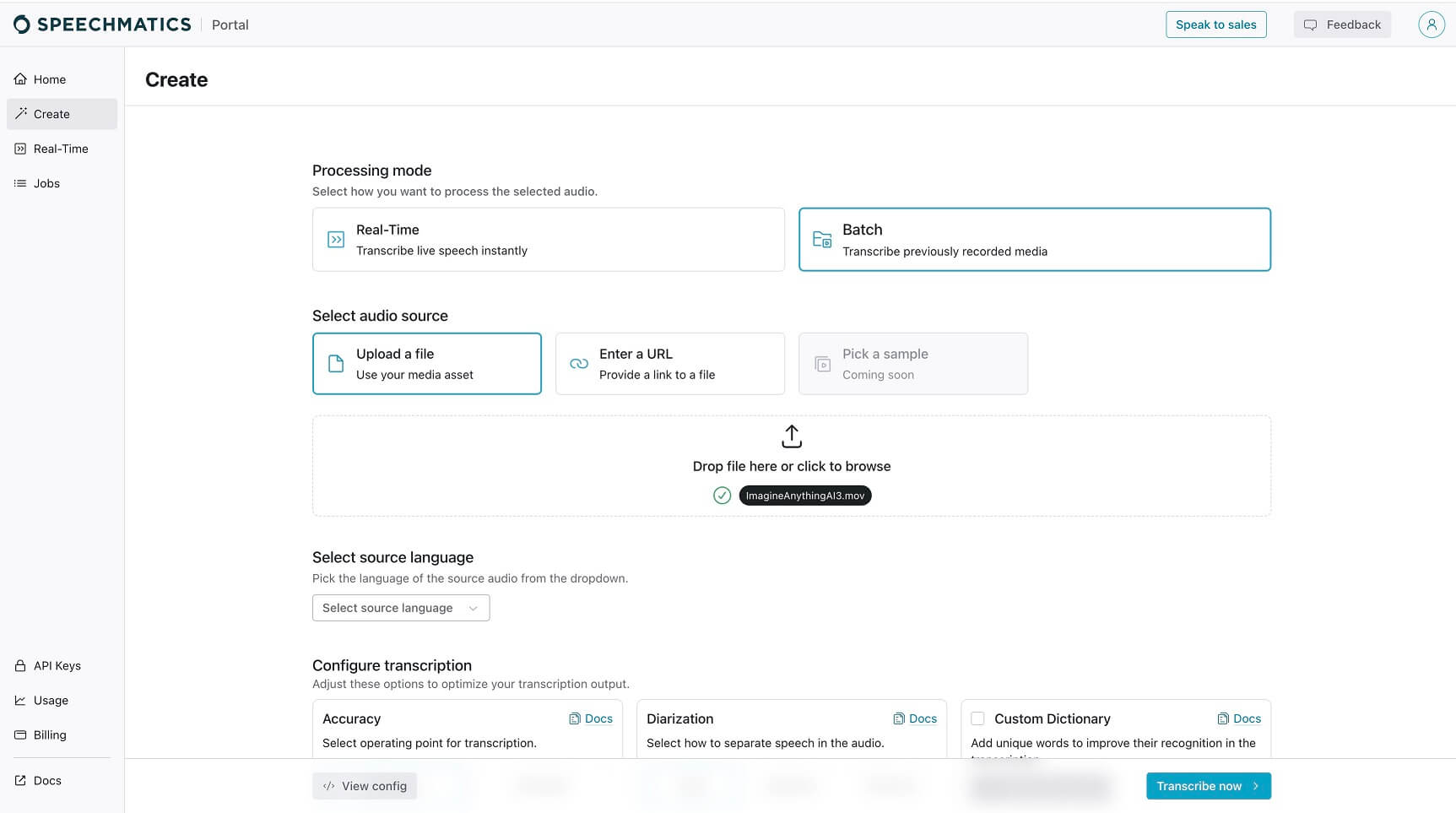
Then we clicked on the “Create” button on the main dashboard, and the website suggested choosing the way we like to input our audio. Here, our choice was to upload the video file. Speechmatics dashboard
⬇️ Customize Settings

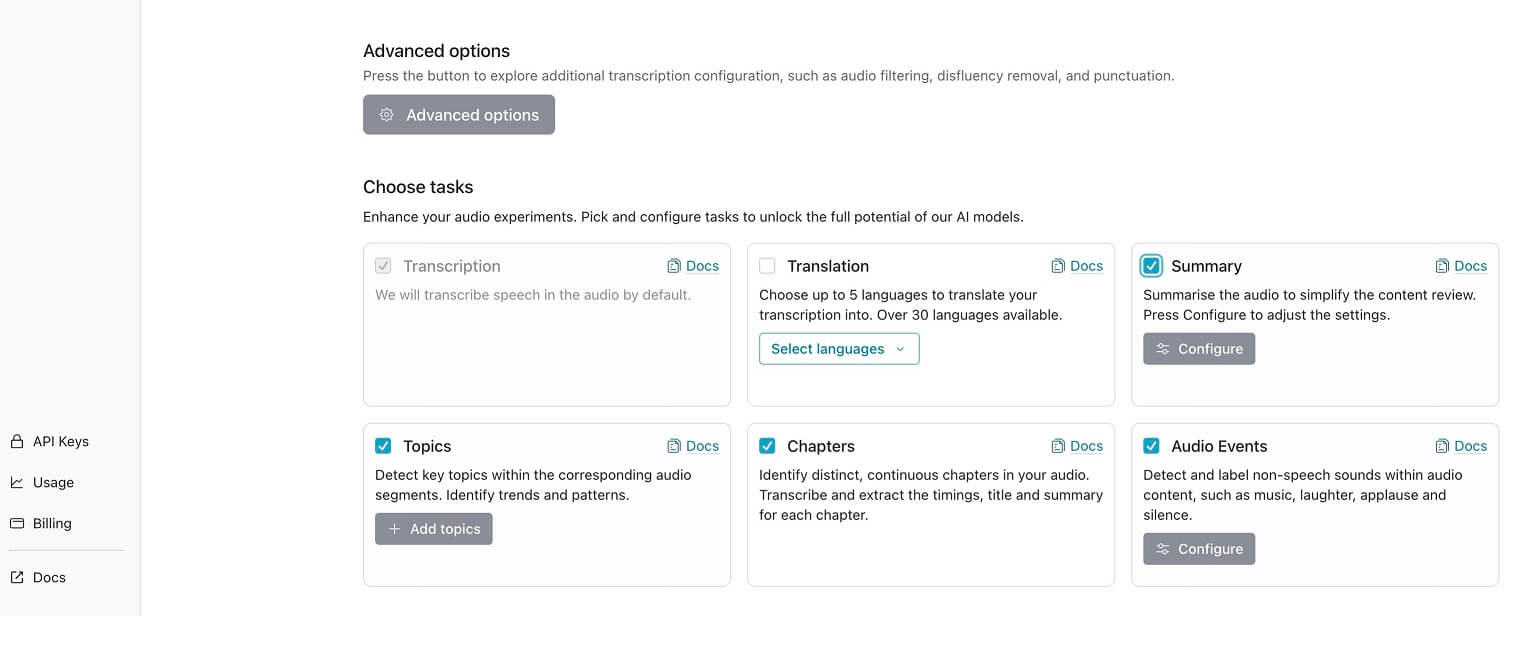
After that, we customized some settings, like the source language and output materials. Speechmatics Customize settings
⬇️Click, Wait, View, Export!

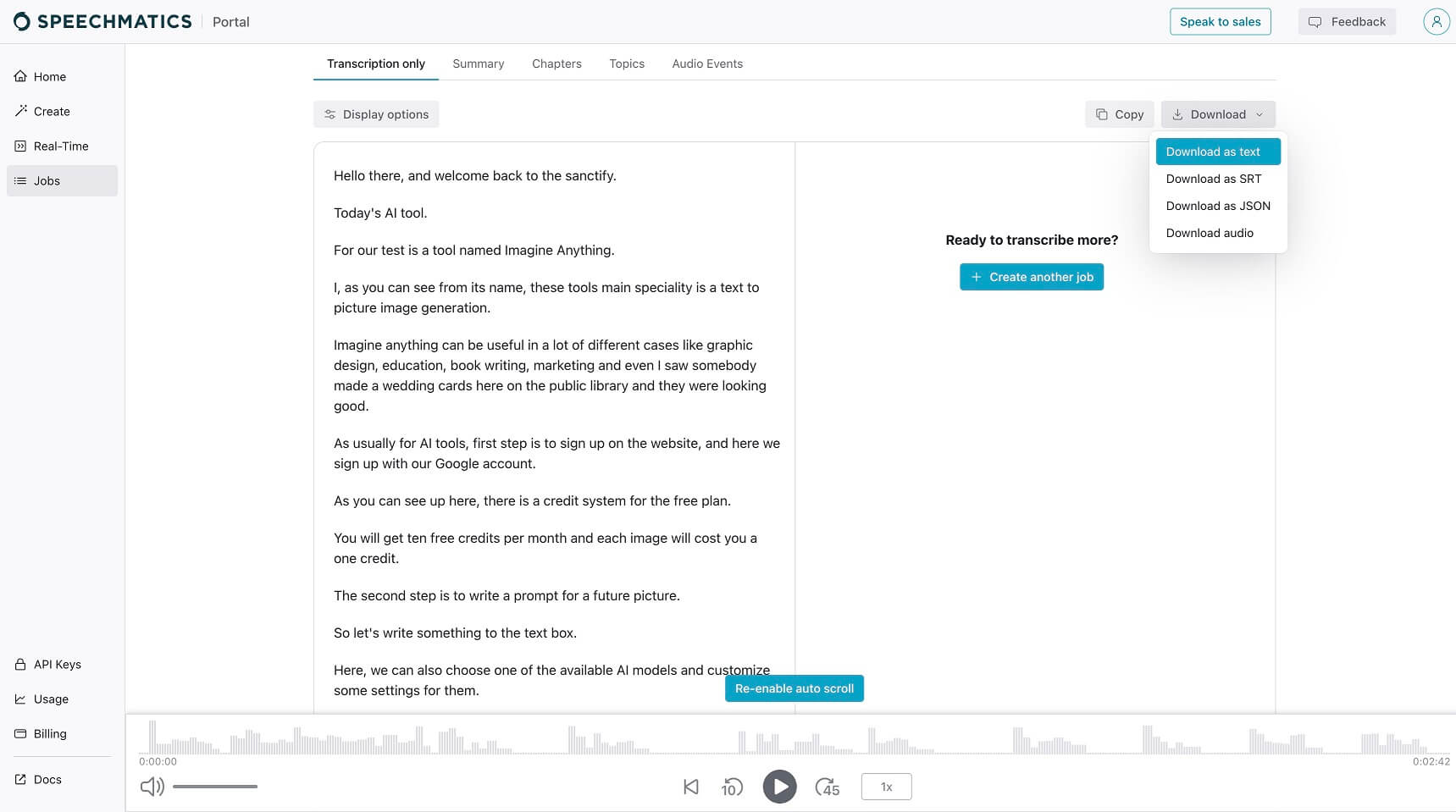
Then just one click on the button in the lower right corner, the tool started uploading and proceeding with our file. It took some time because of connection speed, but we got the results pretty fast. Speechmatics uploading file We viewed an accurate transcription of our video file and checked up on some information, like the summary and chapters. By clicking on the download button, we could download anything in available file formats.


Frequently Asked Questions

Ratings & reviews

Average Rating

0.0

1 reviews

5
100%
4
0%
3
0%
2
0%
1
0%

Share your experience

Sign in to rate this tool and help the community understand how it fits into their workflow.

Community reviews (1)

Ben Blease

Dec 13, 2024

Recommends this tool

Phenomenal - the best ears in the business!

Was using a different transcription provider before, but as soon as I switched over to Speechmatics the uplift in accuracy has been immense. The real-time engine is excellent – latency is fantastic and incredibly accuracy across a ton of languages.