Siteefy
New
Siteefy
New

Company

  • About
  • Contact
  • Blog
  • Newsletter

Resources

  • Submit Tool
  • Categories
  • Use Cases
  • All Tools

Siteefy Tools

  • AI Writer
  • AI Prospecting Tool
  • AI Humanizer
  • AI Content Checker

Legal

  • Privacy Policy
  • Terms of Service

Popular Categories

  • Video40
  • Productivity21
  • Audio & Music20
  • Generative AI20
  • Content & Writing20
  • Photography17

Stay Updated

Get the latest AI tools and insights delivered to your inbox.

Subscribe to Newsletter
Siteefy
Discover the best tools
© 2025 Siteefy. All Rights Reserved.
Siteefy
New
Home/TinyWow
Be first!
Visit
Be first!
Visit
Be first!
Visit
Be first!
Visit
TinyWow

TinyWow

Free, easy-to-use online tools for PDF, image, video, and AI writing tasks to simplify your digital workflow.

FreemiumAI Toolset
TinyWow

TinyWow

Free, easy-to-use online tools for PDF, image, video, and AI writing tasks to simplify your digital workflow.

Freemium
Categories
AI Toolset
#PDF Conversion#Image Editing#Video Processing#File Compression#Background Removal#AI Writing#Content Creation

Overview

TinyWow offers a comprehensive suite of over 250 free online tools designed to handle PDF conversions, image editing, video processing, and AI-powered writing assistance. With no sign-up required and a user-friendly interface, it empowers millions globally to accomplish complex digital tasks effortlessly and efficiently. The platform prioritizes privacy by deleting all files and text after one hour and provides premium options for ad-free, unlimited usage with faster processing.

Category
AI Toolset
Pricing Model
freemium
Last Updated
2025-12-02

Key Features

1

PDF Management Suite

Includes tools to create, merge, split, edit, convert, compress, unlock, and convert PDFs to various formats like Word, Excel, PowerPoint, and JPG.

2

AI Writing Tools

Offers AI-powered essay writer, paragraph writer, content improver, grammar fixer, sentence rewriter, article writer, story generator, and tone of voice adjustment.

3

Image Editing and Enhancement

Features background removal, image upscaling, watermark removal, object removal, resizing, changing background, and converting HEIC to JPG.

4

Video Tools

Provides video trimming, muting, compression, conversion to text or GIF, audio extraction, and downloading from platforms like YouTube, Instagram, TikTok, and Twitter.

5

File Conversion and Compression

Supports converting between Excel, CSV, XML, EPUB, JSON, and creating ZIP files, along with compressing PDFs, images, and videos.

6

AI Image Generation

Generates images from text prompts using AI technology to create unique visuals.

7

Privacy and Security

All uploaded files and generated content are deleted after one hour to ensure user privacy and data security.

8

Premium Subscription

Offers ad-free experience, unlimited usage, and faster processing for a monthly fee.

Who It's For

Audience 1#1

Academic Writing Assistance

Students can use AI essay writers, grammar fixers, and content improvers to create and polish academic papers efficiently.

Audience 2#2

Business Document Management

Small business owners can manage PDFs, convert files, and organize documents without expensive software.

Audience 3#3

Content Creation for Marketing

Content creators can generate articles, YouTube scripts, and social media posts using AI writing tools to streamline production.

Audience 4#4

Image and Video Editing

Users can remove backgrounds, upscale images, compress videos, and extract audio to enhance multimedia content.

Audience 5#5

File Conversion and Compression

Professionals can convert between various file formats and compress files to optimize storage and sharing.

How to Use

1

Select the Desired Tool

Browse the categories or use the search to find the specific tool you need, such as PDF merger or AI essay writer.

2

Upload Your File or Enter Text

Upload the relevant document, image, or video file, or input text for AI writing tools.

3

Configure Settings if Available

Adjust any options provided by the tool, such as output format or compression level.

4

Process the File or Generate Content

Click the action button to start processing or generating content using the selected tool.

5

Download or Copy the Result

Once completed, download the processed file or copy the generated text for your use.

Pricing

Pricing details are gathered from the official TinyWow website and are provided for reference only. Always confirm the latest information directly with the vendor.

PlanPriceHighlights
Free$0

Access to all 250+ tools

  • No sign-up required
  • Files deleted after 1 hour
  • Basic processing speed
  • Includes ads
Premium$9

Ad-free experience

  • Unlimited usage
  • Faster processing speeds
  • Priority customer support
  • Access to all tools with no limits
Found a change in pricing? We welcome corrections. Reach out so we can keep this listing accurate.

Pros & Cons

Pros

  • Extensive variety of over 250 free online tools covering PDFs, images, videos, and AI writing.
  • No sign-up required for basic usage, making it quick and accessible.
  • Privacy-focused with automatic deletion of files after one hour.
  • Supports multiple file formats and conversions, enhancing versatility.
  • Includes advanced AI writing and image generation capabilities.

Cons

  • No detailed pricing plans publicly available; premium features are mentioned but not fully detailed.
  • Website pricing pages return 404 errors, limiting transparency.
  • Primarily web-based with no mention of desktop or mobile apps.
  • Some AI-generated content may require user review due to potential inaccuracies.
  • Limited information on customer support beyond 24/7 availability post-acquisition.
OT

Our Test

Hands-on notes from our editorial team.

✅ Our Test

⬇️ Overview

We wanted to test TinyWow’s AI tools, so we tried the Paragraph Writer and the AI Image Generator.

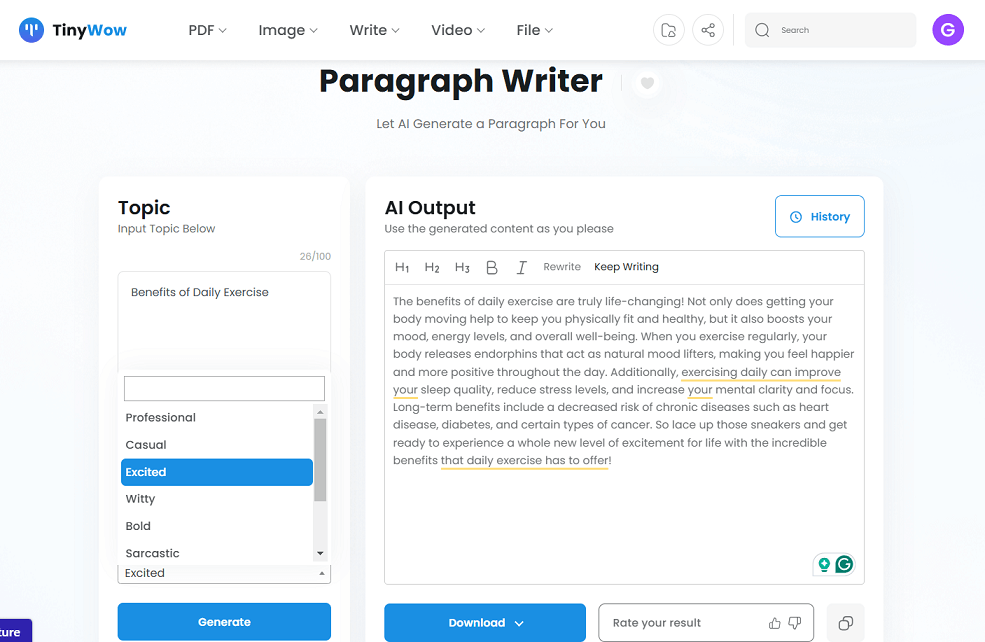
⬇️ Testing the Paragraph Writer

For the Paragraph Rewriter, we entered the topic “Benefits of Daily Exercise” and selected an “excited” tone. The AI generated a lively paragraph that we liked. You can download the result to your device or save it to your drive. There’s also a “History” option in the top-right corner where you can view past rewrites.
⬇️ Testing the AI Image Generator

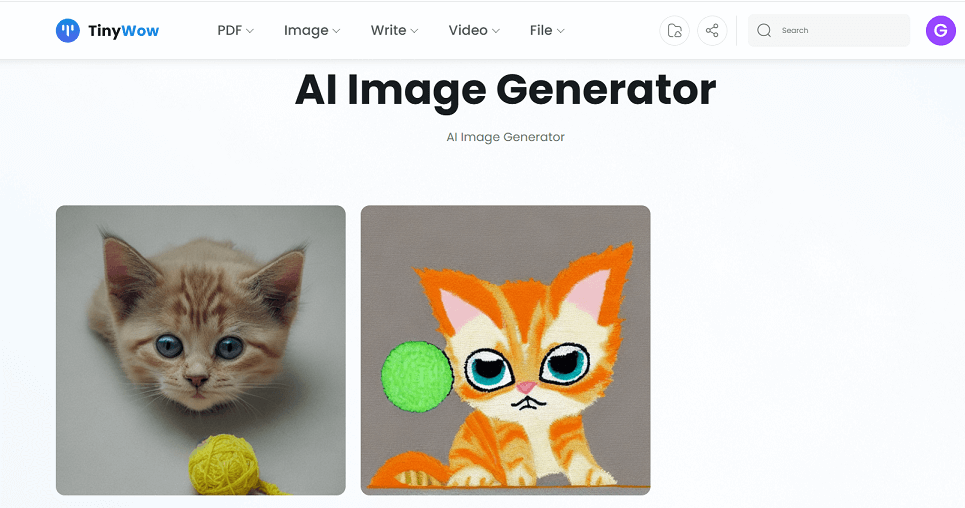
Next, we tried the AI Image Generator. We used the prompt: “A fluffy orange tabby kitten with green eyes, tangled in a ball of yellow yarn on a light gray rug, with a soft pastel pink background.” Unfortunately, the AI didn’t generate the image accurately—the cat’s eyes were blue instead of green, missing this simple detail. Before this, we tested two other prompts with similar results, as the AI struggled with accuracy in specific details. Although the images were cute, they didn’t fully match our descriptions.
Frequently Asked Questions

Is TinyWow completely free to use?
Yes, TinyWow offers over 250 tools for free with no sign-up required, though there is a premium subscription for enhanced features.
Do I need to create an account to use TinyWow?
No, most tools can be used without creating an account or signing in.
How does TinyWow protect my privacy?
All files and generated content are automatically deleted from their servers after one hour to ensure privacy.
What types of files can I convert with TinyWow?
TinyWow supports a wide range of file conversions including PDFs, Word documents, Excel files, images, videos, and more.
What benefits does the Premium plan offer?
The Premium plan removes ads, provides unlimited usage, faster processing, and priority customer support for $9 per month.

Ratings & reviews

Use Cases

Explore tools grouped by use case so you can keep researching without losing momentum.

2 tools

PDF Conversion

View use case
5 tools

Image Editing

View use case
2 tools

Video Processing

View use case
2 tools

File Compression

View use case
8 tools

Background Removal

View use case
8 tools

AI Writing

View use case

Alternatives

Compare other vetted products our editors see buyers evaluate alongside TinyWow.

Cutout.Pro

Cutout.Pro

freemium

Cutout.Pro leverages advanced artificial intelligence and computer vision to provide a comprehensive suite of visual content creation and editing tools. It offers features such as background removal for photos and videos, AI video generation, photo enhancement, cartoonizing, and more, catering to individuals and businesses seeking efficient, high-quality visual content solutions. The platform supports bulk processing, API integration, and offers specialized tools for e-commerce, printing, and interior design applications.

AI Photo Generation & Editing
#Background Removal#Video Editing#Photo Enhancement+3
View Details
Craiyon

Craiyon

freemium

Craiyon is a free AI-powered image generation platform that converts detailed text prompts into unique artworks and visuals. It offers features like negative prompts to exclude elements, style selection, and background removal, all accessible without sign-up. The platform supports creative projects, digital art, content enhancement, and more, with optional paid plans for faster generation and fewer ads.

AI Art Generation
#Text-to-Image Generation#AI Image Customization#Background Removal+2
View Details
EllaAi

EllaAi

paid

Ellavator AI, branded as Ella, is an AI-powered marketing platform designed by marketers for marketers to unify brand strategy and campaign execution. It leverages proven marketing frameworks like ICPs, messaging pyramids, and buyer journeys to create aligned, consistent, and scalable marketing systems. Ella acts as a co-creator, coach, and critic to enhance marketing productivity and precision while maintaining a human tone and brand voice.

Sales & Marketing
#Brand Strategy#Marketing Automation#Campaign Management+2
View Details
PDFinity

PDFinity

free

PDFinity is a comprehensive web-based platform offering a wide range of PDF editing and conversion tools. Users can edit, convert, compress, split, merge, sign, and secure PDF documents without downloading any software. With a user-friendly interface and 24/7 multilingual customer support, PDFinity caters to individuals and businesses seeking efficient PDF management solutions online.

PDF Management
#PDF Conversion#Document Editing#Digital Signatures+2
View Details
Dezgo

Dezgo

freemium

Dezgo is an AI-driven online platform that generates images and videos from text descriptions using advanced neural network models. It offers multiple AI modes tailored for different styles and media types, including text-to-image, text-to-video, image-to-video, and image editing capabilities. Users can create unique, commercially usable media for websites, marketing, social media, and personal projects, with options for free use or paid upgrades for enhanced features.

AI Image Generation
#Image Editing#Prompt Weighting#Commercial Media Creation+1
View Details
Clipdrop (by Jasper)

Clipdrop (by Jasper)

freemium

Clipdrop is an AI-driven platform that enables users to quickly create and enhance visuals through a suite of image editing and generation tools. It offers features such as background removal, object cleanup, image upscaling, and uncropping, all powered by advanced AI algorithms. Additionally, Clipdrop provides an API for seamless integration of its AI capabilities into other applications, making it versatile for both individual creators and developers.

AI Photo Generation & Editing
#Image Editing#Background Removal#Image Upscaling+2
View Details

Other tools people mention

These entries need a full review before we can publish deep dives, but they're worth a look if you want a broader shortlist.

cutout-procraiyonella-aipdfinitydezgoclipdrop

Share your experience

Sign in to rate this tool and help the community understand how it fits into their workflow.

Community reviews (0)

No reviews yet. Be the first to share your experience.