AI adoption is no longer unusual. The more difficult question is whether an organization can turn an experiment into a dependable product or workflow.
Stanford's 2026 AI Index reports that 88% of surveyed organizations used AI in 2025 and 70% used generative AI in at least one business function. AI agent deployment, however, remained in the single digits across nearly all business functions. That gap matters. Testing a model is easy; building a system that is useful, secure, measurable, and maintainable is an engineering challenge.
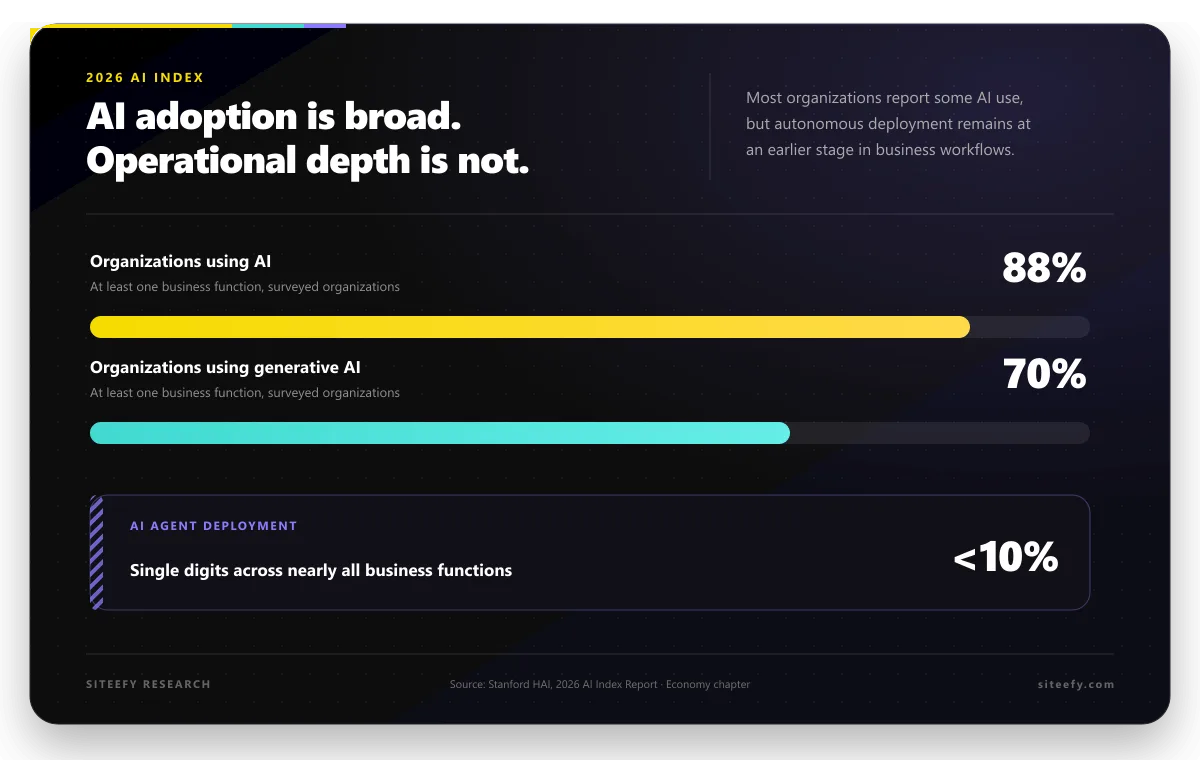
Source: Stanford HAI, 2026 AI Index Report. The agent figure is reported qualitatively as single-digit deployment across nearly all business functions, not as one aggregate percentage.
This guide lays out a practical development process for taking an AI idea from a business problem to production.
Quick Answer
To build an AI solution:
- Define one business outcome and its baseline.
- Decide whether rules, an existing product, or custom AI is the simplest fit.
- Map the data, systems, users, and risks involved.
- Build a thin end-to-end prototype.
- Create an evaluation set and acceptance thresholds.
- Add security, privacy, and governance controls.
- Engineer the surrounding application for reliability.
- Release gradually with monitoring and rollback options.
- Improve the system using real production evidence.
The model is only one part of the product. Data quality, application logic, evaluation, security, and operations usually determine whether the solution survives contact with real users.
1. Start With a Business Decision, Not a Model
Begin with a problem that can be described in operational terms. “Use AI in customer support” is too broad. “Suggest a draft answer for billing questions and reduce average handling time without lowering quality” is testable.
Write down five things before choosing a tool:
| Question | What a useful answer looks like |
|---|---|
| Who uses the system? | A named role, such as a support agent or analyst |
| What does it help them do? | One decision, action, or output |
| What is the current baseline? | Time, cost, accuracy, completion rate, or another observable measure |
| What must not happen? | A clear safety, privacy, legal, or brand constraint |
| Who owns the outcome? | One person accountable for approving changes and results |
This framing prevents a common failure: shipping a technically impressive demo that does not improve an actual workflow.
Start with a narrow, repeatable use case. Siteefy's guide to getting started with AI agents follows the same principle: define the input, decision, and action before expanding the workflow.
2. Choose the Simplest Delivery Path
Not every problem needs a custom model or even an AI system.
| Path | Best fit | Main tradeoff |
|---|---|---|
| Deterministic rules | Stable logic with clear conditions | Predictable, but limited when inputs vary widely |
| Existing AI product | A common workflow already served by mature software | Fast to adopt, but less control over behavior and data flow |
| AI app builder | A prototype, internal tool, or simple product with standard components | Fast iteration, but platform limits may appear later |
| Custom AI application | Proprietary workflows, complex integrations, or strict control requirements | More flexibility, but greater engineering and operational responsibility |
| Custom or fine-tuned model | A validated need that existing models cannot meet | Highest control and cost, with a larger data and evaluation burden |
One published vendor estimate comes from Instinctools, a provider of AI and machine learning development services in the USA. It places standard AI chatbots and automation tools at $20,000 to $50,000, while more complex systems can range from $100,000 to $500,000 or more. These are directional vendor estimates, not fixed market rates.
Teams validating a straightforward application should compare AI app builders and AI app development tools before committing to a custom build. A small proof of value can reveal whether the workflow deserves deeper investment.
The right question is not “Which model is best?” It is “What is the least complex system that can meet the acceptance criteria?”
3. Map the Data and Integration Boundary
An AI feature is shaped by the information it receives and the actions it can take. Document that boundary early.
For each data source, record:
- The owner and system of record
- The fields the AI actually needs
- Data quality and freshness requirements
- Personal, confidential, regulated, or licensed content
- Retention and deletion rules
- Who can access inputs, outputs, logs, and feedback
Then map the integrations. A support assistant may need the help center, CRM, order system, and ticketing platform. An internal search tool may need document permissions, version history, and identity controls. An agent that takes actions also needs explicit limits on which tools it can call and what level of approval each action requires.
Use the smallest necessary data scope. Fewer sources make the first version easier to test, secure, and explain. Additional sources should be added only when evaluation shows that they solve a specific failure mode.
4. Build a Thin End-to-End Prototype
A useful prototype covers one complete path from input to outcome. It should include the real interface, representative data, model call, business rule, and result review, even if the initial scope is narrow.
For example, a document assistant prototype might:
- Accept one type of internal question.
- Retrieve from one approved knowledge base.
- Produce an answer with source references.
- Refuse when evidence is missing.
- Capture a reviewer rating and correction.
This is more informative than a broad chat interface connected to many systems. A thin vertical slice exposes integration, latency, permission, and quality problems early.
Keep the model behind a simple interface so it can be changed without rewriting the entire product. Separate prompts, retrieval, model settings, business rules, and presentation logic. That separation makes testing and future model changes much easier.
5. Build the Evaluation System Before Scaling
AI output is variable, so a handful of impressive examples is not enough. Create a repeatable evaluation process before inviting a large user group.
Start with a representative test set that includes:
- Normal requests
- Difficult but valid requests
- Ambiguous inputs
- Missing or conflicting information
- Inputs that should be refused or escalated
- Known edge cases from the current workflow
Score the system on the dimensions that matter to the use case. These may include task success, factual support, retrieval quality, classification accuracy, safety, latency, cost, or human correction time. Define a minimum threshold for launch and separate thresholds for high-risk cases.
Stanford's 2026 AI Index notes that measured productivity gains are strongest in structured work where outputs are easy to monitor. That is a useful design clue: make the outcome observable, and create a feedback signal that can show whether the system improved it.
Do not rely only on a model grading another model. Automated evaluation is useful for speed and coverage, but expert review is still needed for high-impact, subjective, or safety-sensitive outputs.
6. Treat Security, Privacy, and Governance as Product Requirements
Controls should be designed with the workflow, not added after launch.
The NIST AI Risk Management Framework organizes AI risk work around four functions: Govern, Map, Measure, and Manage. It is voluntary, but it provides a practical structure for assigning ownership, understanding context, measuring risk, and responding to what the team finds.
For generative AI and agentic systems, review the current OWASP Top 10 for LLM and GenAI applications. Risks such as prompt injection, sensitive information disclosure, supply-chain weaknesses, and excessive agency affect application architecture, not just model selection.
At minimum, plan for:
- Authentication and role-based access
- Isolation between users, tenants, and data sources
- Input and output validation
- Protection against prompt injection and unsafe tool use
- Secret management and minimal tool permissions
- Logging that avoids unnecessary sensitive content
- Human approval for consequential actions
- Rate limits, budgets, and abuse monitoring
- A documented incident and rollback process
The OECD AI Principles add a broader standard for trustworthy AI, including transparency, robustness, safety, security, and accountability. Siteefy's guide to cybersecurity tools for every business layer provides additional context for the surrounding application and infrastructure.
7. Engineer the Application Around the Model
A production AI system needs more than a prompt and an API call.
| Layer | What it should handle |
|---|---|
| Product interface | User intent, context, feedback, and clear limits |
| Orchestration | Prompts, retrieval, tools, business rules, and approvals |
| Model gateway | Provider access, versioning, routing, budgets, and timeouts |
| Data layer | Permissions, indexing, freshness, lineage, and retention |
| Evaluation | Test sets, scoring, regression checks, and release thresholds |
| Observability | Quality signals, latency, cost, errors, and user outcomes |
| Governance | Owners, change records, risk decisions, and incident response |
Version prompts and evaluation sets as carefully as code. A model or retrieval change can improve average quality while creating a new failure for an important user group. Regression testing should cover both expected behavior and known risks.
When the system can take actions, design the permissions around the narrowest job it needs to perform. Reading a calendar is different from creating an event, and drafting a refund is different from issuing one. Tool access should reflect that difference.
8. Release Gradually
Progress from prototype to production in controlled stages:
- Internal testing with known scenarios
- A small pilot with trained users
- Limited production traffic
- Wider release after thresholds are met
During the pilot, make it easy for users to flag weak outputs and provide the correct result. Review those failures as a product team, not only as a model-tuning exercise. The problem may sit in the interface, data source, policy, business rule, or workflow.
Every release should have a rollback path. If a new model, prompt, or retrieval method underperforms, the team should be able to return to the previous version without reconstructing the system under pressure.
9. Monitor Outcomes, Not Just Infrastructure
Traditional application monitoring still matters, but uptime and error rate do not tell you whether an AI feature is useful.
Track three groups of signals:
System health
- Availability and failure rate
- Latency by workflow step
- Token or inference cost
- Integration and retrieval errors
Output quality
- Task success against the evaluation set
- Unsupported or incorrect claims
- Refusal and escalation quality
- Human corrections and overrides
Business outcome
- Time saved or work completed
- Adoption and repeat use
- Conversion, resolution, or completion rate
- Complaints, incidents, and support burden
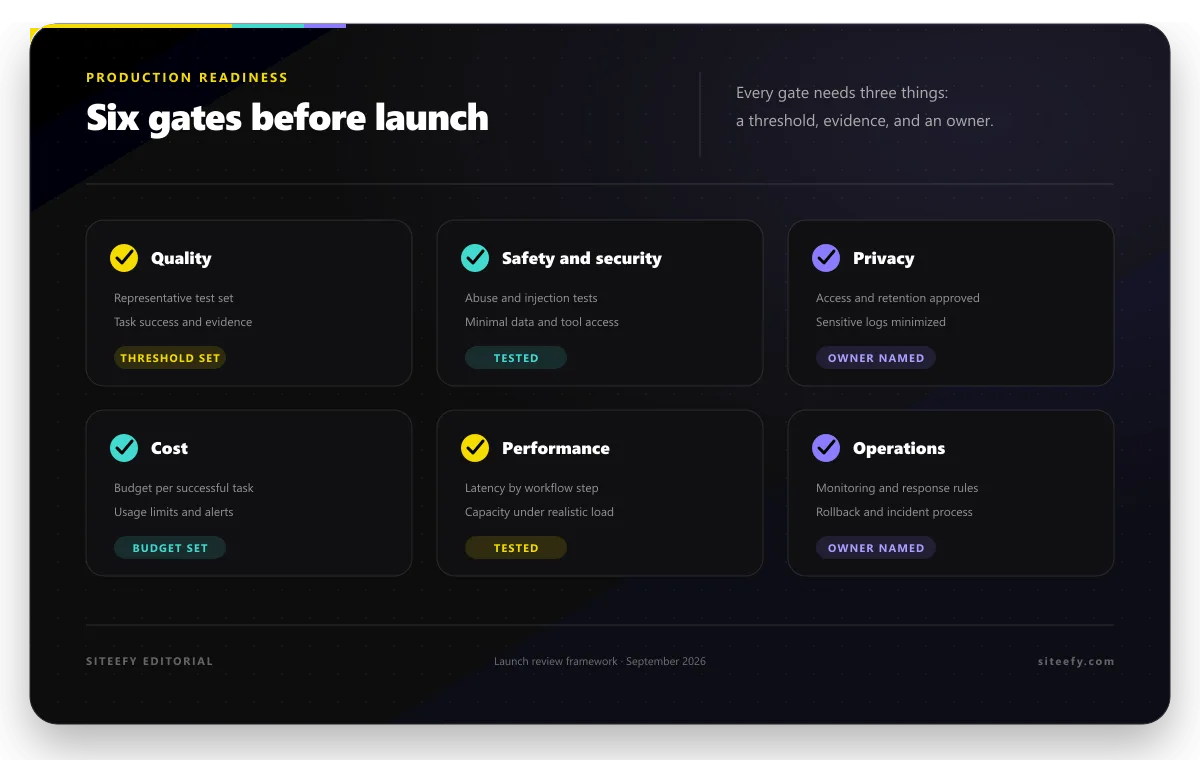
Set an owner and threshold for every signal that can block or reverse a release. A dashboard without a response rule is only a display.
10. Know When to Bring in a Development Partner
Outside help is most useful when the project has a validated outcome but the internal team lacks a required capability, such as data engineering, machine learning, cloud architecture, security, or production operations.
Ask each candidate to explain:
- A comparable system they have taken into production
- How they define and test acceptance criteria
- How they handle data access, privacy, and model risk
- What the client will own, including code, prompts, data pipelines, and documentation
- How costs are measured and controlled
- How releases, monitoring, incidents, and handover work
- Which assumptions could materially change scope or price
A strong partner should be able to discuss failure modes and operating responsibilities as clearly as features.
Production Readiness Checklist
Before launch, confirm that:
- The use case and business owner are clear.
- The current baseline and target outcome are documented.
- The simplest delivery path has been considered.
- Data access and retention are approved.
- The evaluation set represents real inputs and edge cases.
- Launch thresholds are defined.
- High-risk outputs or actions require appropriate review.
- Prompt injection, data leakage, and tool permissions have been tested.
- Prompts, models, retrieval logic, and evaluation sets are versioned.
- Quality, latency, cost, and business outcomes are monitored.
- The team can roll back a release.
- Operational ownership is clear after launch.
Final Thoughts
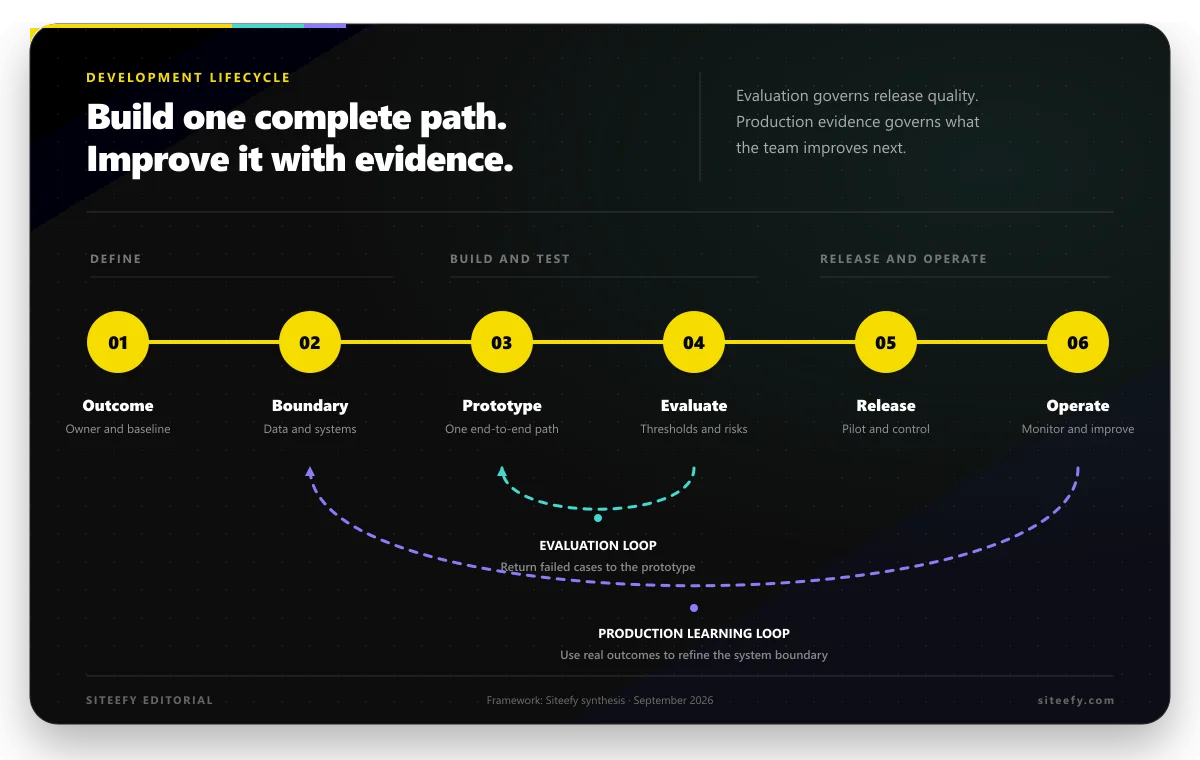
The strongest AI products start small and become more capable only after they earn that complexity. Define the outcome, build one complete workflow, test it against representative cases, and make risk and operations part of the product from the beginning.
AI development is not a one-time model choice. It is a controlled cycle of design, evaluation, release, observation, and improvement.