GenYOU

GenYOU

Create AI-generated portraits and full-body photos of yourself or anyone else with your own face.

Paid·No reviews yet

Overview

GenYOU is a mobile app that allows users to generate numerous AI-created portraits and full-body images using their own face or others'. It offers advanced AI technology to produce consistent identity-preserving images, unlike other apps that generate random lookalikes. Users can create profile pictures, avatars, and even AI influencers for social media and marketing purposes.

Pricing Model
paid
Last Updated
2025-11-25

Key Features

1

Identity-Preserving AI Portraits

Generates AI portraits that maintain the exact identity of the person, unlike apps that create random lookalikes.

2

Full-Body Photo Generation

Creates not only headshots and selfies but also full-body images for more versatile use cases.

3

Style and Character Variations

Allows users to try on new looks, including street style, historical characters, superheroes, and more.

4

AI Influencer Creation

Enables users to generate AI influencers for social media platforms like Instagram to build popularity and brand presence.

5

Mobile App Accessibility

Offers a personal AI portrait maker accessible directly on your phone for easy and on-the-go image generation.

6

Commercial Use License

Generated images can be used commercially without watermarks, suitable for marketing and creative projects.

7

Large Face and Human Image Libraries

Access to millions of pre-made faces and thousands of full-body human images for editing or generating new images.

8

Customizable Features and Priority Generations

Subscribers get priority generation and customizable features to tailor images to specific needs.

Use Cases

#1

Social Media Profile Pictures

Create unique and consistent AI-generated profile pictures for Instagram, Facebook, and other platforms.

#2

AI Influencer Generation

Generate AI models and influencers to build a digital presence and engage audiences online.

#3

Marketing and Advertising

Use AI-generated portraits and full-body images for commercial marketing campaigns without copyright concerns.

#4

Creative Projects and Storytelling

Produce diverse character images and styles for storytelling, game design, or artistic projects.

#5

Personalized Gift or Keepsake

Generate fun and customized portraits of friends and family as unique digital gifts.

How to Use

1

Download and Install the GenYOU App

Get the GenYOU app on your mobile device to start creating AI-generated images.

2

Upload Your Face Photo

Upload a clear photo of your face to enable the AI to generate portraits that preserve your identity.

3

Choose Styles and Settings

Select from various styles, looks, and character options to customize your generated images.

4

Generate Portraits and Full-Body Images

Use the app to create multiple AI-generated photos, including headshots and full-body pictures.

5

Download and Use Images

Save your generated images for personal use, social media, or commercial projects as allowed.

Pricing

Pricing details are gathered from the official GenYOU website and are provided for reference only. Always confirm the latest information directly with the vendor.

PlanPriceHighlights
Faces + Face Generator Subscription$199

15 downloads per month

  • Unlimited face generations
  • No watermarks
  • Commercial use
Humans + Human Generator Subscription$199

15 downloads per month

  • 1,000 priority generations
  • No watermarks
  • Commercial use
Bulk Photo PurchaseVaries ($9 to $1 per photo)

Buy multiple images without subscription

  • Price decreases with volume
  • No watermarks
  • Commercial use
Found a change in pricing? We welcome corrections. Reach out so we can keep this listing accurate.

Pros & Cons

Pros

  • Preserves the identity of the person in generated images, ensuring consistency.
  • Supports full-body image generation, not limited to just faces or headshots.
  • Offers a mobile app for convenient image creation anywhere.
  • Commercial use allowed with no watermarks, suitable for professional projects.
  • Enables creation of AI influencers for social media marketing and branding.

Cons

  • Subscription pricing may be expensive for casual users.
  • Limited free usage; most features require paid plans.
  • Bulk photo purchases can be costly without subscription.
  • No explicit mention of integration with other platforms or APIs on the homepage.
  • Some advanced features may require technical knowledge to fully utilize.
OT

Our Test

Hands-on notes from our editorial team.

✅ Our Test

⬇️ Get Started With GenYOU

I downloaded the GenYOU app to my phone from the App Store and went to the app. Once inside, I explored its templates and used the search bar to find something specific. Being a pet lover, I searched for "cats and dogs with a woman" and found some fun options. I picked a template featuring a dog and clicked "Make a similar".
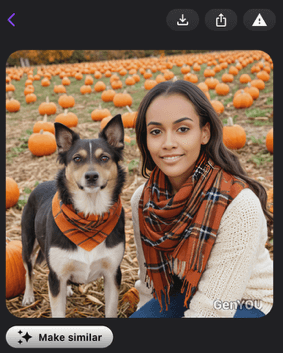
⬇️Create Your AI Portrait

The app then asked me to select the gender (I chose female) and upload four photos from my phone library. After adding the images, it prompted me to sign in with Apple. Once signed in, the app started generating my AI portrait. The process was quick—it took about 20-30 seconds to create, and the results were ready immediately. It was funny, and even the dog's face had been altered.
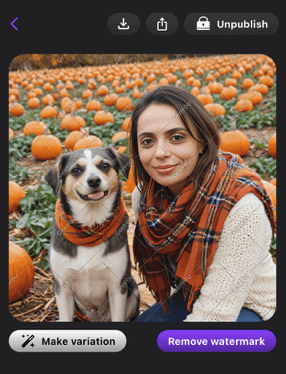
<img decoding="async" class="alignnone size-full wp-image-58831" src="https://siteefy.com/wp-content/uploads/2024/12/Image-created-with-GenYOU.png" alt="" width="286" height="374" />

Then, I decided to try a few other templates just for fun. The app offered plenty of themes to explore, and I enjoyed experimenting with them. After finishing my creations, I went to the “My Photos” section and deleted the images I had made since they were visible to the community. To unpublish them the app required an upgrade. Removing the images from “My Photos” also took them off the community feed.


Frequently Asked Questions

Ratings & reviews

Ratings & reviews

No reviews yet. Be the first to share your experience.

Share your experience

Sign in to rate this tool and help the community understand how it fits into their workflow.

Community reviews (0)

No reviews yet. Be the first to share your experience.