
The four main hosting types
Web hosting keeps a website online and sends its pages to visitors. The four main types are shared, VPS, cloud, and dedicated hosting.
What changes is how those servers are divided and who has to look after them. Shared hosting is the ordinary starting point. VPS and cloud hosting offer more control or flexibility. Dedicated hosting reserves a whole machine for one customer.
The basic difference, at a glance
Shared and VPS hosting divide one server. Cloud hosting draws from a pool. Dedicated hosting reserves the whole machine for one customer.
Shared
Several websites share one server.
VPS
One server is divided into private spaces.
Cloud
Your website can draw from several servers.
Dedicated
One customer gets the whole server.
VPS hosting
Your website gets its own private section of a larger server. You receive more control and a clearer share of the server than with shared hosting.
A VPS starts to make sense when a growing website, online store, or custom application needs something a shared plan cannot provide.
A booking website that needs special software or regular background tasks may move to a VPS when a shared plan becomes restrictive.
You gain more freedom without renting an entire physical server. Someone still has to manage that private space unless the VPS plan includes management.
Expect to pay more than shared hosting and to take on more technical work.
Cloud hosting
Your website uses hosting resources from a connected pool of servers instead of depending on one machine.
Cloud hosting is most useful when traffic changes sharply, growth is hard to predict, or capacity needs to change without moving the website to another server.
A ticket website may need much more capacity when tickets go on sale and much less after the event. Cloud hosting can adjust more easily.
Capacity can usually grow or shrink more easily than with a fixed plan. Pricing and setup can also be harder to predict, and not every cloud plan adjusts automatically.
Both cost and technical work vary widely because cloud plans are sold in many different forms.
Dedicated hosting
You rent an entire physical server for your own organization instead of sharing it with other hosting customers.
Dedicated hosting is mainly for a very large or specialized website that genuinely needs a whole machine and has people who can manage it.
A large company with a heavy, steady workload and strict server requirements may choose dedicated hosting for full control.
You control the whole machine and do not share its resources with other customers. That control is expensive and unnecessary for most small and medium-sized websites.
This is normally the most expensive option and requires experienced technical help.
What hosting looks like in practice
These two screens show the difference more clearly than provider labels do. Managed WordPress hosting gives the owner a straightforward way to recover a broken website.
A VPS exposes the server itself: its location, internet addresses, network, storage, and backups. That extra control is useful only when you or someone you hire knows how to use it.
Managed WordPress hosting
Restore the website with a button
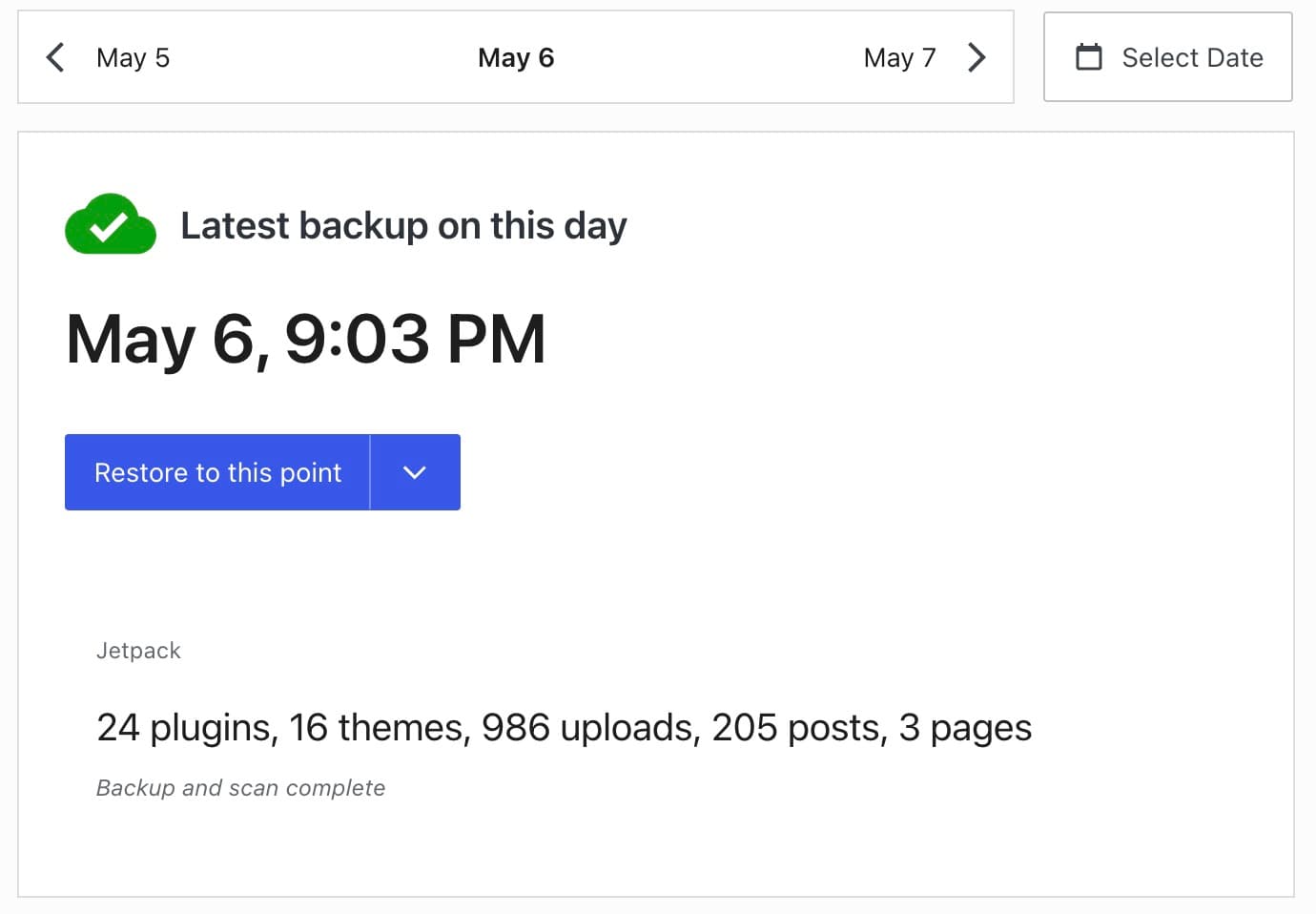
- 1Automatic backup
The hosting company has already saved a working copy of the website.
- 2Restore button
Use this to return the website to that saved copy after something breaks.
Why this is beginner-friendly
If an update or edit breaks the site, you can return to a working version without rebuilding it yourself.
VPS hosting
More control means more settings
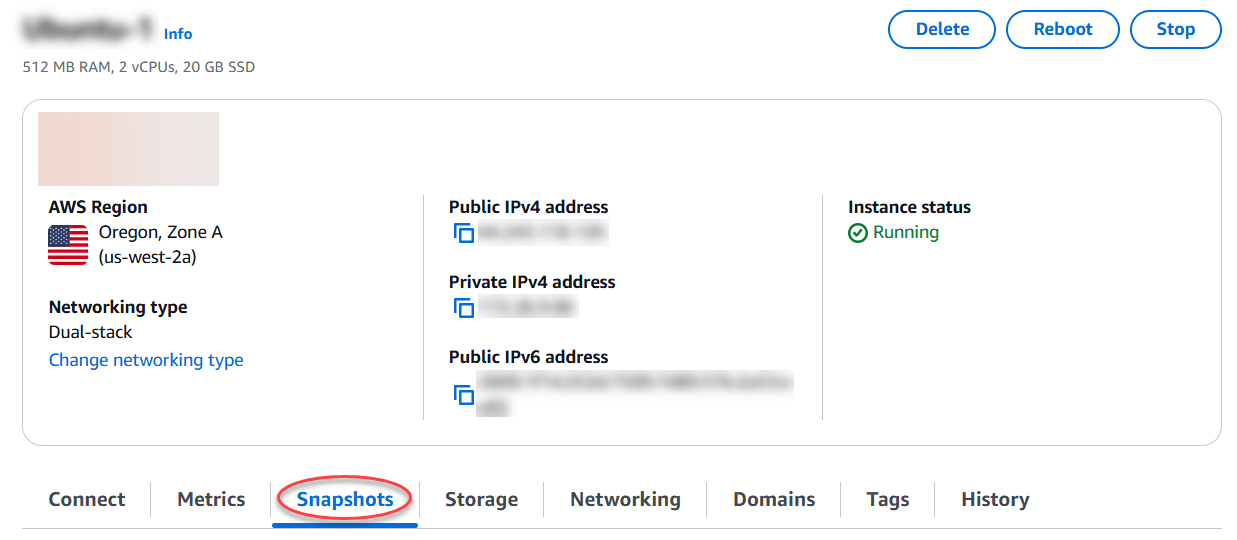
- 1Server location
You choose where the server runs, which can affect who it is closest to.
- 2Internet addresses
These addresses connect the server to the internet and may need to be configured.
- 3Backups and settings
Snapshots are backup copies. Storage and networking are managed from the same area.
What the extra control requires
A VPS gives you more control, but you or someone you hire must understand and maintain these settings.
What about WordPress hosting and other labels?
Managed WordPress hosting is a hosting package built specifically for WordPress. The provider may handle updates, backups, caching, security checks, and WordPress support. Underneath, the service can still use shared, VPS, cloud, or dedicated hosting.
Website builders and hosted store platforms include hosting as part of the product, so their users usually do not choose a server type at all. Reseller hosting is for agencies or businesses that want to sell hosting accounts to their own clients.
Static and serverless hosting are specialist choices used mainly for custom websites and applications. Most first-time website owners do not need to compare them before choosing ordinary web hosting.
A managed plan changes who does the technical work. It does not necessarily change the type of server underneath.
With shared hosting or managed WordPress, the provider handles most routine server work. With an unmanaged VPS, cloud plan, or dedicated server, that work belongs to you or your technical team. Always check what the provider means by “managed” before buying.
Which hosting type should you choose?
For a normal first website, start with shared hosting or a managed WordPress plan. Both reduce the amount of technical work and usually cost less than VPS, cloud, or dedicated hosting.
Move to a more advanced type only when you have a specific reason: the current plan cannot handle your traffic, you need special server software, your demand changes sharply, or your organization requires its own server.
More control is not automatically better. If nobody needs it or knows how to manage it, you are paying for extra work.
- A normal first siteStart with shared hosting or managed WordPress.
- A custom server needConsider a VPS, preferably managed if you do not have server experience.
- Large traffic swingsCompare cloud plans and check how their pricing changes with use.
- A required private machineChoose dedicated hosting only when the organization has a clear reason and people who can manage it.
How to compare hosting costs
This guide compares hosting types, not individual plans. Providers within the same type can charge very different prices depending on the plan, country, billing term, and current promotion.
Shared hosting is usually the lowest-cost starting point. Managed hosting costs more when the provider handles more work for you. VPS, cloud, and dedicated hosting vary widely depending on the resources and management included.
When you compare plans, check the renewal price rather than the intro price, the term you have to prepay to get it, what counts as a limit (storage, visits, bandwidth, email), whether backups and migration are included or sold separately, and what it costs to leave.
How we checked this guide
Siteefy checked the definitions against current provider documentation on July 30, 2026. The recommendations are Siteefy's editorial conclusions for ordinary website owners; individual plans still need to be compared on price, limits, support, backups, and migration help.
- Google Cloud: What is server hosting?
Definitions of shared, VPS, cloud, and dedicated hosting.
- AWS: What is cloud hosting?
How cloud hosting differs from fixed shared, VPS, and dedicated resources.
- WordPress.com hosting
A current example of hosting packaged and managed specifically for WordPress.