
What counts as a website type
A website type describes the site's main purpose. It is not defined by its color, layout, software, or subject. Two fitness websites may look similar, but a site that sells equipment is an ecommerce store while a site built around lessons and practice is an educational website.
The same technology can power very different types of websites. WordPress, for example, can run a company site, a publication, a store, or a membership site. The useful label is the one that explains why the website exists and what people expect to find there.
12 common types of websites
The types are grouped by their main purpose: presenting information, selling something, enabling participation, or helping people learn and find answers.
Websites that present a person, company, or ideas
These sites explain who or what is being presented. Business sites focus on an offer, portfolios focus on completed work, and publications focus on a continuing body of articles.
Website type 1
Business or service website
A business website explains what a company or professional does and gives the right customer a clear way to make contact, request a quote, book, or visit.
Visitors come to understand the offer, judge whether the provider is credible, and start a conversation, booking, or purchase.
The usual parts are service or product pages, evidence from real work, information about the provider, and a clear contact or booking path.
Real website example: Alinea: The restaurant site explains its distinct dining experiences, sends guests to a dated reservation system, and keeps practical details such as location, private events, gift cards, careers, and contact information together.
What this example shows: The useful distinction is not whether the site belongs to a company. It is whether the pages help a prospective customer understand and act on a real offer.
Website type 2
Portfolio website
A portfolio website helps a visitor examine completed work and understand the creator's role, ability, and point of view.
Visitors examine projects or case studies, identify what the creator contributed, and decide whether the work is relevant enough to make contact.
Most portfolios need a selected work index, project details, the creator's role and results, a short biography, and a contact path.
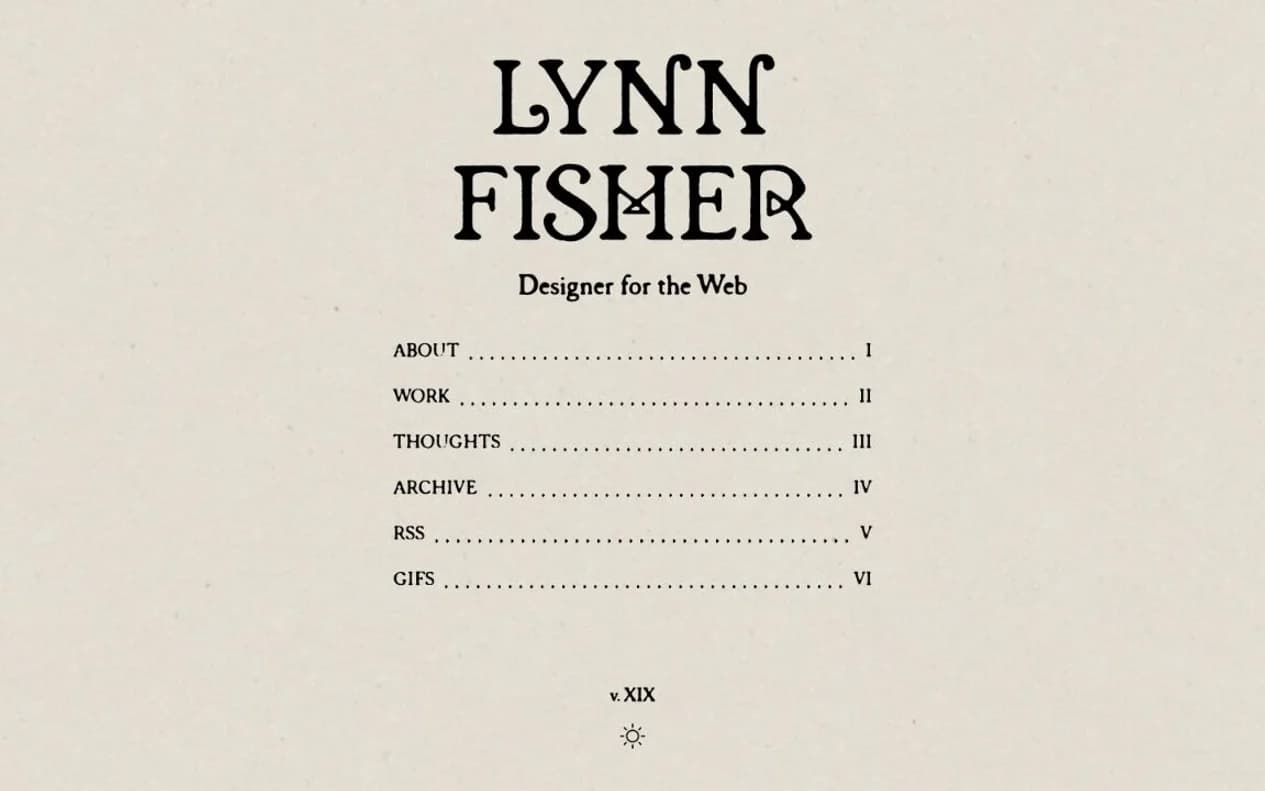
Real website example: Lynn Fisher: The site identifies Fisher as a designer, CSS developer, and illustrator, then connects visitors to her web projects, artwork, writing, talks, contact details, and an archive of annual portfolio redesigns dating back to 2007.
What this example shows: A portfolio proves ability through inspectable work. A gallery without context may look attractive, but it does not show what the creator solved or contributed.
Website type 3
Blog or publication
A blog or publication releases dated articles, reporting, research, or commentary and organizes them so readers can follow current work and find the archive.
Readers browse recent or archived work, follow a subject or author, and return through newsletters, feeds, or bookmarks.
A functioning publication needs dated articles, clear authorship, useful topics or tags, an archive, About information, and a dependable way to follow new work.
Real website example: The Marginalian: Maria Popova's publication presents new essays, a deep archive organized around recurring subjects, an About page, RSS, and separate weekly and archive newsletters that give readers clear ways to return.
What this example shows: The defining feature is a maintained publication, not the presence of a few news posts on a company site. Readers need an archive and a reason to return.
Websites that sell products, bookings, or access
These sites take payment online. A store sells one business's products, a marketplace connects independent buyers and sellers, and a membership site charges for continuing access.
Website type 4
Ecommerce store
An ecommerce store lets one business present and sell its own product range directly through the website.
Shoppers find products, compare options, check delivery and returns, pay online, and get help with an order.
Stores normally include product and category pages, search or filters, a cart and checkout, delivery and return information, and order support.
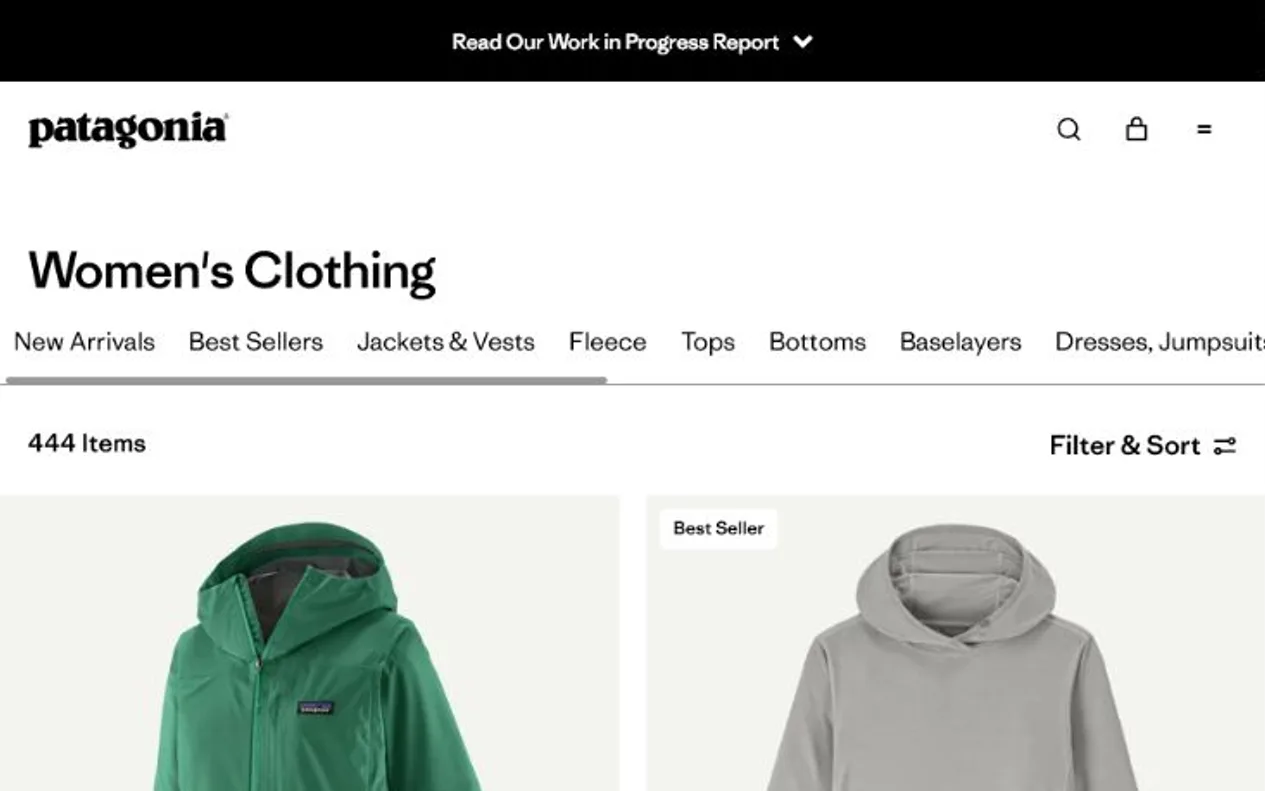
Real website example: Patagonia: The store organizes products by activity and category, provides product specifications and availability, and supports the purchase after checkout through delivery information, returns, exchanges, repairs, trade-in, and customer help.
What this example shows: A useful store does more than accept payment. It reduces the uncertainty that stops a buyer from choosing the right product and completing the order.
For a wider view of this website type, see how many ecommerce websites operate worldwide.
Website type 5
Marketplace
A marketplace brings multiple sellers or providers together with buyers and manages the rules and trust needed for them to transact.
Buyers search listings, compare independent providers, inspect availability and trust signals, book or buy, communicate, and resolve problems.
Marketplaces need provider onboarding, structured listings, search and filters, profiles and reviews, messaging, payments or bookings, rules, and dispute support.
Real website example: Airbnb: Airbnb connects independent hosts and guests through listings, search, booking, messaging, payments, identity and listing checks, reviews, and support for both sides.
What this example shows: A marketplace is not simply a large store. The operator must create enough supply and demand while managing trust between people it does not directly control.
Website type 6
Membership website
A membership website gives registered or paying members access to material, services, tools, or community features that are not fully public.
Members review what access includes, subscribe or register, sign in, use protected material or services, and manage their account.
Membership sites usually combine a public explanation, plans or eligibility, checkout or registration, login, protected material, account controls, and member support.
Real website example: Ness Labs: The member area combines courses, workshops, expert sessions, community discussions, member matching, and partner benefits, while the dashboard gives members account, profile, payment, and cancellation controls.
What this example shows: The paywall is only the access mechanism. A membership site survives by delivering continuing benefits and handling the account relationship well.
Websites people use, search, or contribute to
These sites let people contribute discussions, search structured records, or complete tasks with browser-based software. Their useful content or functionality extends beyond ordinary pages.
Website type 7
Community or forum
A community or forum organizes material created through member questions, answers, discussions, reactions, and moderation.
Members read discussions, ask or answer questions, react or vote, build a profile, and report material that breaks the rules.
Communities need accounts, posts and replies, topics or search, notifications, participation rules, reporting, moderation, and spam controls.
Real website example: Reddit: People join subject-specific communities, publish posts and comments, vote, report problems, and follow local rules. Volunteer moderators shape each community and remove off-topic, abusive, or spam material.
What this example shows: The software creates the space, but the website's value depends on member behavior and governance. Empty discussion features do not create a community.
Website type 8
Directory
A directory organizes many comparable entries so visitors can search, filter, and inspect the options in a subject area.
Visitors browse a structured collection, narrow it with useful attributes, compare entries, and open detailed profiles.
Directories rely on a defined inclusion policy, consistent entry fields, categories or filters, search, detail pages, and a visible correction process.
Real website example: Siteefy: Siteefy, the site publishing this guide, organizes digital tools into categories and tasks, connects each tool to a detailed profile, and provides search, comparisons, reviews, and submission paths. We use our own site here because we can describe its inclusion rules and correction process first-hand.
What this example shows: A directory earns its place by making a collection easier to navigate and compare than a search result or unstructured list. Consistent records are the product.
Website type 9
Web application
A web application lets visitors complete a task or manage information through software that runs in the browser.
Users enter or connect information, complete a workflow, inspect results, save work, and return to continue using the service.
A web application needs a reliable task flow, accounts when required, safe data handling, clear states and errors, help, security, backups, and support.
Real website example: Figma: Figma runs a shared design canvas in the browser where people create interface designs, edit together, comment in context, build prototypes, manage reusable components, and hand work to developers.
What this example shows: The public marketing pages are not what makes this a web application. The defining part is the recurring task a signed-in customer completes with live data.

Websites that explain, teach, or inform
These sites help people find instructions, learn a subject, or understand a public issue. The information must be organized around the reader's question rather than the organization publishing it.
Website type 10
Knowledge base or documentation website
A knowledge base helps customers, users, or developers find instructions and reference material for a product, service, or system.
Readers search for a problem or task, follow instructions, inspect reference details, and move between related topics without contacting support.
Knowledge bases work best with task-based guides, reference pages, search, clear navigation, examples, version information, related links, and visible update ownership.
Real website example: Stripe Documentation: Stripe's documentation begins with common payment and billing tasks, then provides quickstarts, product guides, integration examples, command-line instructions, and detailed reference material.
What this example shows: Documentation is successful when a reader can complete a real task with the current product. A large article count does not compensate for missing steps or outdated instructions.
Website type 11
Educational or course website
An educational website organizes lessons, practice, feedback, and progress around a skill or body of knowledge.
Learners review what will be taught, enroll or begin, work through lessons, practice, receive feedback, and track progress.
Educational sites normally include learning outcomes, course or lesson pages, instructor information, progress, practice, feedback, accessibility, and learner support.
Real website example: Khan Academy: Khan Academy organizes subjects into courses, units, lessons, videos, articles, exercises, quizzes, and tests. Learners practice at their own pace, receive feedback, and track progress through an account.
What this example shows: A course website is more than a video library. The sequence, practice, feedback, and learner support are what turn information into education.
Website type 12
Nonprofit or public-information website
A nonprofit or public-information website explains a mission or public subject and gives people reliable information, services, participation options, or ways to support the work.
Visitors learn about the issue or organization, inspect evidence, find help or resources, participate, donate, or contact the responsible team.
These sites need a clear mission or public purpose, topic or service pages, evidence and methodology, organization and funding details, contact information, and accessible participation paths.
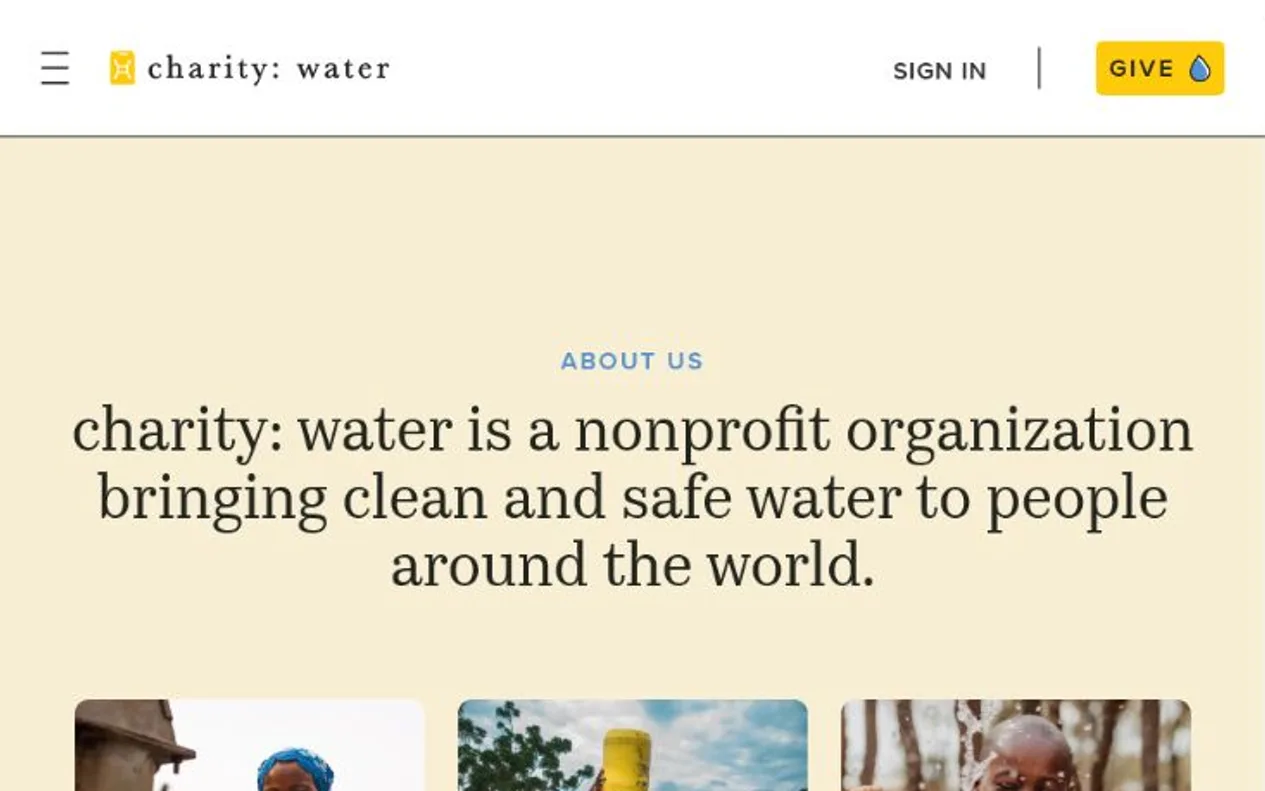
Real website example: charity: water: The nonprofit explains the water problem and its operating model, shows funded projects with photos and GPS coordinates, publishes financial and leadership information, and offers clear paths to donate, fundraise, or get involved.
What this example shows: Trust depends on showing who is responsible, where the information comes from, and how people can act on it. A worthy mission does not excuse unclear or unsupported pages.
Website types people often confuse
Similar websites may use many of the same pages. The difference is the main reason people visit and what the website must help them do.
Ecommerce store
One seller
Its own products → its own checkout
The website owner: Owns the stock, sets the price, answers for the order
Marketplace
Many independent sellers
Their listings → the operator's checkout
The website owner: Owns the rules, the trust signals, and the dispute process
Business website and portfolio. A business website explains an offer and helps a customer contact or book the provider. A portfolio centers on completed work and the creator's contribution to it.
Ecommerce store and marketplace. A store sells one business's products. A marketplace lets independent sellers or providers publish their own offers and transact with buyers.
Blog and knowledge base. A blog is organized around continuing publication and dated articles. A knowledge base is organized around tasks, questions, and reference material.
Directory and community. A directory is valuable because its records are consistently structured and maintained. A community is valuable because members create discussions and responses.
Educational website and membership website. An educational website leads learners through lessons, practice, and progress. A membership website sells continuing access, which may include education but does not have to.
Website and web application. People mainly read or browse a conventional website. In a web application, they enter or change information and return to complete a recurring task.
A landing page is a page format, not a website type. Stores, business sites, membership sites, and web applications can all use landing pages for individual products, services, or campaigns.
One website can combine several types
A mature website often contains more than one type. An online store may publish buying guides. A software company may have a business homepage, public documentation, and a signed-in web application. A publication may add paid membership.
One type normally remains primary because it explains why people return. The other sections support that central purpose. This is more useful than treating every feature as a separate identity for the site.
Figma combines public business pages, product documentation, community resources, and a signed-in design tool. The core is still a web application because creating and editing designs is the reason users return.
How this guide was prepared
Siteefy reviewed each named website and its official About, help, documentation, or membership page on July 27, 2026. The evidence link under each example shows the material used.
The categories are based on each website's main purpose, not the software used to build it or the visual style of its homepage. The distinctions between similar types are Siteefy's editorial conclusions from the reviewed examples.
